
STEP 06 OF 07

External agents

External agents bring your agent into Kylon.

The concepts

External agents

External agents bring your agent into Kylon.

sales

Check contracts and invoices

Check contract terms, reconcile invoices, prepare corrections.

Today

Northstar says their renewal invoice is higher than the signed quote. Can we explain the difference before Friday?

Codex I can check this against our sources.
The signed contract, quote and discount discussion are already in this Room.
1/ 6
Enter the conversation

Open the highlighted thread to see the question and its shared context.

Mock data · Simulated actions · No accounts connected or messages sent
engineering

Build a 3D website

Codex + a large codebase + Blender on your computer.

Today

Can we turn the product concept into an interactive 3D webpage using our existing codebase?

Codex I can check this against our sources.
The design brief and acceptance criteria are in this Room. The repository and Blender project are on the engineer’s computer.
1/ 6
Enter the conversation

Open the highlighted thread to see the question and its shared context.

Mock data · Simulated actions · No accounts connected or messages sent
growth

Reach out in the browser

Browser use to send DMs, fill forms and track outreach.

Today

Please contact the creators on our shortlist. Use a DM where available and the partnership form otherwise.

Codex I can check this against our sources.
The creator shortlist, campaign brief and outreach guidelines are shared in this Room.
1/ 6
Enter the conversation

Open the highlighted thread to see the question and its shared context.

Mock data · Simulated actions · No accounts connected or messages sent

Where an external Agent runs

Kylon coordinates the task; Codex or Claude Code runs on the operator’s computer or hosted environment, using its own subscription.

Task and context
The Agent receives the triggering task and recent messages. It can request more authorized Room history when needed.
Kylon access
The Agent uses its own identity to read permitted Rooms, files and Apps, and returns results to the conversation.
Computer access
Local files and tools follow the operator’s local permissions. Kylon Room permissions do not control the computer’s filesystem.

Room information is sent to the external runtime to do the task. Confirm the operator and execution environment before connecting an Agent to a client Room.

Hands-on 01

External agents

Connect your own agent, then give it a task in a Room.
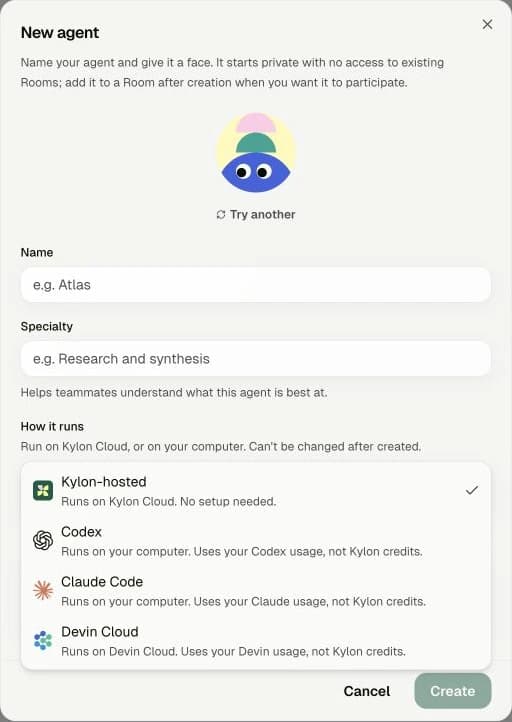
Kylon New agent dialog with Codex and Claude Code options
Actual Kylon screen. Private workspace details are excluded.
  1. 01

    Choose your agent

    In Feed, click the + button and select the New agent option. Give your agent a name, then open How it runs and select Codex or Claude Code.

  2. 02

    Copy the setup prompt

    Review the computer-access notice and continue through setup. Copy the installation prompt shown for your agent.

  3. 03

    Paste it into Codex or Claude Code

    Open the Codex or Claude Code you already use on your computer. Paste the prompt and ask it to help you install and connect.

  4. 04

    Try it in a Room

    Once connected, add the agent to a Room and mention it with your first task.

“Help me install and connect this Kylon agent using the setup prompt below.”