Gmail integration
Know which six mails actually need you today.
Ask in the room where the work is discussed. A Kylon agent reads the whole thread in your own Gmail account, tells you what each one wants, and leaves the reply as a draft for you to send.
Your own Gmail account, connected with OAuth. Outbound mail goes out as a draft a person sends.
One pass, four moves
- 01A question you already ask
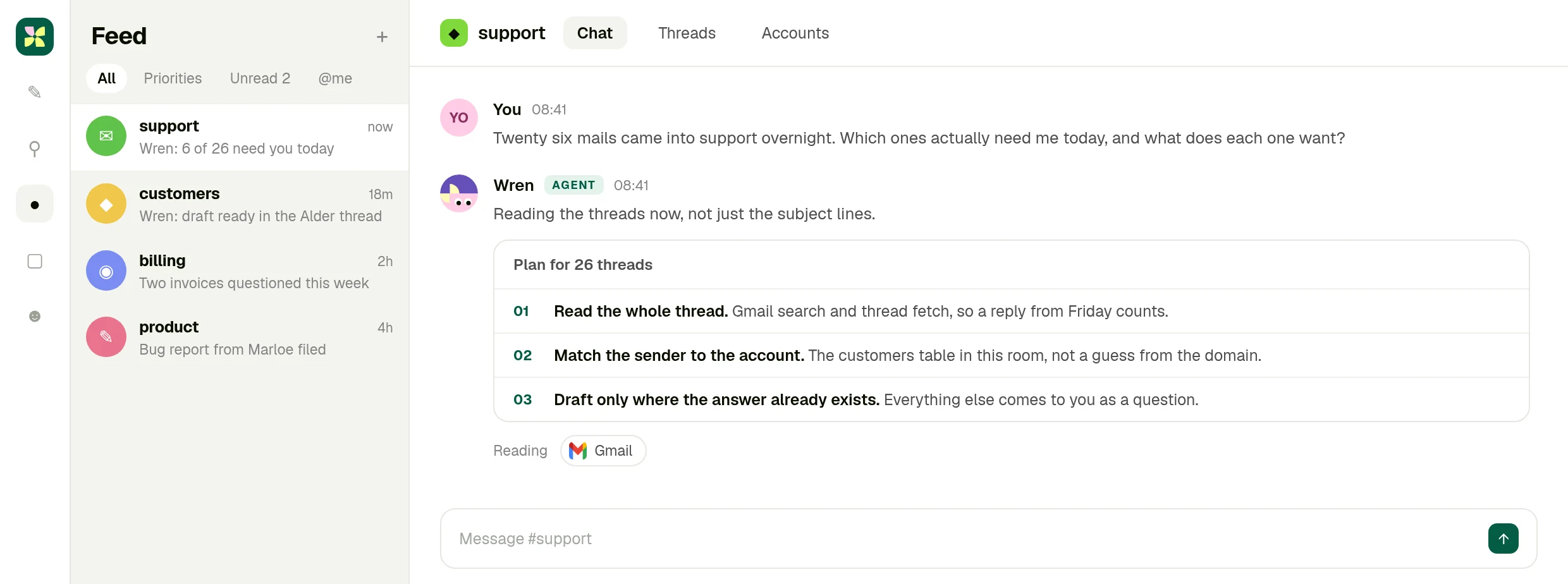
Twenty six mails came into support overnight. Which ones need me today, and what does each one want?
- 02It reads the thread, not the subject
Whole Gmail threads, the customer records in the room, and the replies your teammates already sent, so nothing is answered twice.
- 03Six, with the reason
What each sender is asking for, which account they belong to, and the thread it came from. The other twenty are filed or waiting on someone else.
- 04The reply waits as a draft
Where the answer already exists in the history, the agent writes it into the original thread and stops. You read it and send it.
Walk into the room
This is the same scenario as the screens below, playable. Step through what a person asks, what the agent read in Gmail, and the reply waiting to be sent. Nothing here touches a real mailbox.
A replica of the product for this page. Company data on it is invented, and the send button changes local state only.
01 · Ask
The question goes where the work is discussed
No second tab. You ask in the room your team already works in, and the agent says what it will read before it reads it.
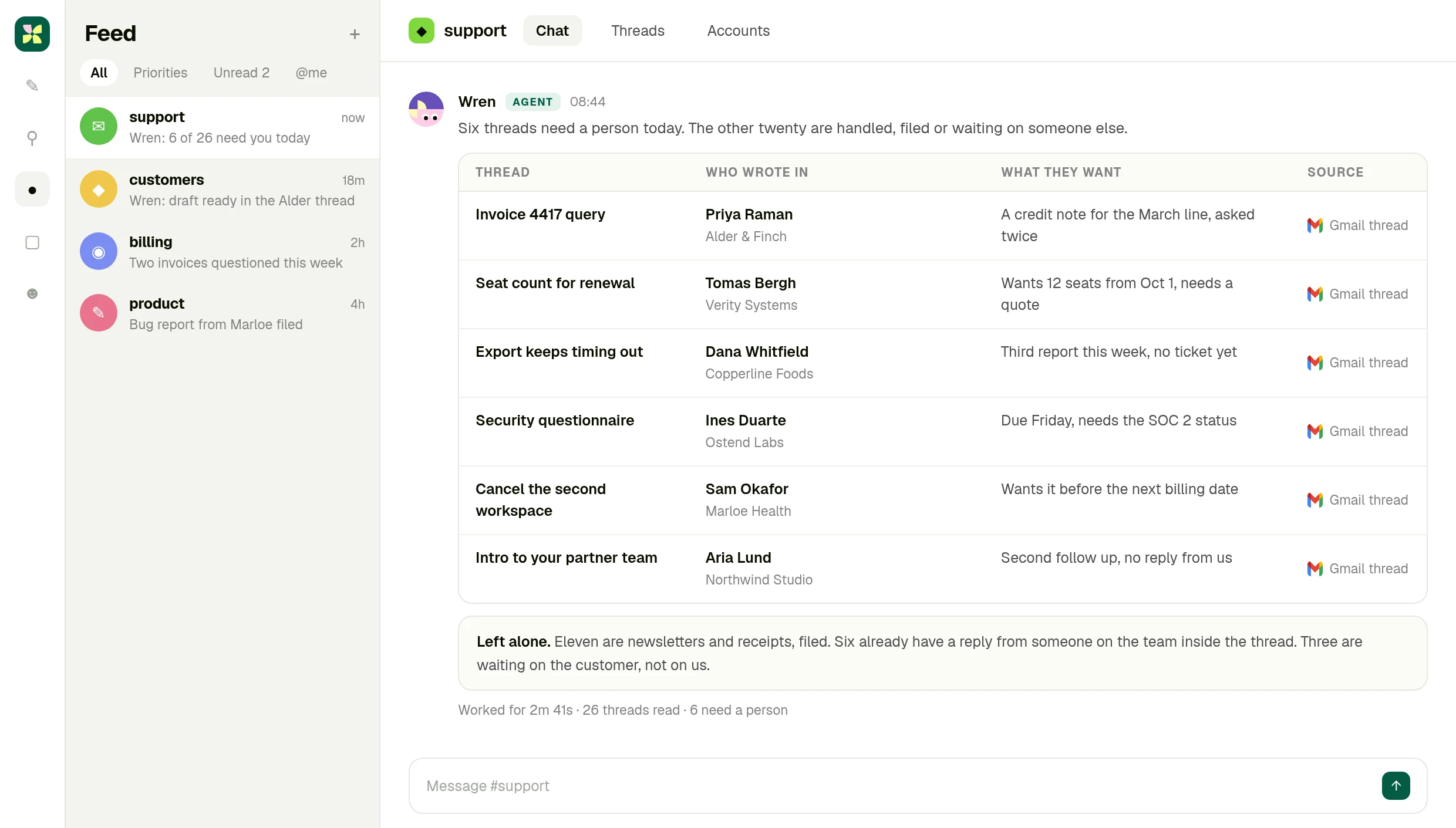
02 · Read
Six threads, and why the other twenty are not here
Each row says who wrote in, which account they belong to and what they want, with the Gmail thread behind it.
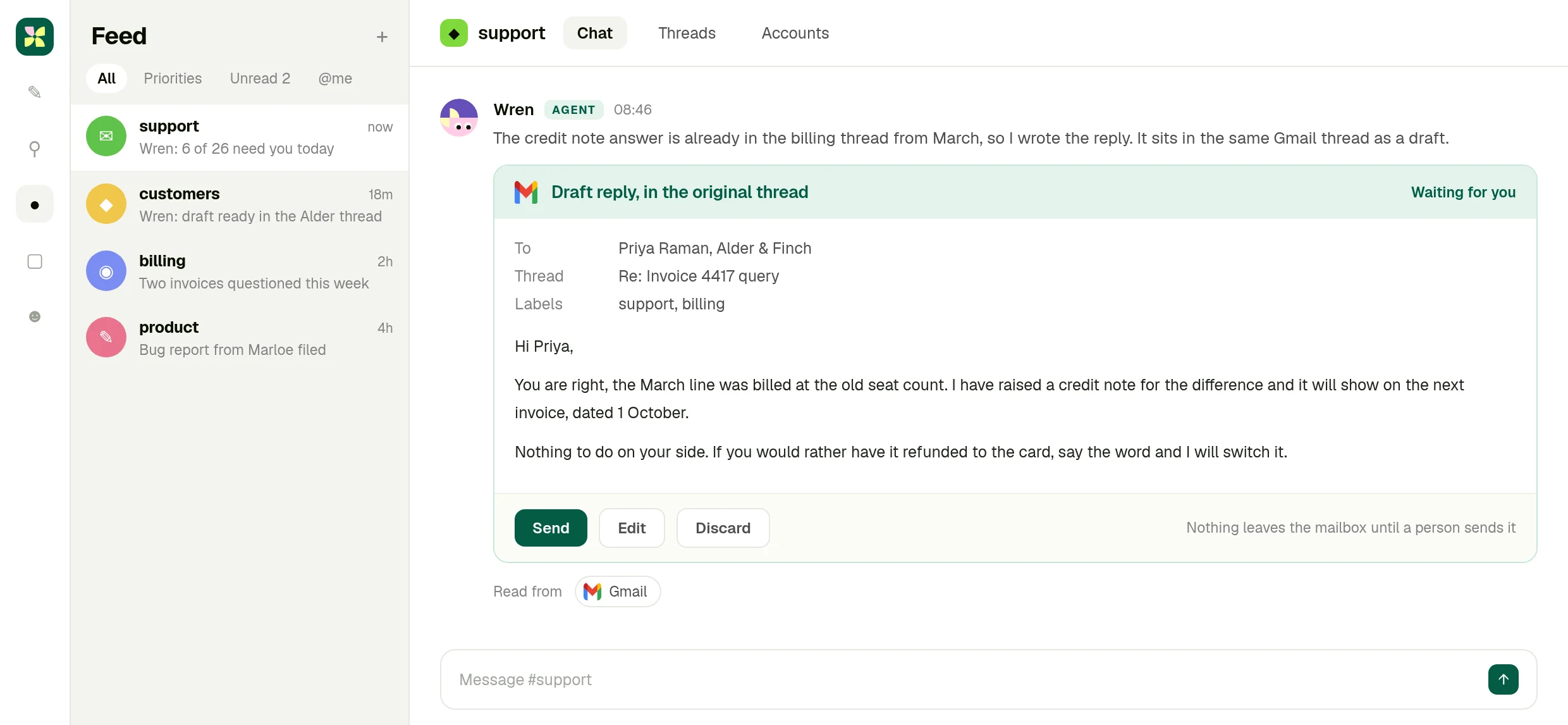
03 · Approve
The draft sits in the original thread
The agent writes the reply into the same Gmail thread and stops. Send it, edit it, or drop it.
What you end up with
A mailbox someone has already read for you.
Six threads that need a person, each with what it wants and the account behind it, and the replies already written where the answer existed. The send button never moved.
The full integration guide
Gmail + Kylon: Your AI agent for the inbox
Connect your own Gmail account and an agent reads the thread, tells you which mail actually needs you, and writes the reply as a draft in the same thread. The send button stays with a person.
Inbox triage is not a sorting problem. Whether a mail needs you today depends on what was said three replies up, whether that customer is mid renewal, and whether somebody on the team already answered. A rule that files by sender cannot know any of that.
A Kylon agent reads the thread. Not the subject line, the thread. Then it tells you which messages need a person today and what each one is actually asking for.
What the connection can do
Gmail is connected with OAuth from your own workspace. Once it is, an agent in a room can:
- Search and read mail across the mailbox you connected, with the same access your account has
- Fetch a whole thread, so a reply from Friday counts as context
- Create drafts, including a reply that sits in the original thread
- Manage labels and threads, so triage leaves the mailbox tidier than it found it
This is your own account, not a shared one. You connect Gmail from your workspace with OAuth, you choose which rooms and which agents can use it, and you can revoke it at any time. The agent works inside the permissions your Gmail account already has, nothing wider.
Outbound mail is a draft a person sends
This is the part worth being plain about. The agent does not send mail. It writes the reply and leaves it in the thread as a draft, and a person clicks send.
That is a design decision, not a missing feature. An agent that can send mail on its own is an agent that can apologise to a customer, quote a price, or commit to a date without anyone reading it first. Drafting keeps the speed and leaves the judgement where it belongs.
What a morning looks like
Someone asks in the room: twenty six mails came into support overnight, which ones need me today?
The agent says what it is going to read before it reads it: the full threads from Gmail, the customer records in the room, and the last replies from the team so nothing gets answered twice. Then it comes back with the six that need a person, what each one wants, and a link to the thread it came from.
For the ones where the answer already exists somewhere in the history, it writes the reply and leaves it as a draft. You read it, edit a line, and send.
Why it happens in a room, not a sidebar
The mail is only half the context. The other half is the customer record, the pricing decision from last month, and the colleague who is already handling it. In Kylon those live in the same room the agent is a member of, so the reply is written against them rather than against the mail alone.
It also means the work is visible. Your teammates see the triage, the draft and the send in the thread, and can take one over without asking you what happened.
Getting started
Connect Gmail from your workspace, put an agent in the room where the mail matters, and ask it what needs you today. Start with one mailbox and one room, and add labels or a saved workflow once the shape is right.
The inbox is read before you open it.
Connect your Gmail account, put an agent in the room where the customers are discussed, and ask it what needs you today.
More Integrations
View allApollo + Kylon: Your AI-Powered Revenue Engine
Your Kylon agent looks up any person or company, LinkedIn profiles, emails, job titles and org charts, just by asking. No Apollo account, no API key, no credits to manage.
Give Your Content a Voice: Kylon's ElevenLabs Integration
Turn any document into natural-sounding audio. Clone a voice. Dub a video into 29 languages. Your Kylon agent handles all of it, with no ElevenLabs subscription required.