HubSpot integration
Walk into the forecast call knowing which deals went quiet.
Ask in the room where the pipeline is discussed. A Kylon agent reads your HubSpot deals and the activity behind them, says what each record is missing, and waits before it writes anything.
Your own HubSpot account, connected with OAuth. Record changes are applied only after a person approves them.
One pass, four moves
- 01The question before every forecast call
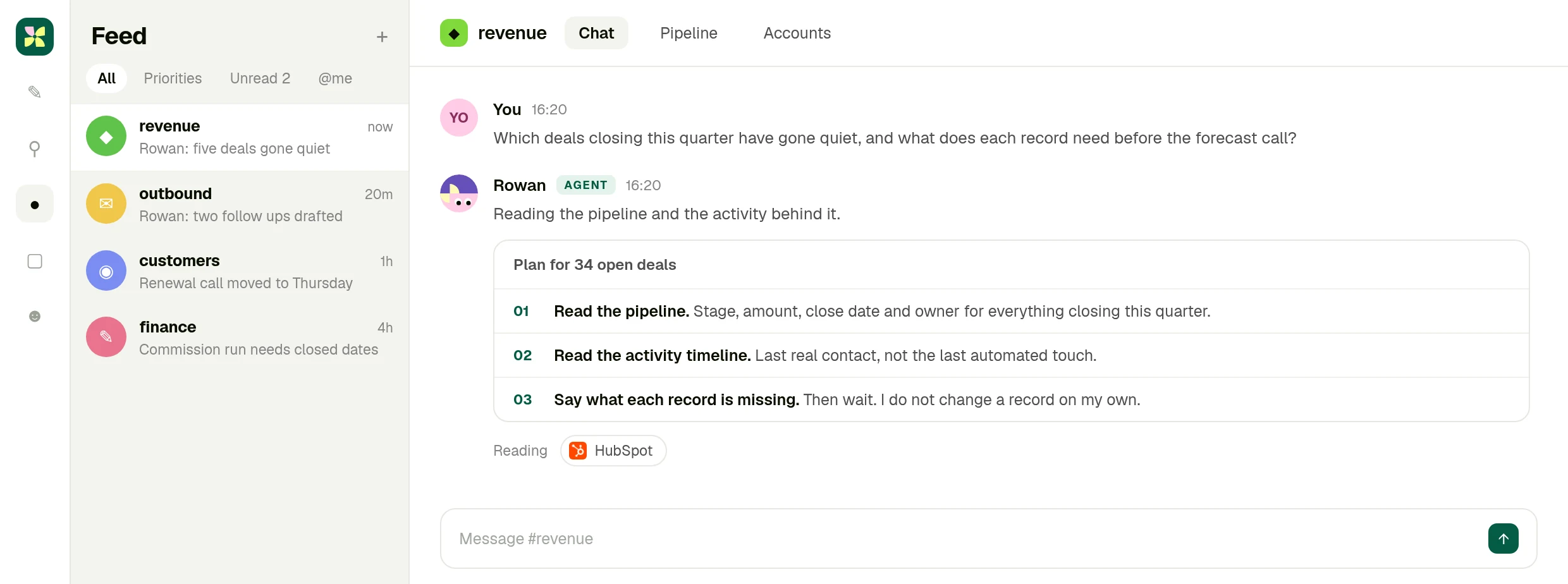
Which deals closing this quarter have gone quiet, and what does each record need before Thursday?
- 02It reads the timeline, not just the stage
Open deals, amounts, owners and close dates, then the last real contact behind each one rather than the last automated touch.
- 03Five deals, with the reason
A close date that already passed, a champion who changed role, a legal thread that never reached the record. Everything healthy is left alone.
- 04Eleven changes, waiting for you
Corrected dates, notes written from the real history, follow up tasks for the owners. Apply them all or review one by one.
01 · Ask
The question goes where the pipeline is discussed
You ask in the Kylon room, and the agent says what it will read in HubSpot before it reads it.
02 · Read
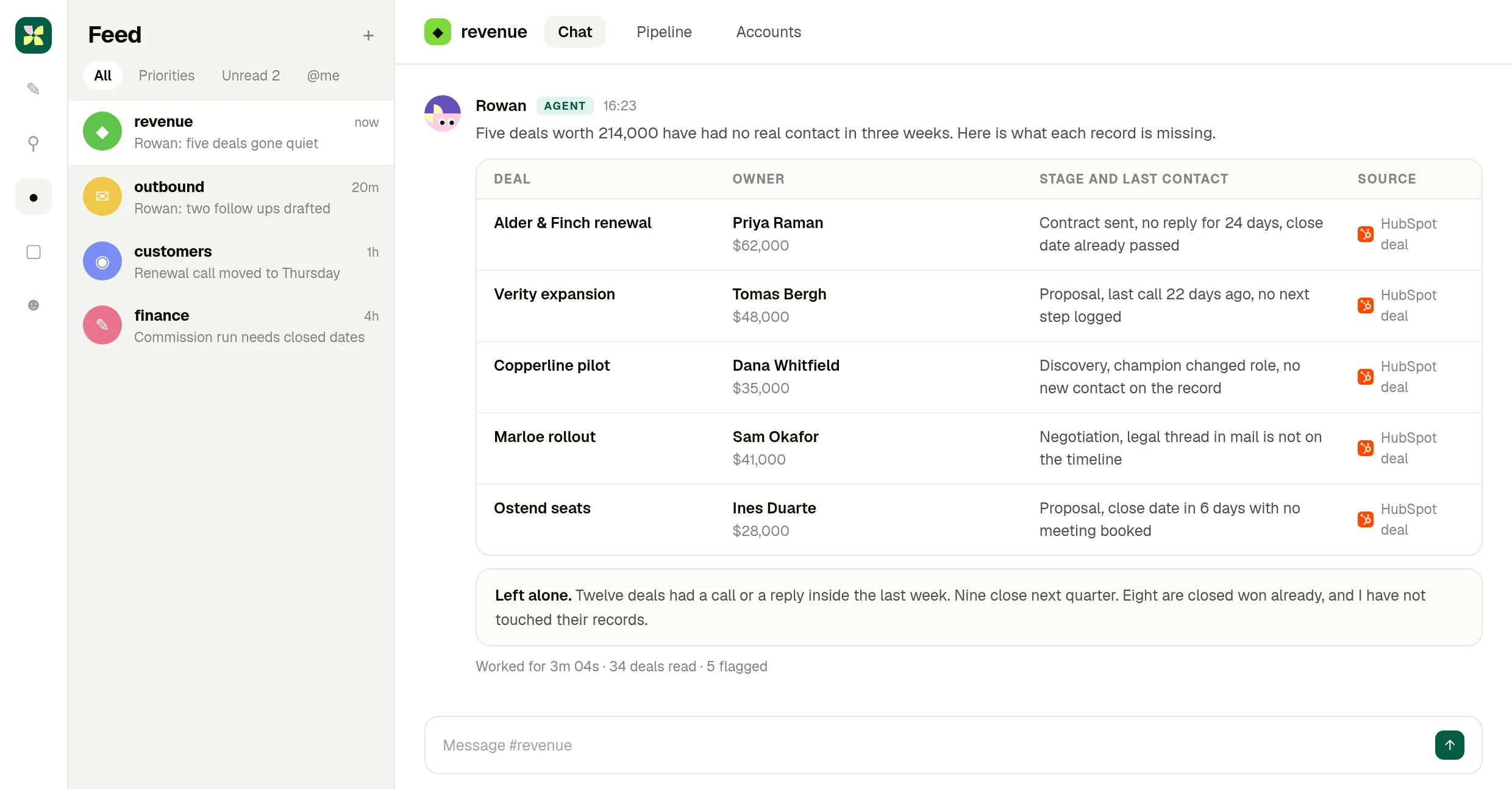
Five deals, and what each record is missing
Owner, amount, stage and the last real contact, with the HubSpot deal behind every row.
03 · Approve
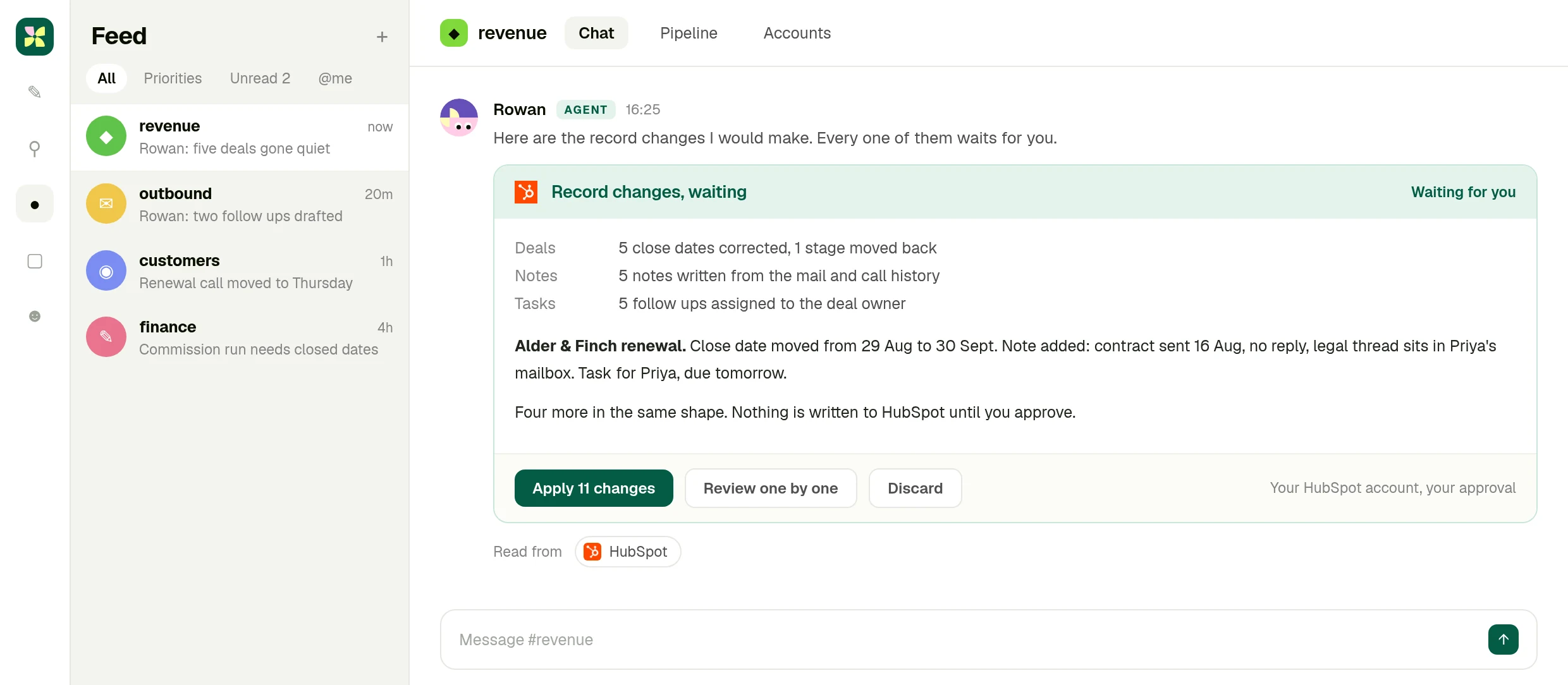
The record changes wait for your call
Close dates, notes and tasks, listed as eleven changes. Nothing is written to HubSpot until you approve.
What you end up with
A pipeline that matches what is actually happening.
Five stuck deals with the reason each one stalled, and the record changes written and waiting, so the forecast call argues about the business rather than the data.
The full integration guide
HubSpot + Kylon: Your AI agent for the deals that went quiet
Connect your own HubSpot account and an agent reads the pipeline and the activity behind it, says which deals went quiet and what each record is missing, then waits before changing anything.
Nobody argues about CRM hygiene until the forecast call. Then it turns out four deals have a close date from last month, one is in the wrong stage, and the legal thread that would explain the delay is sitting in somebody's mailbox rather than on the record.
A Kylon agent can read the pipeline and the activity behind it, say exactly what each record is missing, and hold every change until a person approves it.
What the connection can do
HubSpot is connected with OAuth from your own workspace. Of the four connections in this set it reaches the deepest into the product. An agent in a room can:
- Create and update contacts, companies, deals and tickets, one at a time or in bulk
- Read and write associations between records, so a contact ends up on the right deal
- Move deals through pipelines and stages
- Add notes and meetings, and read the activity timeline behind a record
- Work with custom object schemas, not only the standard objects
This is your own account, not a shared one. You connect HubSpot from your workspace with OAuth, you choose which rooms and which agents can use it, and you can revoke it at any time. The agent works inside the permissions your HubSpot account already has, nothing wider.
It reads the activity, not just the fields
A deal that looks alive in the pipeline can be three weeks cold. The difference is in the timeline: the last real conversation, not the last automated touch. The agent reads that, then says what the record needs, in plain language, with the amount and the owner attached.
What the day before a forecast call looks like
Someone asks in the room: which deals closing this quarter have gone quiet, and what does each record need?
The agent reads the open deals, the timeline behind each one, and the mail and calls the room already has access to. It comes back with five deals worth a real number, each with the reason it is stuck: a close date that has already passed, a champion who changed role, a legal thread that never made it onto the record.
Then it proposes the changes. Corrected close dates, a note written from the actual history, a follow up task for the owner. Eleven changes, listed, waiting. You apply them all, or review them one at a time, or throw them away. It is your HubSpot account and your approval.
Why a room and not a CRM view
Because the evidence is not all in HubSpot. It is in the mailbox, the call, the thread where the team discussed the account. An agent in a Kylon room reads those alongside the CRM, which is how the note ends up saying something a person would have written.
Getting started
Connect HubSpot from your workspace, put an agent in the room where the pipeline is discussed, and ask it what went quiet. Keep it as a weekly workflow once the shape is right.
The forecast is only as good as the records behind it.
Connect your HubSpot account, put an agent in the room where the pipeline is discussed, and ask it what went quiet.
More Integrations
View allApollo + Kylon: Your AI-Powered Revenue Engine
Your Kylon agent looks up any person or company, LinkedIn profiles, emails, job titles and org charts, just by asking. No Apollo account, no API key, no credits to manage.
Give Your Content a Voice: Kylon's ElevenLabs Integration
Turn any document into natural-sounding audio. Clone a voice. Dub a video into 29 languages. Your Kylon agent handles all of it, with no ElevenLabs subscription required.