ステップ 06 / 07

External agents

External agents は、自分のエージェントを Kylon に連れてくることです。

基本概念

External agents

External agents は、自分のエージェントを Kylon に連れてくることです。

sales

Check contracts and invoices

Check contract terms, reconcile invoices, prepare corrections.

Today

Northstar says their renewal invoice is higher than the signed quote. Can we explain the difference before Friday?

Codex I can check this against our sources.
The signed contract, quote and discount discussion are already in this Room.
1/ 6
Enter the conversation

Open the highlighted thread to see the question and its shared context.

Mock data · Simulated actions · No accounts connected or messages sent
engineering

Build a 3D website

Codex + a large codebase + Blender on your computer.

Today

Can we turn the product concept into an interactive 3D webpage using our existing codebase?

Codex I can check this against our sources.
The design brief and acceptance criteria are in this Room. The repository and Blender project are on the engineer’s computer.
1/ 6
Enter the conversation

Open the highlighted thread to see the question and its shared context.

Mock data · Simulated actions · No accounts connected or messages sent
growth

Reach out in the browser

Browser use to send DMs, fill forms and track outreach.

Today

Please contact the creators on our shortlist. Use a DM where available and the partnership form otherwise.

Codex I can check this against our sources.
The creator shortlist, campaign brief and outreach guidelines are shared in this Room.
1/ 6
Enter the conversation

Open the highlighted thread to see the question and its shared context.

Mock data · Simulated actions · No accounts connected or messages sent

External Agent はどこで動くか

Kylon がタスクを調整し、Codex や Claude Code は操作者のコンピューターまたはホスト環境で、自分の契約を使って動きます。

タスクと情報
起点となるタスクと最近のメッセージを受け取り、必要に応じて許可された履歴を取得します。
Kylon のアクセス
エージェント自身の権限で Room、ファイル、App を操作し、結果を会話に返します。
コンピューターのアクセス
ローカルのファイルやツールは操作者側の権限に従います。Kylon の Room 権限がローカルファイルを制御するわけではありません。

作業のため Room の情報が外部の実行環境に送られます。顧客の Room に接続する前に操作者と実行環境を確認します。

実践 01

External agents

自分のエージェントを接続し、ルームでタスクを依頼します。

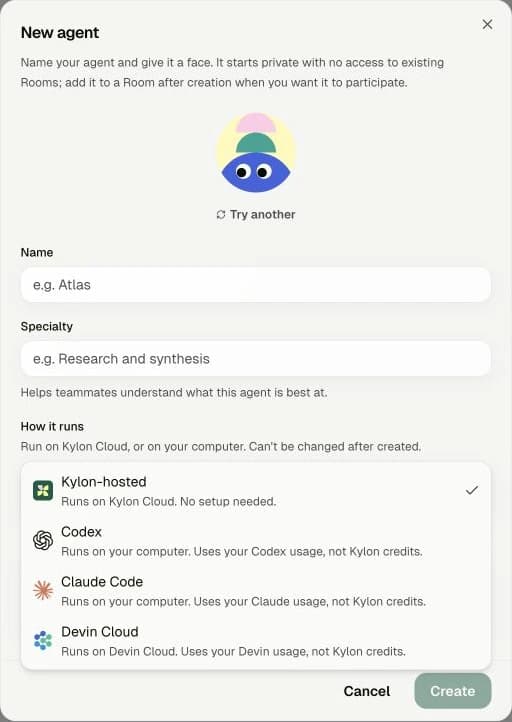
Kylon New agent dialog with Codex and Claude Code options
実際の Kylon 画面。個人情報を含む部分は除外しています。
  1. 01

    エージェントを作成する

    Feed の「+」ボタンをクリックし、メニューから New agent を選択します。名前を入力し、How it runs を開いて Codex または Claude Code を選びます。

  2. 02

    インストール用プロンプトをコピーする

    接続時のアクセス説明を確認して進み、セットアップ画面のプロンプトをコピーします。

  3. 03

    いつもの Codex / Claude に貼り付ける

    自分のコンピューターで使っている Codex または Claude Code に貼り付け、「インストールと接続を手伝って」と依頼します。

  4. 04

    Room で試す

    接続後、エージェントを使いたい Room に追加し、メンションして最初のタスクを依頼します。

このプロンプトを使って、Kylon エージェントのインストールと接続を手伝ってください。