Plaud integration
Turn the meeting no bot could join into tasks, records and a follow-up.
Plaud records the site visit, the client lunch and the workshop. Connect it to a Kylon room and an agent reads the transcript and notes, gives every action item an owner, and drafts the follow-up for you to approve.
Your own Plaud account, connected through Plaud's official MCP server. The agent reads recordings, and nothing goes to a client until a person approves it.
One pass, four moves
- 01Connect Plaud once
Authorize your Plaud account from the room and choose which agents can use it. Turn on Cloud Sync in the Plaud app so new recordings reach them.
- 02Say what happens after a meeting
Once, in plain words: when a site visit recording syncs, put the action items in Tasks and draft the recap to the client.
- 03It reads the recording
The transcript with speaker names and the summary Plaud already generated, including your own templates, next to the records in the room.
- 04You approve, then it moves
Tasks land with owners and the line they came from. CRM changes and the follow-up email wait for the person who was there.
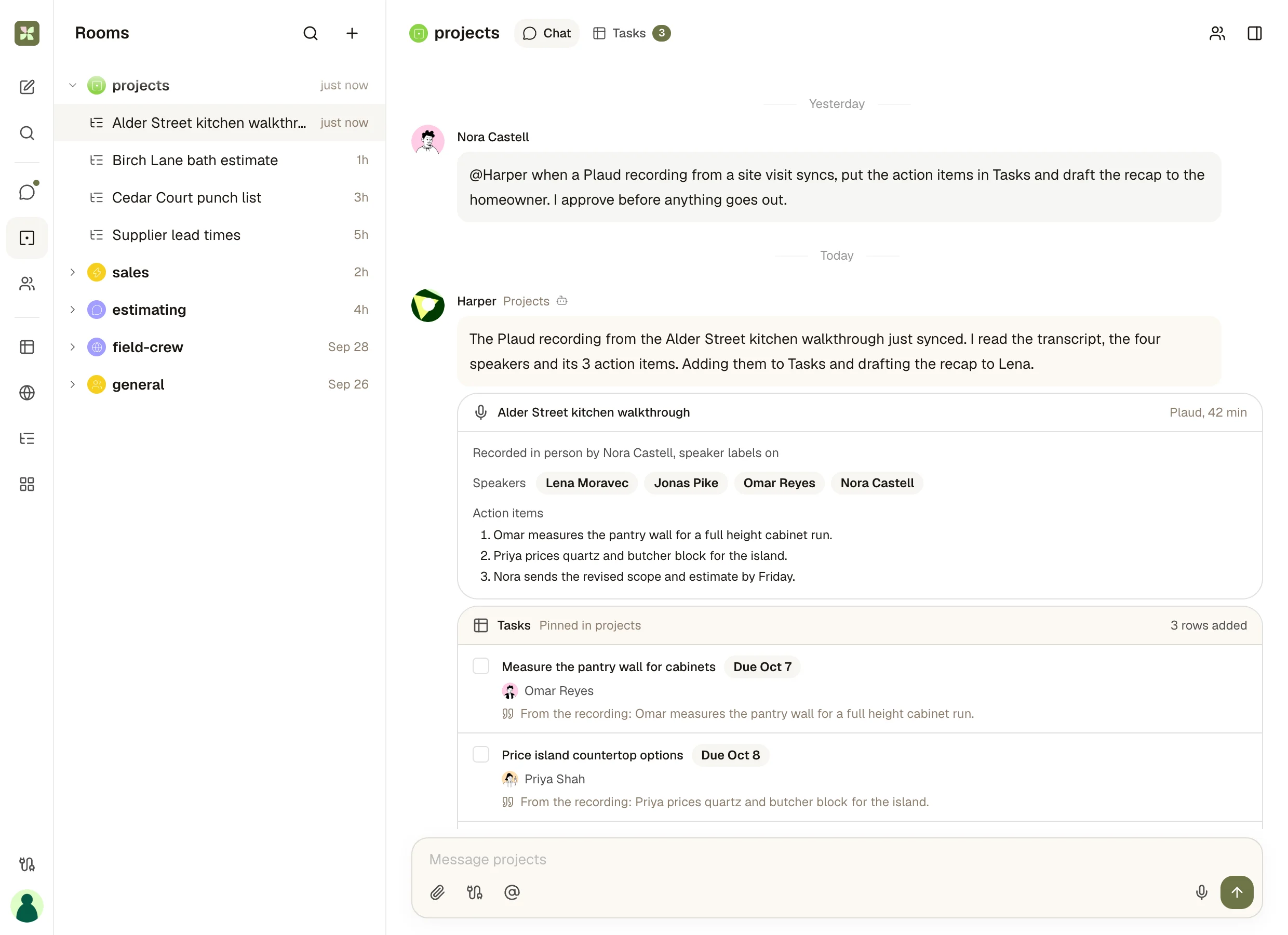
01 · Read
The recording arrives where the project lives
One instruction from yesterday, one recording that synced this morning. The agent says what it read: four speakers, three action items, forty two minutes.
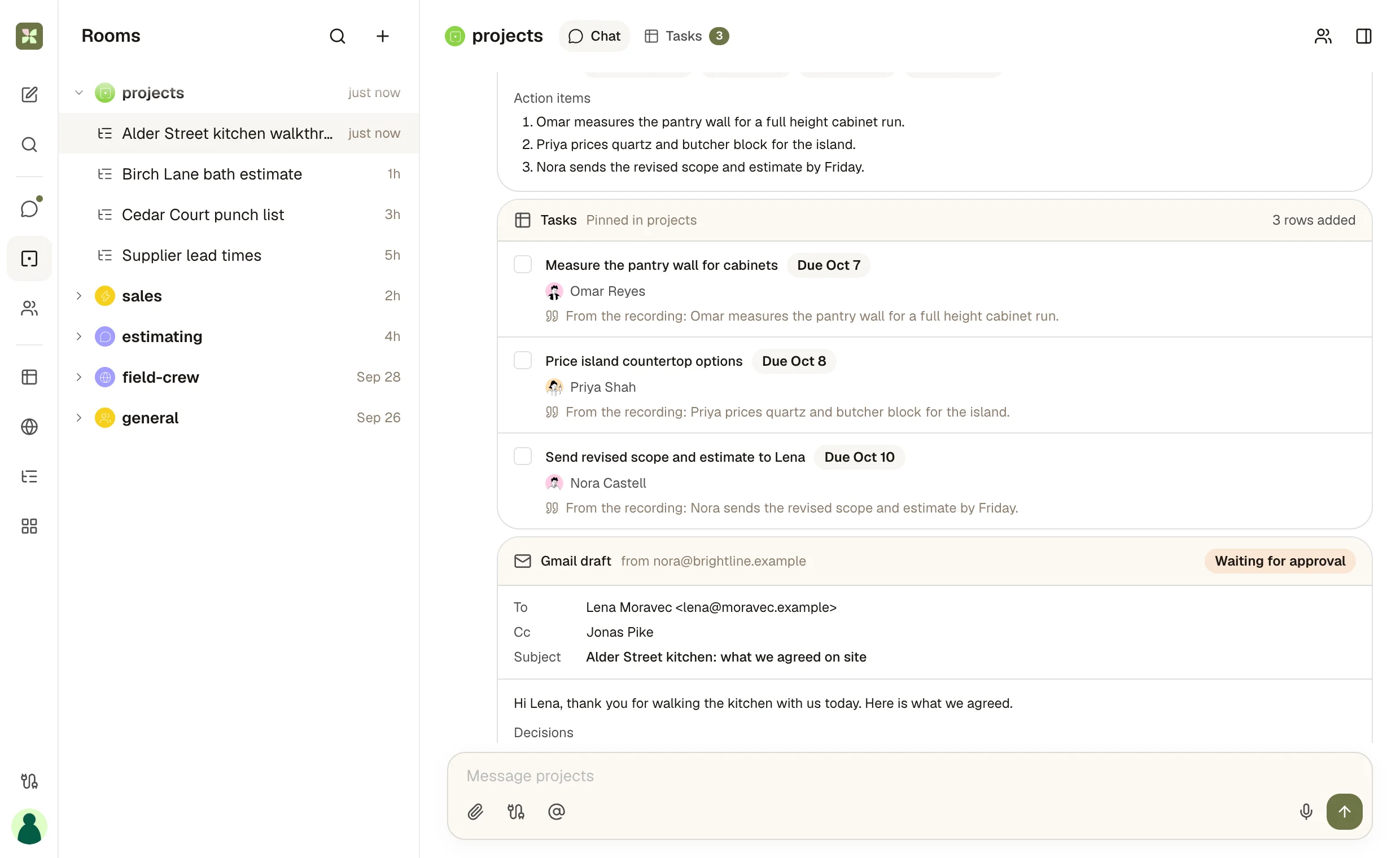
02 · Assign
Every action item becomes a task with an owner
Each row in the room's Tasks App has an owner, a due date and the line from the recording it came from, so nobody has to ask what was agreed.
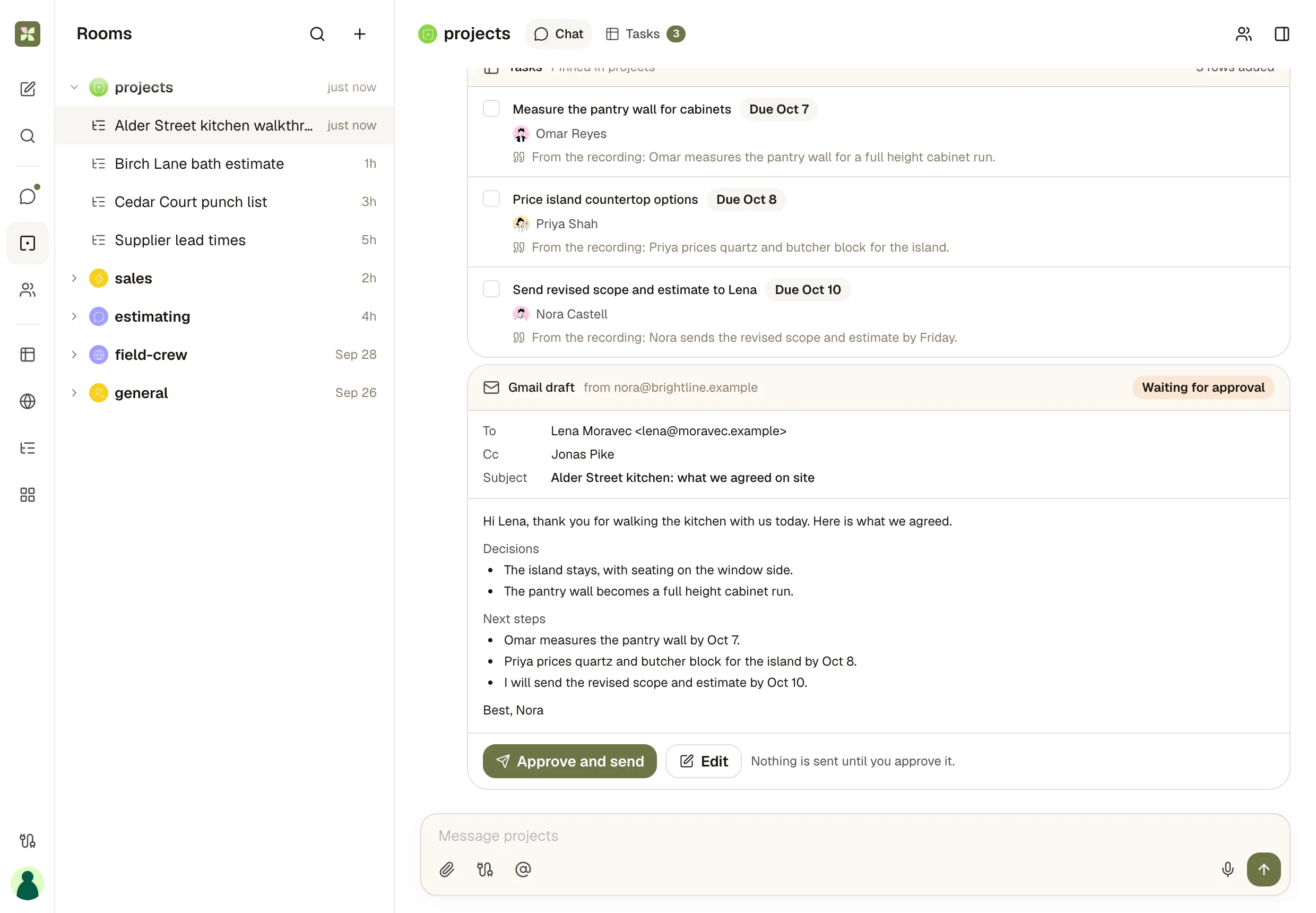
03 · Approve
The recap waits for the person who was there
The follow-up to the client is drafted in Gmail from what was decided on site. Approve it, edit it, or drop it.
What you end up with
A site visit that is already followed up.
Three tasks with owners and a recap written from what was decided on site, in the room your whole team works in. The recording stays in Plaud. You read the recap once and send it.
The full integration guide
Plaud + Kylon: Your in-person meetings, turned into team work
Connect your own Plaud account and an agent reads the recording, gives every action item an owner, proposes the CRM update and drafts the follow-up. A person approves anything that reaches a client.
Plaud records the conversations a meeting bot cannot join: the site visit, the client lunch, the workshop, the chat at a booth. The recording gets captured and summarized. The follow-up is still somebody's evening.
Connect Plaud to a Kylon room and an agent picks it up from there. It reads the transcript and the notes Plaud generated, turns each action item into a task with an owner, proposes the CRM update and drafts the follow-up email. A person approves anything that reaches a client or changes a record.
This page collects everything we have published about Plaud and Kylon: how the connection works, the six in-person meetings teams use it for, two short films and the deeper guides.
What the connection can do
Kylon connects to Plaud through Plaud's official MCP server. You authorize your own Plaud account once from an authorization card, then choose which agents can use it. Those agents can:
- Find recordings by name, with when each one started and how long it ran
- Read the transcript with speaker names and timestamps
- Read the notes Plaud generated, one entry per tab, including summaries from your own templates and the moments you flagged on the device
- Do the follow-up in the room where the project or the account is already discussed, next to its tasks, records and threads
The connection reads. Plaud documents its MCP as read-only and working with synced recordings, so recording, editing and new transcriptions stay in the Plaud app.
Connect Plaud in three steps
- Turn on Cloud Sync in the Plaud app. A recording reaches the agent once it has synced.
- Connect Plaud in Kylon. Authorize your Plaud account from the authorization card and pick the agents that can read it.
- Ask for the first piece of work. For example: "Find my last Plaud meeting and turn it into tasks for the team."
Two habits make it work better. Generate the summary you want in Plaud first, with a template for each kind of meeting, so the agent starts from a structured note. And give recordings real names. Search matches the recording name, not the transcript, so "Alder St kitchen walkthrough" is easy to find and "New Recording 12" is not.
Six in-person meetings teams run through it
- Site visits and in-home consultations. Scope items become tasks with owners, open questions go to the estimator, and the recap to the client waits for the person who walked the site.
- Client meetings in person. The agent matches the recording to the account, proposes the CRM fields to update and drafts the follow-up in your connected Gmail.
- Handoffs to someone who was not there. The new owner reads the commitments in the client's own words, with the lines they came from.
- Checking numbers before they go out. Square footage, unit counts, dates and prices said out loud are checked against the quote and the project records, and every mismatch is listed for a person to settle.
- Repeat questions. Questions from the counter, the booth or the open house are collected over a few weeks into a draft answer list that a person edits and approves.
- Workshops and trainings in more than one language. Decisions and tasks land in the room, with a recap in the language each reader works in.
Each one is written up in full, with the setup, in Kylon + Plaud: Six Use Cases for the Meetings That Happen in Person.
Watch it run
A pitch meeting recorded on Plaud, from the recording to the follow-up. The agent reads the recording and updates the investor's record, a teammate's Codex updates the chart in the record's thread, and the follow-up waits as a draft for a person to send.
The same pattern in a sales team: From inquiry to deal follows a Cal.com booking to a signed deal, with the Read AI report and the Plaud notes turned into the call recap. The film runs 49 seconds, and the page has the prompt that sets the workflow up in your own room.
Everything about Plaud on Kylon
- Six use cases for in-person meetings: site visits, client meetings, handoffs, number checks, repeat questions and workshops, with a room you can play through.
- Plaud MCP: setup, tool reference and limits: the tools the connection exposes, the fields they return, search limits and troubleshooting.
- Plaud Embedded SDK and MCP to CRM and issue tracking: the two routes to Plaud material, what Embedded costs, and a reviewed CRM and issue tracking workflow.
- From inquiry to deal: the sales workflow film, with Plaud notes in the call recap.
- AI meeting notes: how Kylon turns the notetaker you already use into tasks, CRM updates and drafts, with the Plaud pitch meeting film.
What stays with a person
Follow-up emails are created as drafts in your connected mailbox and wait for a person to send them. CRM changes and tasks are proposed in the thread first, so the person who was in the meeting confirms them.
Once a use case works by hand, an Automation in the room can check for new recordings each evening and start the same steps. People review in the morning.
Tell people you are recording. Plaud's own guidance is to inform all participants and confirm consent before recording.
Bring your next Plaud recording to your team.
Start a workspace, connect Plaud from a room, and ask your agent to find your last meeting and turn it into tasks for the team.
More Integrations
View allApollo + Kylon: Your AI-Powered Revenue Engine
Your Kylon agent looks up any person or company, LinkedIn profiles, emails, job titles and org charts, just by asking. No Apollo account, no API key, no credits to manage.
Give Your Content a Voice: Kylon's ElevenLabs Integration
Turn any document into natural-sounding audio. Clone a voice. Dub a video into 29 languages. Your Kylon agent handles all of it, with no ElevenLabs subscription required.
Questions
How does Kylon connect to Plaud?
Through Plaud's official MCP server, added as a connection in Kylon. You authorize your Plaud account once, choose which agents can use it, and those agents can list your recordings and read their transcripts and generated notes inside the room where the work is discussed.
Can an agent change my Plaud recordings?
No. Plaud documents its MCP as read-only. An agent reads recordings, transcripts and the summaries Plaud has already generated, including summaries from your custom templates. Recording, editing and new transcriptions happen in Plaud.
Do I need Plaud Cloud Sync turned on?
Yes. Plaud says its MCP works with synced recordings, so a recording has to be synced to your Plaud account before an agent can read it.
Does anything reach a client without review?
No. Follow-up emails are created as drafts in your connected mailbox and wait for a person to approve them. CRM changes and tasks are proposed in the thread first, so the person who was in the meeting confirms them.