Every client engagement, from first call to the next phase.
Your firm gets one Room per engagement and an App that keeps the pipeline, proposal, workplan, workshop, findings and hours in one place. The agent reads call notes, board exports and project hours, and drafts the proposal, charter, readout and invoices in the tools you already use. Nothing reaches the client until the partner says ok.


Northfield Advisory, Pinecrest Freight, their people, sites and numbers are made up for the film, and product names and logos belong to their owners.
One engagement, from the discovery call to the next phase.
Seven steps from the film: how a small firm does each one today, what Orin does in the Room, and who decides.
- 01Discovery
Turn the first call into a deal
- Today
- The call is booked on Cal.com, the notes sit in Read AI, and someone copies the deal into the CRM by hand.
- In Kylon
 OrinEngagement opsRuth Calder, COO of Pinecrest Freight, books a discovery call on Cal.com. Orin reads the Read AI report: dock scheduling runs on phone calls and spreadsheets at 3 sites, and Ruth wants a 6 week diagnostic. Orin adds the $36,000 deal to the Pipeline tab.
- Who decides
 LeahLeah reads the notes and tells Orin to draft the proposal.
- 02Proposal
Draft the proposal
- Today
- Scope copied from call notes into a proposal template, with the pricing table typed line by line.
- In Kylon
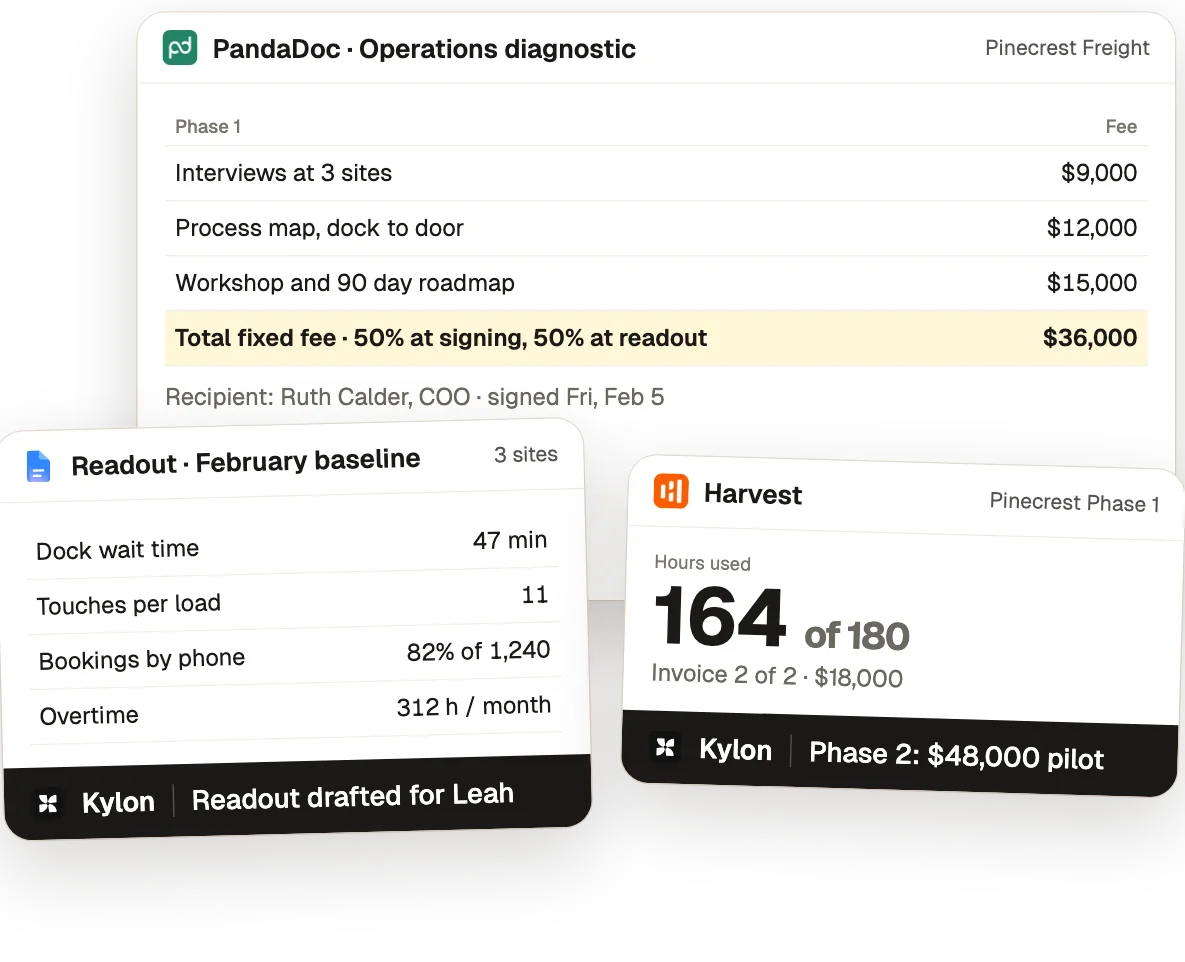
- OrinEngagement opsSam points Orin to the scope in the call notes. Orin drafts the proposal in PandaDoc: interviews at 3 sites for $9,000, a process map for $12,000, a workshop and 90 day roadmap for $15,000. $36,000 fixed, half at signing.
- Who decides
- LeahLeah sends the proposal, and Ruth signs it on Friday, Feb 5.
- 03Kickoff
Plan the work and write the charter
- Today
- A workplan built task by task in Asana and a charter in Docs, where a hopeful savings number can slip into the success measures.
- In Kylon
- OrinEngagement opsOrin builds the Asana workplan, 6 weeks and 14 tasks with the readout on Fri, Mar 12, and drafts the charter. Leah takes out the promised 30% cut in dock wait and $180,000 a year in savings. Orin saves her note as an engagement rule: never promise savings we have not measured, say what we will measure.
- Who decides
- LeahLeah approves the charter before it is shared with Ruth.
- 04Workshop
Sort the workshop output
- Today
- A board full of sticky notes and votes, and action items typed up from the recording afterward.
- In Kylon
- OrinEngagement opsSam drops the board export into the thread. Orin sorts 38 stickies into 4 clusters with dot votes, with dock bookings by phone on top at 9 votes, and pulls 7 action items with owners and due dates from the Read AI notes.
- Who decides
 SamSam owns the workshop output and hands the dock logs to Mei.
- 05Readout
Write the readout
- Today
- Dock logs in a spreadsheet, a process map drawn by hand, and a readout email written from scratch.
- In Kylon
- OrinEngagement opsOrin maps the process in 4 lanes with 3 pain points and sets the baseline from Mei's dock log analysis: 47 minute average dock wait, 11 touches per load, 82% of 1,240 loads booked by phone, 312 overtime hours a month. It drafts the readout email from Leah's Gmail with the engagement rule applied.
- Who decides
- LeahLeah sends the readout email to Ruth.
- 06Hours
Close out hours and invoice
- Today
- Hours checked against the fixed fee budget by hand, and the invoice built in a separate accounting tool.
- In Kylon
- OrinEngagement opsMei asks Orin to close out the hours. Orin pulls the project from Harvest: 164 of 180 budgeted hours used, 16 left, $18,000 uninvoiced. It drafts invoice NA-1042, 2 of 2, for $18,000. NA-1041 was paid Feb 12.
- Who decides
- LeahLeah sends every invoice.
- 07Next phase
Propose the next phase
- Today
- The next proposal starts from a blank template and a chat thread asking what comes next.
- In Kylon
- OrinEngagement opsWith Phase 1 closed and $36,000 paid, Orin drafts Phase 2 in PandaDoc: an 8 week pilot at Ridgefield for $48,000, with a table of what we will measure against the February baseline and no promised savings.
- Who decides
- LeahLeah reviews the draft and walks Ruth through it on Mon, Apr 5.


Works through the tools your firm already uses.
Orin reads and drafts in your own accounts through these connections. Workshop boards and client data come in as exports.
 Connection
Discovery calls clients book, so a new deal starts with a date and a contact.
 Connection
Meeting reports from calls and workshops: summary, key questions and action items with owners.
 Connection
Proposals with pricing tables, drafted for the partner to send and the client to sign.
 Connection
The workplan: tasks, owners, milestones and the readout date.
 Connection
Client emails like the readout, drafted from the partner's account. Every draft waits for someone to press Send.
 Connection
Hours against the budget, the uninvoiced amount and invoice drafts.
The board export with sticky notes and votes, sorted into clusters in the Workshop tab.
The client's own data, exported and uploaded, which the analyst turns into the baseline.

Leah, the partner, approves every proposal, email and invoice that goes to the client; Sam runs the workshop, and Mei builds the baseline from the dock logs.
Start with this week's discovery calls.
- 1Make a Room for each engagementInvite the partner, consultants and analysts on the work.
- 2Connect what you useCal.com, Read AI, PandaDoc, Asana, Gmail and Harvest from Connections. Drop in workshop board exports and client data files.
- 3Ask for the first draft“Read the notes from this call and draft the proposal.” The partner reviews it and sends it.
I run a small consulting firm. Set up our engagements in Kylon with me, one step at a time, and show me each result before you move on. 1. Make an App for our firm with tabs for Pipeline, Proposal, Workplan, Workshop, Findings, Hours and Next phase. 2. Connect Cal.com, Read AI, PandaDoc, Asana, Gmail and Harvest. For workshop boards and client data, I will upload the exports. 3. After every discovery call, read the meeting notes, add the deal to the Pipeline and draft the proposal with a pricing table. 4. At kickoff, build the workplan and draft the charter. In the success measures, say what we will measure, never savings we have not measured. 5. When a phase ends, compare hours with the budget and draft the invoice that is due. Rules: never send a proposal, email or invoice to a client without approval from the partner on the engagement.

Spend your hours with the client, not on the paperwork.
Set up one Room for your next engagement and let the agent draft. The partner still decides what reaches the client.