Every listing, from first call to closing day.
Leads, pricing, the listing, showings, offers and closing, in one Room with your team. An agent reads your calendar, inbox and MLS exports, builds the CMA and drafts the remarks and emails. Nothing reaches a client, a lender or the MLS until the agent on that deal says ok.


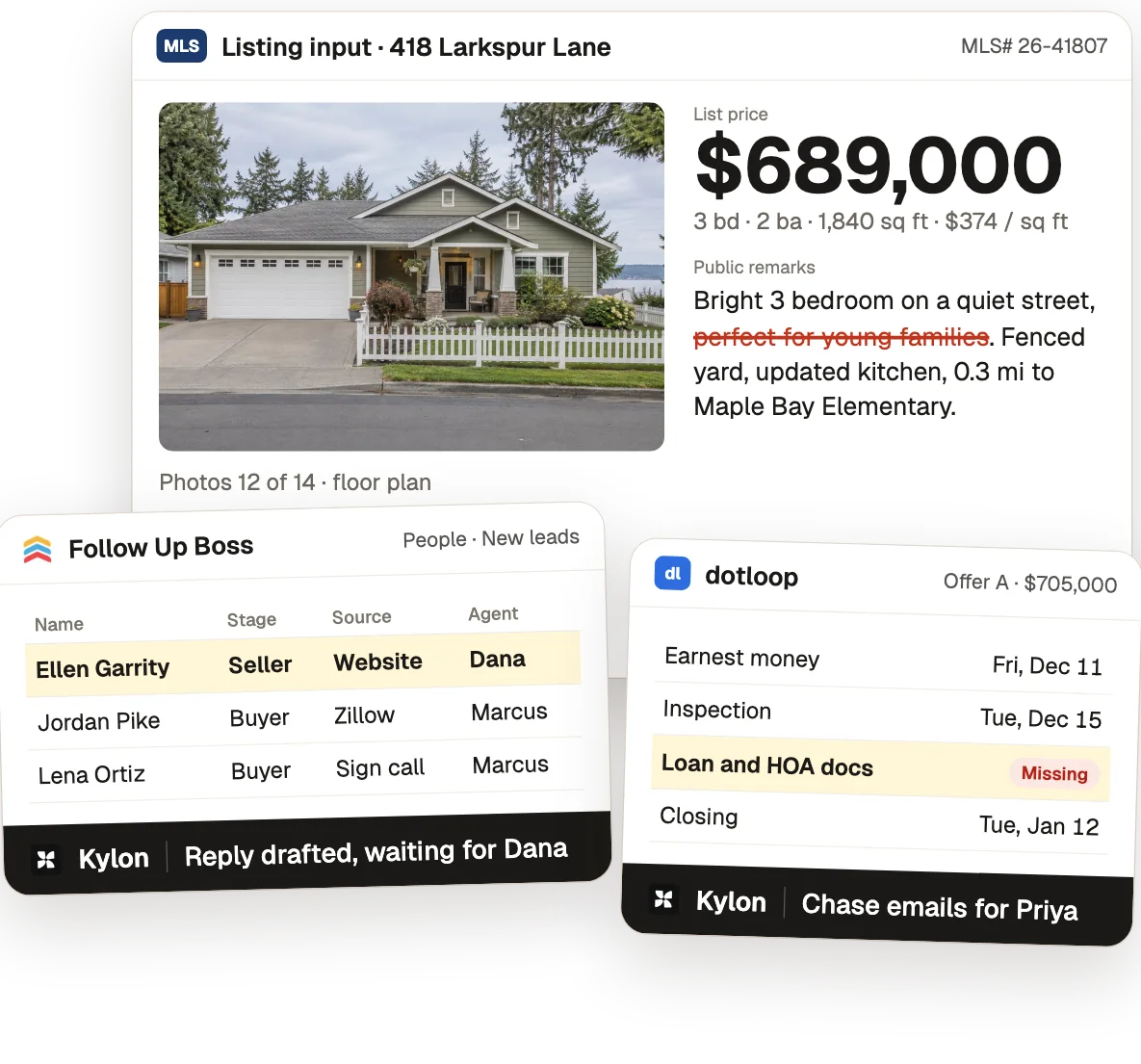
Harbor Lane Realty, Maple Bay, its people, addresses and numbers are made up for the film. Product names and logos belong to their owners.
One listing, from the first call to the first check-in.
The same Room as the film. Each step opens a tab of the team's own Kylon App, laid out like the tool it replaces.
- 01Leads
Answer the seller first
- Today
- Web, Zillow and sign-call leads land in Follow Up Boss, and the callback happens hours later.
- In Kylon
 JuniperTeam opsA new seller lead comes in from the website at 7:42 AM. Juniper drafts the reply to Ellen Garrity with two listing appointment times from Dana's Google Calendar and tags two buyer leads for Marcus.
- Who decides
 DanaDana sends the reply. The appointment is Wed, Nov 18 at 4 PM.
- 02Pricing
Set the list price
- Today
- Comps pulled from the MLS into Cloud CMA or RPR and adjusted by hand.
- In Kylon
- JuniperTeam opsDana drops in the comps export from the MLS. Juniper builds the CMA from 5 sold comps, adjusted $672K to $701K, average $371 per sq ft, and suggests $689,000.
- Who decides
- DanaDana sets the price at $689,000 with Ellen.
- 03Listing
Write the listing
- Today
- Remarks typed into the MLS input form, with the broker checking them for Fair Housing.
- In Kylon
- JuniperTeam opsJuniper drafts the public remarks, 12 of 14 photos and the floor plan. Dana asks to take out "perfect for young families", and Juniper saves it as a listing rule: describe the home, not who should live there.
- Who decides
- DanaDana approves the copy and pastes it into the MLS herself.
- 04Showings
Run the showings
- Today
- The showing service confirms showings, and the open house flyer is made in Canva.
- In Kylon
- JuniperTeam opsMarcus drops in the showing requests export. Juniper puts 9 weekend showings on Dana's calendar, collects 6 feedback forms and drafts the open house flyer with the listing rule applied.
- Who decides
- DanaDana prints the flyer and hosts the open house on Sat, Dec 5, 1 to 3 PM.
- 05Offers
Compare the offers
- Today
- Offer PDFs arrive by email, go into a comparison spreadsheet, then a call with the seller.
- In Kylon
- JuniperTeam opsJuniper reads 3 offers from Gmail into one comparison: A $705,000 conventional, B $712,000 FHA, C $698,000 cash. It drafts the recap to Ellen from Dana's Gmail.
- Who decides
- DanaDana sends the recap. Ellen decides with Dana.
- 06Closing
Get to closing day
- Today
- The transaction coordinator tracks deadlines in dotloop or SkySlope and chases the lender, HOA and title.
- In Kylon
- JuniperTeam opsPriya drops in the dotloop checklist export after Offer A is signed. Juniper tracks every date to close on Tue, Jan 12 and drafts two chase emails for the missing loan and HOA docs.
- Who decides
 PriyaPriya sends both emails. Ellen and the buyers sign in dotloop.
- 07After close
Stay in touch
- Today
- Past clients sit in a smart list until the next holiday email.
- In Kylon
- JuniperTeam opsThe sale closes at $705,000, 102.3% of list. Juniper moves Ellen to past clients and drafts her first check-in for Mon, Apr 12.
- Who decides
- DanaDana sends each touch herself.

Your calendar, your inbox, your listing data.
Your agent works through the accounts you connect and the exports you already pull. You still publish in the MLS and sign in dotloop yourselves.
 Connection
Offers, client emails and chase emails to lenders and the HOA. Every draft waits for someone to press Send.
 Connection
Open times for listing appointments, and weekend showings put on the listing agent's calendar.
The sold comps export for the CMA. Your agents publish the listing in the MLS themselves.
The showing requests export, for the showing count and buyer feedback.
The checklist export for deadlines and documents. People sign in dotloop.
 Export
Your lead list. The Leads tab is laid out like the lead profile your agents know.

Dana sends client emails and approves pricing and listing copy, Marcus brings in the showing requests, and Priya sends every closing email.
Start with this week's leads.
- 1Make a Room for your listingsInvite your agents and your transaction coordinator.
- 2Connect what you useGmail and Google Calendar from Connections. Drop in your MLS comps, showing and dotloop exports as files.
- 3Hand over your first leadAsk for a reply with two appointment times. Your agent drafts it in the Room and waits for you to send it.
I run a real estate team. Set up our listings in Kylon with me, one step at a time, and show me each result before you move on. 1. Make an App for our team with tabs for Leads, Pricing, Listing, Showings, Offers, Closing and Past clients. 2. Connect Gmail and Google Calendar. I will upload our MLS comps, showing requests and dotloop exports as files. 3. When a seller lead comes in, draft a reply with two listing appointment times from my calendar. 4. When offers arrive by email, put them side by side and draft a recap for the seller. 5. Every morning, check closing deadlines and draft chase emails for anything missing. Rules: never send an email or publish anything to the MLS without approval from the agent who owns that deal.

Run every listing from one Room.
Start free, connect Gmail and Google Calendar, and let an agent draft your first lead reply. Nothing goes out until your team says ok.