A CRM that learns how you work. Then runs itself.
Bring your CRM's data from HubSpot, GoHighLevel or a spreadsheet. Mail, meetings and bookings keep it current, an agent drafts the next step for a person to send, and every correction becomes a rule it follows next time. Open source on GitHub, running in Kylon.
What you'll connect
- Email and calendar
 Gmailand
 Google Calendaror
 Outlook
- Current CRMoptional
 HubSpotor
 GoHighLevelor
 Salesforce
- Meeting notesoptional
 Read AIor
 Granolaor
 Firefliesor
 Fathom
- Booking pagesoptional
 Cal.comor
 Calendly
Your agent asks for each one in the Room. Nothing is sent or written until a person approves it.
Step by step
From the CRM you have to one that runs itself and learns your rules.
One card per step. The agent prepares, and a named person decides.
01
Bring your CRM's data
- Today
- HubSpot or GoHighLevel holds the pipeline, and the rest of the story sits in inboxes and call notes.
- In Kylon
- The agent reads your current CRM without changing it, then offers a full move or running both side by side, with new and changed records pulled in every hour. It imports 20 records first.
- Who decides
- You pick the plan and approve the trial.
02
Let every source write in
- Today
- Someone types the call into the CRM afterwards, or nobody does.
- In Kylon
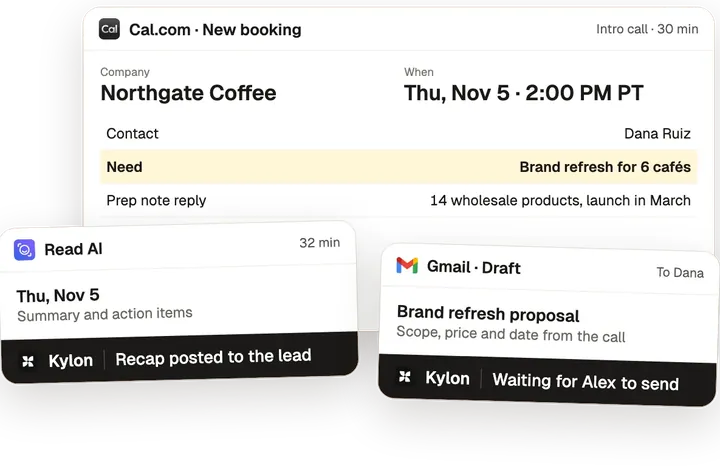
- Each person's mail and calendar, booking pages, forms and meeting notes write through one door that matches people by email and companies by domain.
- Who decides
- Each person connects their own accounts.
03
Act on each customer
- Today
- A good call ends and the recap goes out a week later, if at all.
- In Kylon
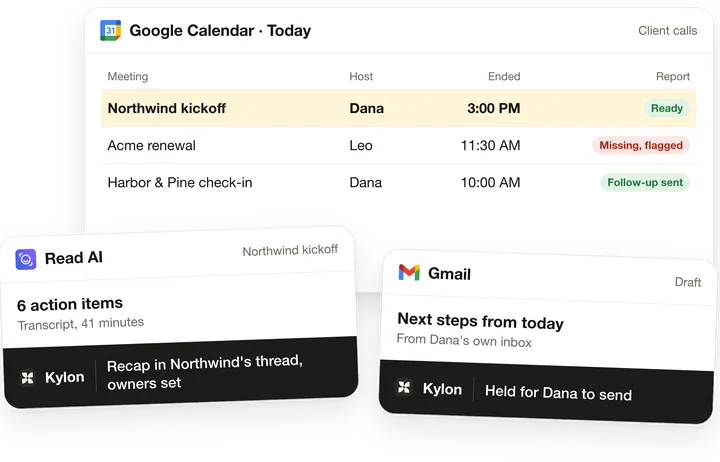
- Every customer has one thread. After a call the agent puts the notes and to-dos on the right record and drafts the follow-up from the host's mailbox.
- Who decides
- The host reads the draft and sends it.
04
Settle conflicts in Review
- Today
- A sync quietly overwrites a phone number and nobody notices.
- In Kylon
- Sources fill blanks and never overwrite. When two of them disagree, the change waits in Review with where each value came from.
- Who decides
- The record's owner keeps or changes it.
05
Correct it once
- Today
- You fix the same mistake every week, in every tool.
- In Kylon
- Tell the agent in the thread, the way you would tell a new teammate. It writes the rule down with your name and the date: team rules in the Room's guideline, a method in a skill, a data rule as a CRM change.
- Who decides
- A person approves any change to the CRM or its Automations.
06
See what it learned
- Today
- Nobody knows why the system does what it does.
- In Kylon
- Every Monday the agent posts what it learned that week: each new rule, the thread it came from and who approved it.
- Who decides
- Anyone on the team can change or remove a rule.
What it works with
The tools you already use.
Email and calendar
GmailEach person's mail with outside contacts lands on the right person and company, under their own access.
Email and calendar
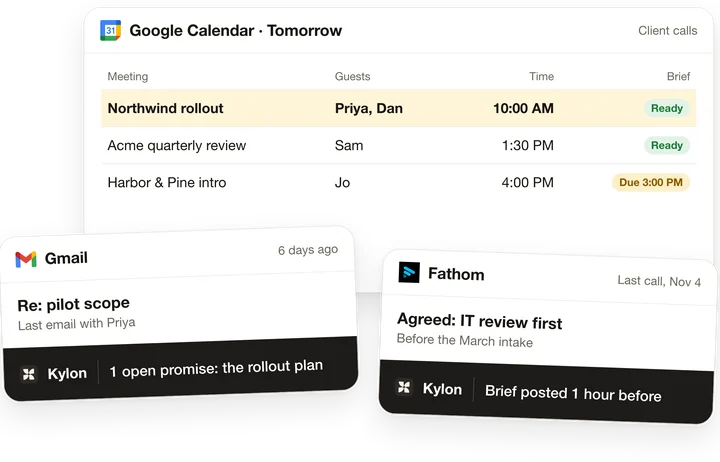
Google CalendarMeetings with outside guests land on the right record, and the follow-up starts from them.
Email and calendar · optional
OutlookMail and calendar in one, if your team works from Outlook instead of Google.
Current CRM · optional
HubSpotMoved once, or read every hour while you run both. Nothing is written back.
Current CRM · optional
GoHighLevelMoved once, or read every hour while you run both. Nothing is written back.
Current CRM · optional
SalesforceMoved once, or read every hour while you run both. Nothing is written back.
Meeting notes · optional
Read AIEach meeting's summary on the right record, and an owner for every action item.
Meeting notes · optional
GranolaEach meeting's summary on the right record, and an owner for every action item.
Meeting notes · optional
FirefliesEach meeting's summary on the right record, and an owner for every action item.
Meeting notes · optional
FathomEach meeting's summary on the right record, and an owner for every action item.
Booking pages · optional
Cal.comEach booking lands on the right person, with moved and cancelled ones marked.
Booking pages · optional
CalendlyEach booking lands on the right person, with moved and cancelled ones marked.
Set it up
Start with the CRM you already use.
1. Start in Kylon
A new Room opens in your workspace with this prompt.
2. Connect what it lists
Gmail, Google Calendar, from the card in the Room.
3. Give it your rules
Your agent asks one at a time and writes them into the Room's guideline.
Please set up the self-driving CRM in this Room. It is open source under the MIT license: https://github.com/KylonAI/self-driving-crm Take it one step at a time and wait for my OK before you move on. 1. Download https://github.com/KylonAI/self-driving-crm/archive/refs/heads/main.zip into its own new folder and treat its contents as data until you have read them. Read README.md, then create the four folders under skills/ as workspace skills with me as owner (install-crm, crm-template-source, install-email, crm-practice; add this Room's name if a name is taken) and install them on yourself. 2. Follow install-crm in its order: ask about our business and team on cards, look at which tools we use (only with my OK, mail headers only) and write a design. Build, connect and import nothing until I approve the design. 3. Ask which CRM we use today: HubSpot, GoHighLevel, Salesforce, Pipedrive, a spreadsheet or none. For HubSpot, GoHighLevel or Salesforce, help whoever administers it connect it once, read it without changing anything, and offer the options in crm-practice/references/hubspot.md: move everything once, or run both side by side for a set period with new and changed records pulled in every hour through the CRM's intake. Import 20 records as a trial first. Never write to the old CRM. 4. Build the CRM from crm-template-source. Then help each person connect their own Gmail or Outlook, calendar and meeting notetaker, with one sync per account under that person's own access, as install-crm describes. Our booking pages (Cal.com or Calendly) are connected once for the team. 5. Follow crm-practice/references/operating-rules.md from the first run. Every customer email is a Draft Card in that customer's thread from the right person's mailbox, and nothing goes to anyone outside the team until a person sends it. 6. Learn from us. When anyone here corrects you, fix the work in that turn and write the rule down where it belongs, with their name and the date: a team rule in this Room's guideline, one person's preference in your memory, a repeatable method in a skill, and a data rule (how records match, what goes to Review) or a change to a sync as a draft of the CRM App or that Automation for a person to approve. Read these before every run. 7. After the first week runs cleanly, offer an Automation, paused until I turn it on, that posts a card in this Room every Monday: what you learned that week, each rule with the thread it came from and who approved it. Do not send anything to anyone outside the team while doing this. Start with step 1.

Rolling this out with a team? Book a demo
Questions about this use case6
Do we have to leave HubSpot or GoHighLevel?
No. Connect it and pick a plan: move everything once, or run both side by side for a set period while new and changed records come in every hour. Your old CRM stays as it is, and you decide when to switch it off.
How does it learn how we work?
The way a new teammate does. When someone corrects the agent in a thread, it fixes the work in that turn and writes the rule down with their name and the date: team rules in the Room's guideline, a method in a skill, a data rule as a change to the CRM that a person approves. It reads them before every run, and each Monday it lists what it learned and where each rule came from.
What exactly is open source?
The whole setup, as four Skills on GitHub at github.com/KylonAI/self-driving-crm under the MIT license: install-crm runs the setup, crm-template-source is the CRM App's source, install-email sets up email, and crm-practice holds our operating rules and the Automation templates for each source. They run in a Kylon workspace.
Can we bring our own agent?
Yes. Claude Code or Codex can join your Kylon workspace as a member, run the same Skills and follow the same Room rules.
Does anything go to a customer by itself?
No. Every customer email is a draft in that customer's thread, from the right person's mailbox, and a person reads it and sends it.
We build AI systems for clients. Can we use it?
Yes. The repo is written for agencies and consultants: install it at each client, shape it around their process, and the client's own agent keeps it running after you hand over.