Every client call gets a recap, owners and a follow-up draft.
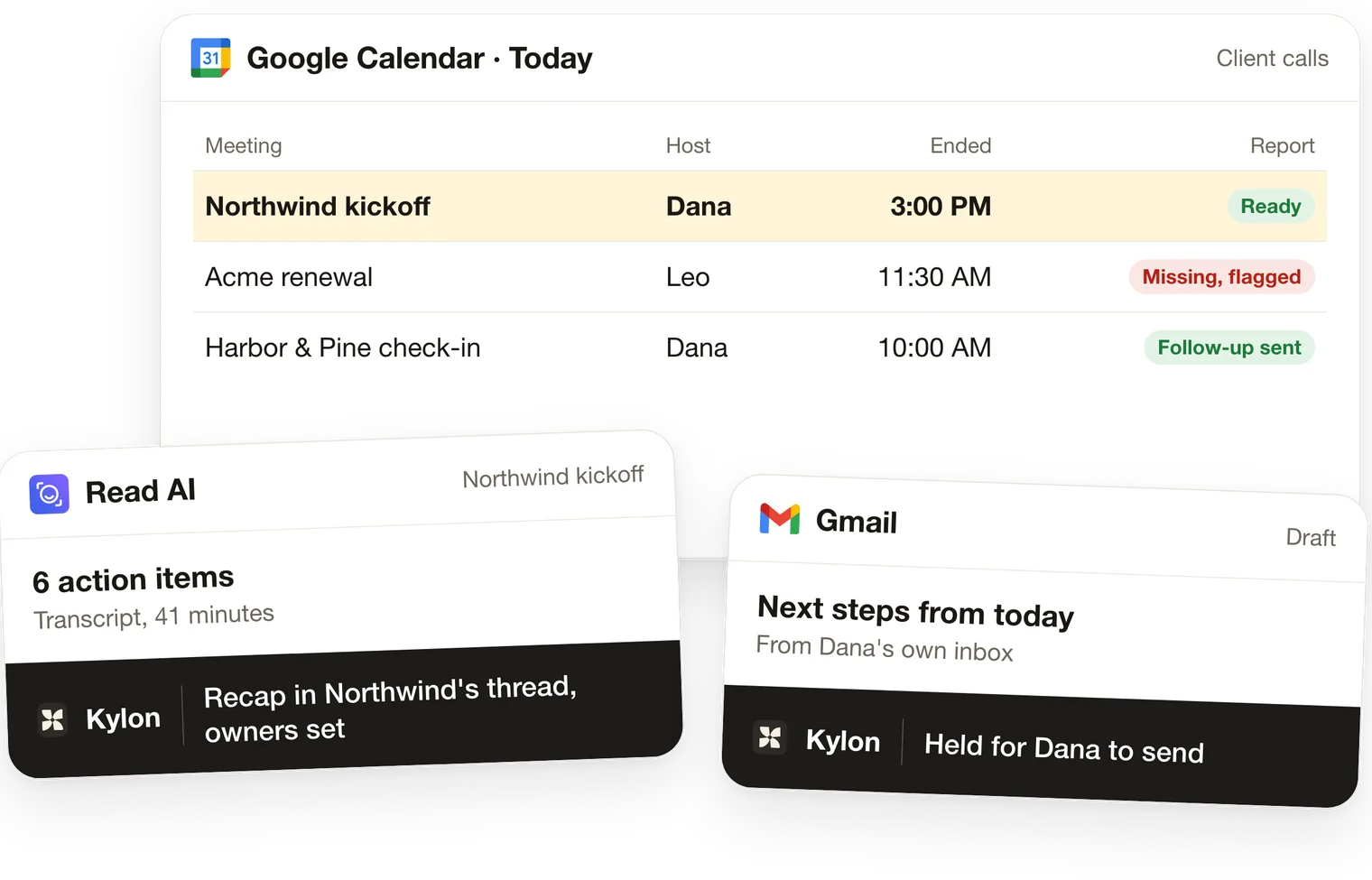
After each client meeting, the agent reads your notetaker's report, writes the recap in the client's thread, lists action items with owners and drafts the follow-up from the host's mailbox. Missing recaps are flagged the same day.
What you'll connect
 Google Calendar
 Gmail
 Read AIoptional
 Granolaoptional
 Firefliesoptional
 Fathomoptional
 tl;dvoptional
 Outlookoptional
Your agent asks for each one in the Room. Nothing is sent or written until a person approves it.
Step by step
From the end of a call to a follow-up in the host's drafts.
One card per step. The agent prepares, and a named person decides.
01
Find the meetings that ended
- Today
- Nobody knows which client calls ended without a recap.
- In Kylon
- The agent reads the calendar for client meetings that ended and matches each one to its client and its notetaker report.
- Who decides
- You choose which meetings count: outside guests only, or all of them.
02
Read the whole report
- Today
- A skimmed summary, transcript turns out of order, an empty report taken as done.
- In Kylon
- The agent puts transcript turns in time order, pages through every result and treats an empty summary or transcript as missing.
- Who decides
- The host checks the recap before it is saved.
03
Recap and action items
- Today
- The notes stay in the notetaker and the action items in someone's head.
- In Kylon
- A short recap goes in the client's thread, and each action item gets an owner and a due date on the meeting's record.
- Who decides
- Each owner accepts or reassigns their item.
04
Draft the follow-up email
- Today
- The follow-up waits until someone remembers it, often days later.
- In Kylon
- The follow-up is drafted from the host's own mailbox, naming what was agreed and the next step.
- Who decides
- The host reviews, edits and sends every email.
05
Flag the missing recaps
- Today
- A call that was never recorded is found a week later.
- In Kylon
- A meeting on the calendar with no report is checked against the host's inbox for a reschedule, then flagged to the host the same day.
- Who decides
- The host rebooks or writes the recap by hand.
What it works with
The tools you already use.
Connection
Google CalendarTells the agent which meetings happened, when they ended and who attended.
Connection
GmailSends nothing on its own: follow-ups are drafted from the host's mailbox for them to send.
Optional
Read AIProvides the meeting report and transcript the recap is written from.
Optional
GranolaProvides the meeting report and transcript the recap is written from.
Optional
FirefliesProvides the meeting report and transcript the recap is written from.
Optional
FathomProvides the meeting report and transcript the recap is written from.
Optional
tl;dvProvides the meeting report and transcript the recap is written from.
Optional
OutlookUse instead of Gmail if your team works from Outlook.
Set it up
Start with last week's client meetings.
1. Start in Kylon
A new Room opens in your workspace with this prompt.
2. Connect what it lists
Google Calendar, Gmail, from the card in the Room.
3. Give it your rules
Your agent asks one at a time and writes them into the Room's guideline.
Set up our post-meeting follow-up in this Room. Take it one step at a time and wait for my OK before you move on. 1. Connect Google Calendar and Gmail first (Outlook if we use it). Then connect the notetaker we use: Read AI, Granola, Fireflies, Fathom, tl;dv or Otter. Tell me which ones still need connecting. If our team uses Read AI, tell me how an admin turns on Global Report Access so one connection covers everyone. Otter isn't in the connection list yet: if we use it, help me add it as an MCP server with the URL https://mcp.otter.ai/mcp. 2. Ask me which meetings count: only meetings with people outside our company, or all of them. Ask who hosts client calls, and help each host connect their own mailbox so follow-ups come from them. 3. Build a Meetings App with one record per meeting: client, host, time, notetaker report link, recap, action items with owner and due date, follow-up status, and a "recap missing" flag. 4. Take our last week of client meetings as a first pass. For each one, read the notetaker report (put transcript turns in time order, page through every result, and treat an empty summary or transcript as missing, not as done), write a short recap in the client's thread, list action items, and draft the follow-up email from the host's mailbox for them to review. Show me before anything is saved. 5. For any meeting on the calendar with no report, check the host's inbox for a reschedule first, then flag it to the host. 6. Copy our rules into this Room's guideline: which meetings count, what a recap includes, who reviews follow-ups. 7. After a clean week, offer to turn this into an Automation that checks every 15 minutes for meetings that ended, and mentions you so you draft each follow-up. Start with step 1.

Rolling this out with a team? Book a demo
Questions about this use case5
Which notetakers does it work with?
Read AI, Granola, Fireflies, Fathom and tl;dv connect from Kylon's connection list. Otter is added by hand as an MCP server with its URL. The agent reads whichever one your team uses, so you don't have to switch.
Does it send the follow-up email for me?
No. The follow-up is drafted from the host's own mailbox, and the host reviews, edits and sends every email. Nothing goes to a client on its own.
How soon after the call does it run?
You run the first week with the agent. After a clean week it offers an Automation that checks every 15 minutes for meetings that ended and hands each one to the agent to recap and draft.
What if a meeting wasn't recorded?
The agent compares the calendar with what the notetaker returned. An empty summary or transcript counts as missing. Before flagging, it checks the host's inbox for a reschedule, then tells the host the same day.
Can one connection cover the whole team?
With Read AI, an admin can turn on Global Report Access so one connection sees everyone's meetings. With the other tools, each host connects their own notetaker, and each host connects their own mailbox so follow-ups come from them.