Stripe integration
Every failed payment reaches the person who knows the customer.
Ask in the room where your team talks about accounts. A Kylon agent reads failed payments and refund requests in Stripe, adds what the CRM and the inbox say about each customer, and holds every refund or credit for finance.
Your own Stripe account, connected from your Kylon workspace. Refunds and credits are issued only after a person approves them.
One pass, four moves
- 01The Monday question
Which renewals failed over the weekend, and who owns each of those customers?
- 02Stripe, plus what Stripe cannot see
Failed charges, invoices and subscriptions from Stripe, then the account owner from the CRM and the last email with each customer.
- 03A note for each account owner
A short draft to the customer in the owner's own mailbox, with the amount, the reason and the history.
- 04Money waits for finance
Credits, refunds and voided invoices are listed with the reason. Finance approves each one before anything moves in Stripe.
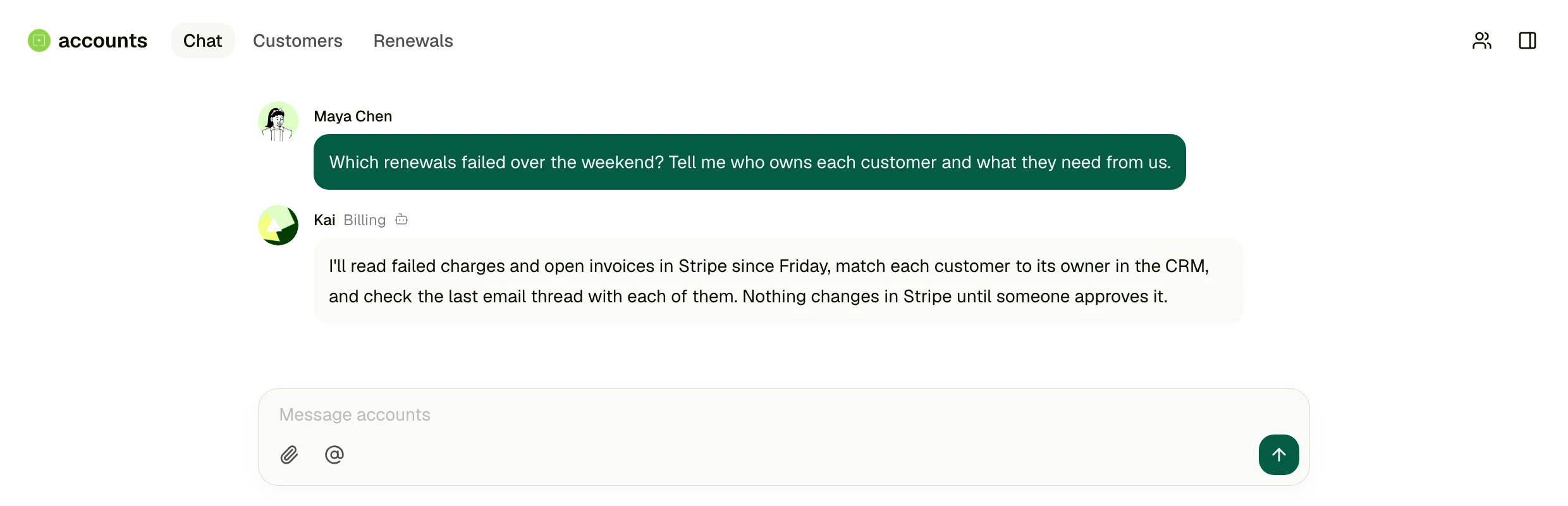
01 · Ask
The question goes where accounts are discussed
You ask in the Kylon room. The agent says what it will read in Stripe and where it will look for each owner.
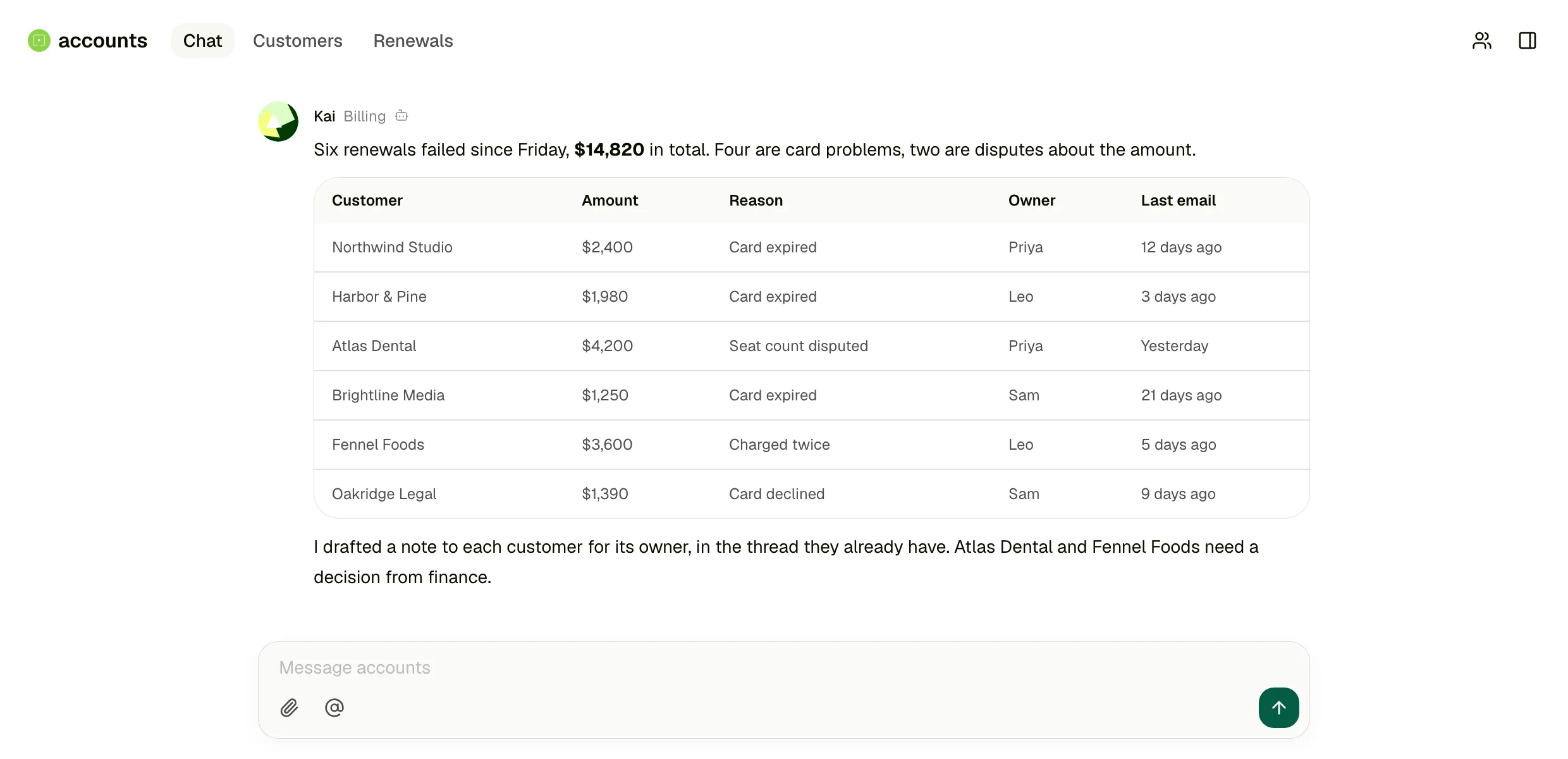
02 · Read
Six failed renewals, each with an owner
Amount, reason, owner and the last email with the customer, in one table.
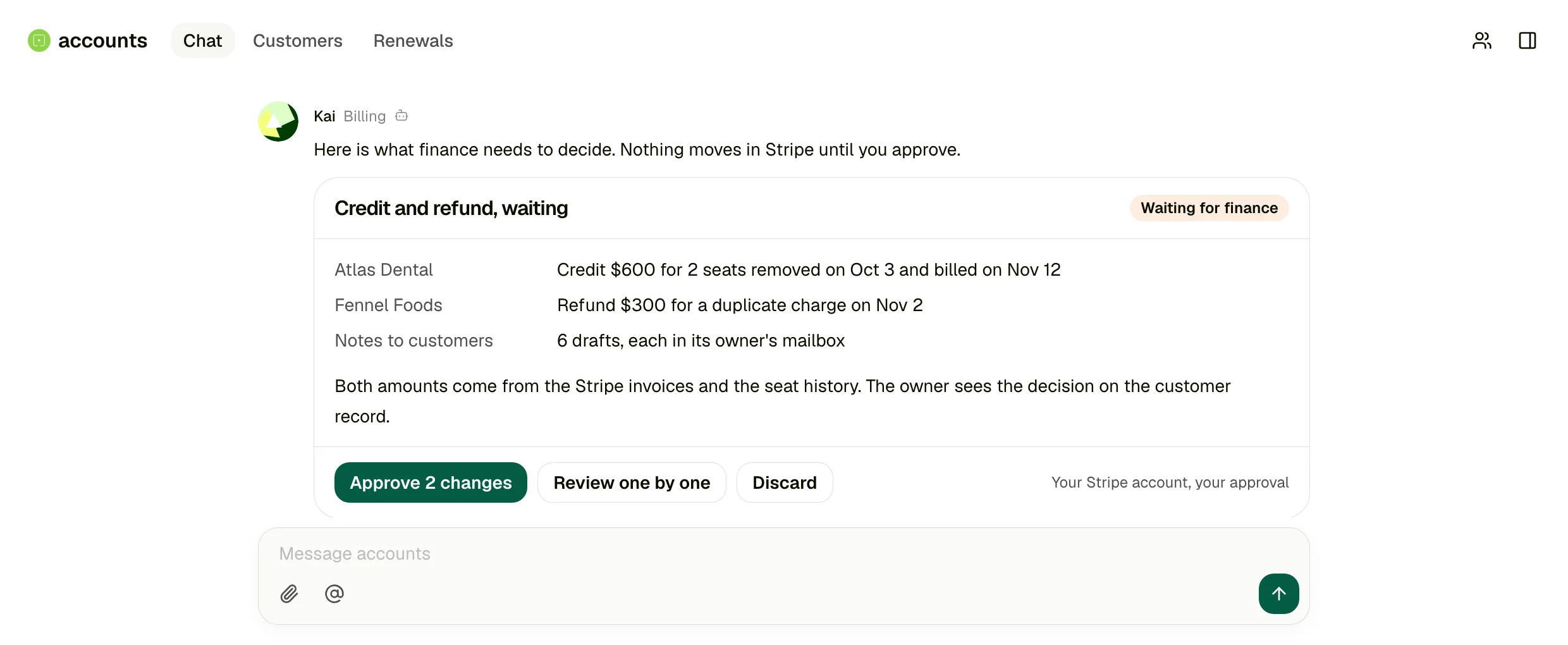
03 · Approve
The credit and the refund wait for finance
Each change carries its reason and the Stripe invoice behind it. Nothing moves until finance approves.
What you end up with
No failed payment sits unread in a dashboard.
Each failed renewal has an owner and a drafted note to the customer, and where money moves, finance has decided on the record.
The full integration guide
Stripe + Kylon: Every failed payment reaches the person who knows the customer
An agent reads failed payments in Stripe, finds who owns each customer, and holds refunds and credits for finance.
A failed renewal is a line in the Stripe dashboard. Who should talk to that customer, what they said last week, and whether the amount was even right live somewhere else: the CRM, the account owner's inbox, the thread where the team discussed the account.
A Kylon agent reads Stripe and those other places together, gives every failed payment to the person who knows the customer, and holds anything that moves money until finance approves it.
What the connection can do
You connect Stripe from your Kylon workspace and choose which rooms and agents can use it. An agent can:
- Read customers, charges, invoices and subscriptions, including why a charge failed
- Read balance transactions and invoice payments, to see what was actually collected
- Create invoices, credits, refunds and subscriptions, and void an invoice, after a person approves
- Write the note to the customer as a draft in the owner's own mailbox, never sending it on its own
The agent works inside the access of the account you connected, and you can revoke it at any time.
Stripe's own AI, and an agent for the whole team
Stripe ships a Dashboard assistant that answers questions and acts in the Dashboard after you confirm, and a hosted MCP server that lets AI tools read and write your Stripe data. Both are good at Stripe. The work around a failed payment needs people who are not in Stripe: the account owner who knows the customer, and finance who signs off on money. A Kylon agent sits in the room where those people already talk, so the answer reaches them, and the approval happens where everyone can see it.
What a Monday looks like
Someone asks in the room: which renewals failed over the weekend, and who owns each customer?
The agent reads the failed charges and open invoices since Friday, matches each customer to its owner in the CRM, and checks the last email thread. Six renewals, four card problems and two disputes about the amount. It drafts a short note to each customer for its owner, in the thread they already have.
The two disputes need money to move: a credit for seats the customer removed, a refund for a duplicate charge. Those go to finance as two changes with the reason and the Stripe invoice behind each one. Nothing happens in Stripe until finance approves.
Getting started
Connect Stripe from your workspace, add an agent to the room where accounts are discussed, and ask which payments need a person this week. When the question comes back every Monday, keep it as an Automation.
Billing problems are customer conversations.
Connect Stripe, add an agent to the room where accounts are discussed, and ask which payments need a person this week.
More Integrations
View allApollo + Kylon: Your AI-Powered Revenue Engine
Your Kylon agent looks up any person or company, LinkedIn profiles, emails, job titles and org charts, just by asking. No Apollo account, no API key, no credits to manage.
Give Your Content a Voice: Kylon's ElevenLabs Integration
Turn any document into natural-sounding audio. Clone a voice. Dub a video into 29 languages. Your Kylon agent handles all of it, with no ElevenLabs subscription required.
Questions
Is there a Stripe MCP server, and how does Kylon fit with it?
Stripe hosts its own MCP server for AI tools. In Kylon you connect your Stripe account from your workspace, and the agents in a room use it next to your CRM and inbox, so the account owner and finance see the same answer.
Can the agent refund a customer on its own?
No. Refunds, credits and voided invoices are listed in the room with the reason and the invoice behind them, and they happen in Stripe only after a person approves.
What can the agent read in Stripe?
Customers, charges, invoices, subscriptions and balance transactions in the account you connected, within the access that account already has.
Who can use the Stripe account I connect?
You connect it from your Kylon workspace, then choose which rooms and which agents can use it. You can revoke the connection at any time.