QuickBooks integration
Get paid on overdue invoices without a Friday spreadsheet.
Every Monday a Kylon agent reads the aged receivables in QuickBooks, checks the last email with each client and who owns the relationship, and drafts a reminder for that person to send.
Your own QuickBooks Online company, connected from Kylon. Reminders go out from the owner's own mailbox, after they read them.
One pass, four moves
- 01Monday's list
Which invoices are past due, by how long and for how much, straight from the aged receivables report.
- 02Context before the reminder
The last email with each client, any date they gave, and who owns the relationship.
- 03A reminder in the owner's voice
Drafted in the owner's own mailbox, in the thread they already have with the client, with what the client asked for attached.
- 04Paid clients drop off
When the bookkeeper records a payment in QuickBooks, that client comes off next week's list.
01 · Ask
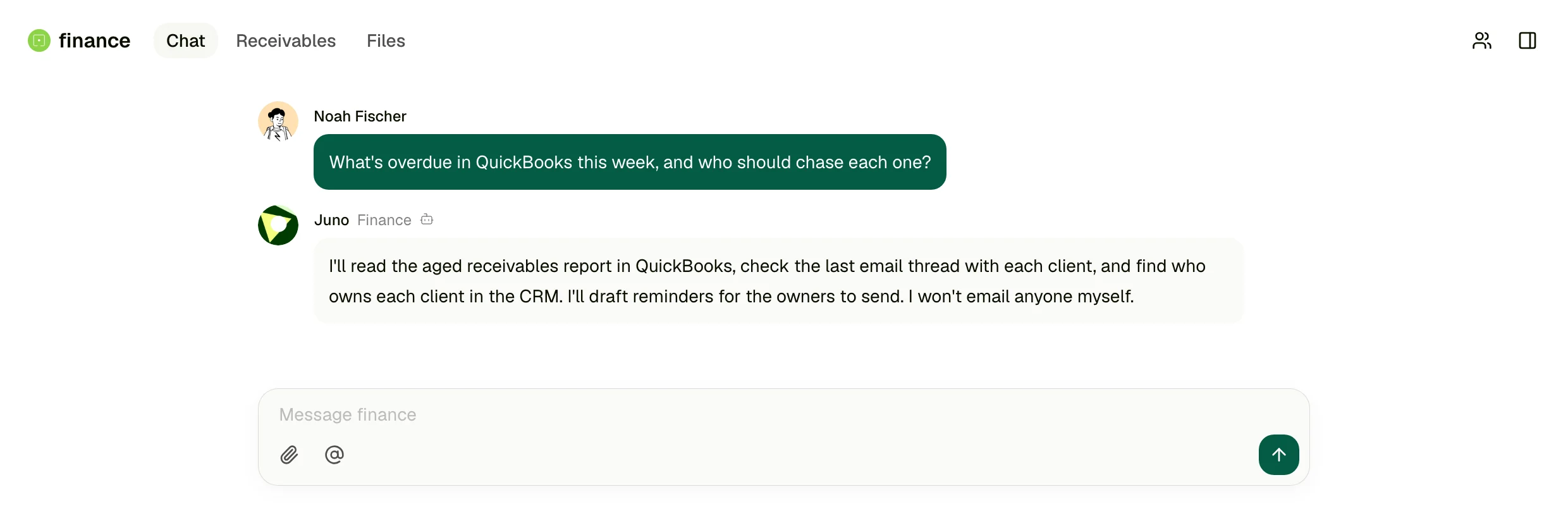
The Monday question, asked in the finance room
You ask once. The agent says what it will read in QuickBooks, email and the CRM, and that it will not email anyone itself.
02 · Read
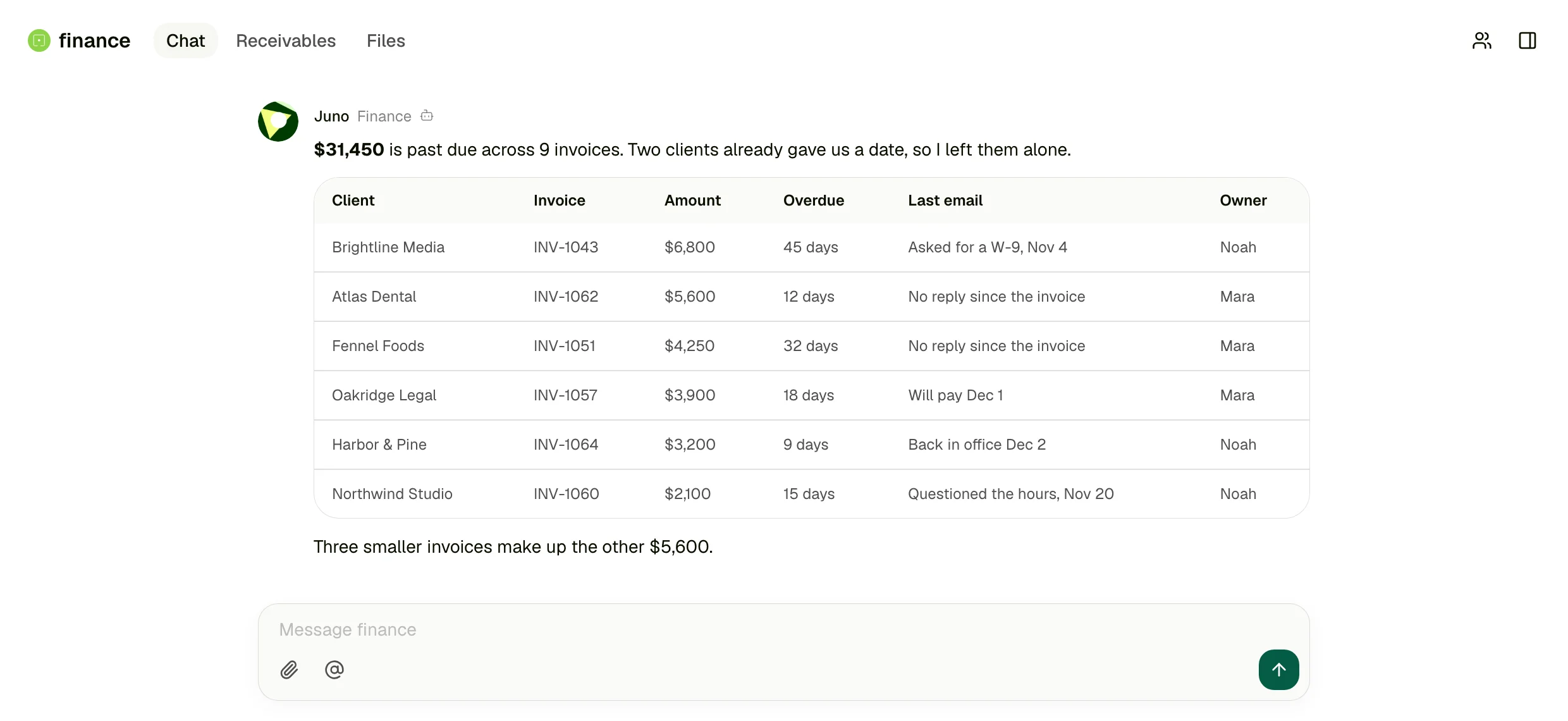
Nine invoices past due, and what each client last said
Invoice, amount, days overdue, the last email and the owner. Clients who gave a date are left alone.
03 · Approve
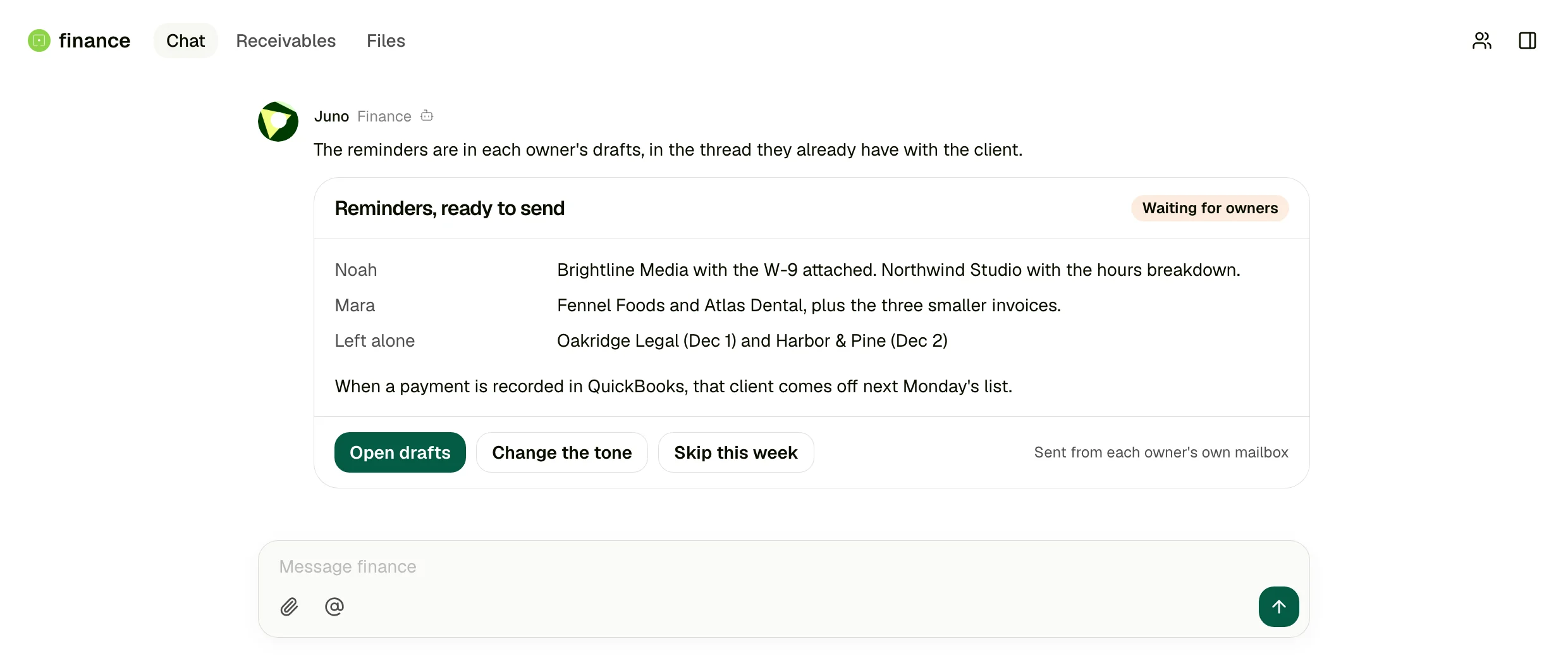
Reminders wait in each owner's drafts
Each owner reads their reminders, changes a line, and sends them from their own mailbox.
What you end up with
Every overdue invoice has a next step and an owner.
A reminder drafted for each client who needs one, the document they asked for attached, and the clients who already gave a date left alone.
The full integration guide
QuickBooks + Kylon: Get paid on overdue invoices without a Friday spreadsheet
An agent reads overdue invoices in QuickBooks and drafts a reminder for whoever owns each client.
Most small businesses chase late invoices the same way. Someone exports the aged receivables on a Friday, works down the list, and tries to remember which client said they were paying on the first and which one is waiting for a document. The list is in QuickBooks. The context is in everyone's email.
A Kylon agent reads both, and drafts the reminder for the person who owns the client, in the thread they already have.
What the connection can do
You connect your QuickBooks Online company from your Kylon workspace and choose which rooms and agents can use it. There is no server to run. An agent can:
- Read reports: aged receivables, profit and loss, balance sheet, general ledger and customer balances
- Read and create invoices, estimates, payments, bills and customers, writing only after a person approves
- Draft the reminder in the owner's own mailbox, in the existing thread with the client
- Attach what the client asked for, such as a W-9 or an hours breakdown from your files
The agent works inside the access of the account you connected, and you can revoke it at any time.
Intuit's AI, and an agent your whole team works with
QuickBooks has its own AI agents inside the product, and Intuit publishes a QuickBooks Online MCP server that runs on your own machine with an Intuit developer app. Collections are a team job: the owner knows the client, the bookkeeper records the payment, and the last word from the client is in someone's inbox. A Kylon agent sits in your finance room with all three.
What a Monday looks like
Someone asks in the room: what is overdue this week, and who should chase each one?
The agent reads the aged receivables: nine invoices past due. It checks the last email with each client. Two have already given a date, so it leaves them alone. One asked for a W-9 three weeks ago and nobody sent it. Another questioned the hours on their invoice.
It drafts a reminder for each remaining client in the owner's mailbox, with the W-9 and the hours breakdown attached where they were asked for. The owners read them, change a line, and send. When the bookkeeper records a payment in QuickBooks, that client comes off next Monday's list.
Getting started
Connect QuickBooks Online from your workspace, add an agent to your finance room, and ask what is overdue. Keep it as a Monday Automation once the list looks right.
Late payments are a follow-up problem.
Connect QuickBooks Online, add an agent to your finance room, and ask what is overdue this week.
More Integrations
View allApollo + Kylon: Your AI-Powered Revenue Engine
Your Kylon agent looks up any person or company, LinkedIn profiles, emails, job titles and org charts, just by asking. No Apollo account, no API key, no credits to manage.
Give Your Content a Voice: Kylon's ElevenLabs Integration
Turn any document into natural-sounding audio. Clone a voice. Dub a video into 29 languages. Your Kylon agent handles all of it, with no ElevenLabs subscription required.
Questions
Is there a QuickBooks MCP server?
Intuit publishes a QuickBooks Online MCP server that you run on your own machine with an Intuit developer app. In Kylon you connect your QuickBooks Online company from your workspace, with no server to run.
Will the agent email my clients?
No. It drafts each reminder in the owner's own mailbox, in the thread they already have with the client. The owner reads it and sends it.
Can it change our books?
It can create invoices, payments and other records, but only after a person approves. For chasing overdue invoices it only reads QuickBooks.
Who can use the QuickBooks company I connect?
You connect it from your Kylon workspace, then choose which rooms and which agents can use it. You can revoke the connection at any time.