Meta Ads integration
Know which Meta ads to cut before Monday's budget call.
A Kylon agent reads spend and results by ad in Meta Ads, joins them with signups and deals from your analytics and CRM, and holds every budget change for the person who owns the account.
Your own Meta ad account, connected from Kylon. Budget and status changes wait for the account owner's approval.
One pass, four moves
- 01The question before the budget call
Which ads spent the most last week, and which of them brought customers, not just clicks?
- 02Meta, joined with what happened after the click
Spend, CPM and results by ad from Meta, matched to signups in your analytics and deals in your CRM.
- 03Cut, keep, scale, with the numbers
A ranked list for the marketer, with the reason on every row.
- 04Changes held, creative briefed
Budget changes wait for approval. The designer gets a brief for new versions of the ad that works.
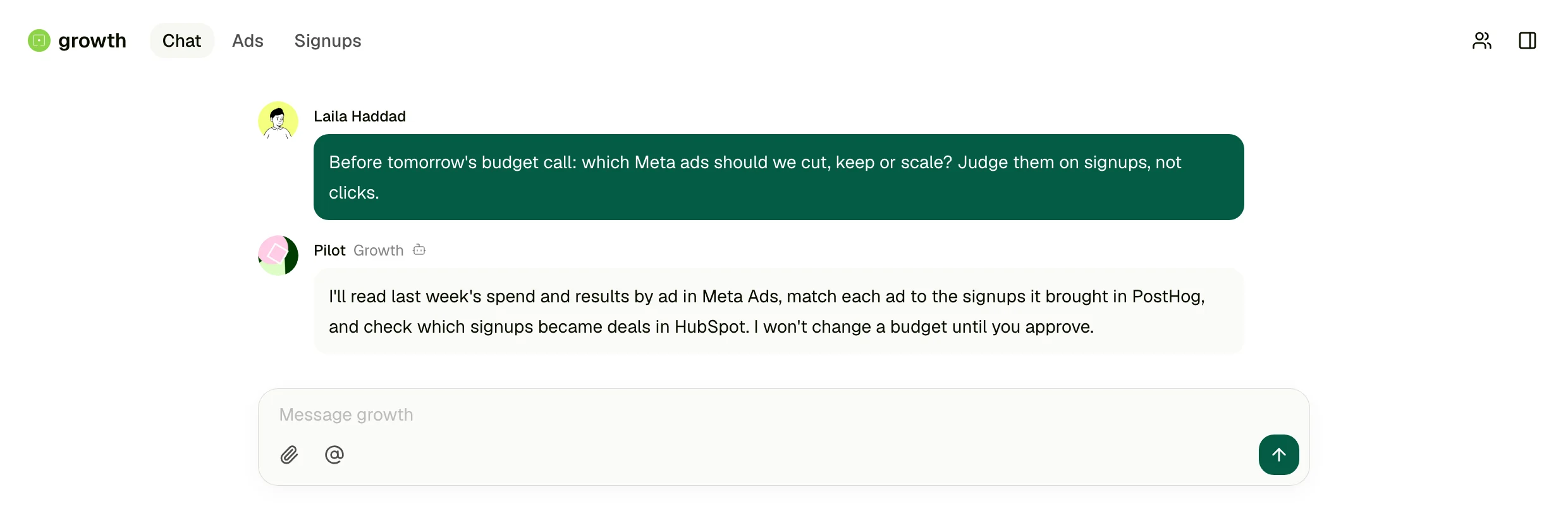
01 · Ask
The question goes where the ads are discussed
You ask in the Kylon room. The agent says which numbers it will join and that it will not touch a budget yet.
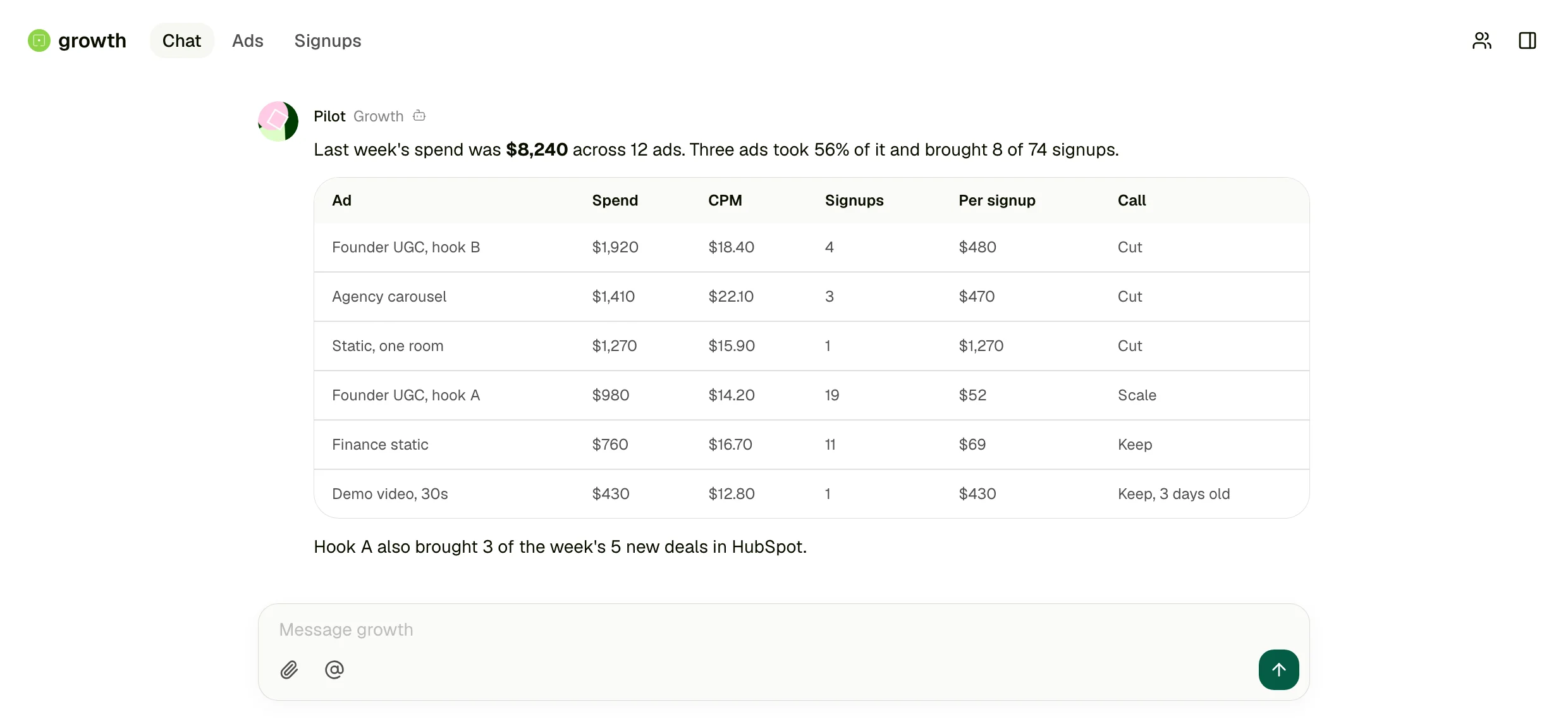
02 · Read
Every ad, ranked by cost per signup
Spend and CPM from Meta next to the signups and deals each ad brought.
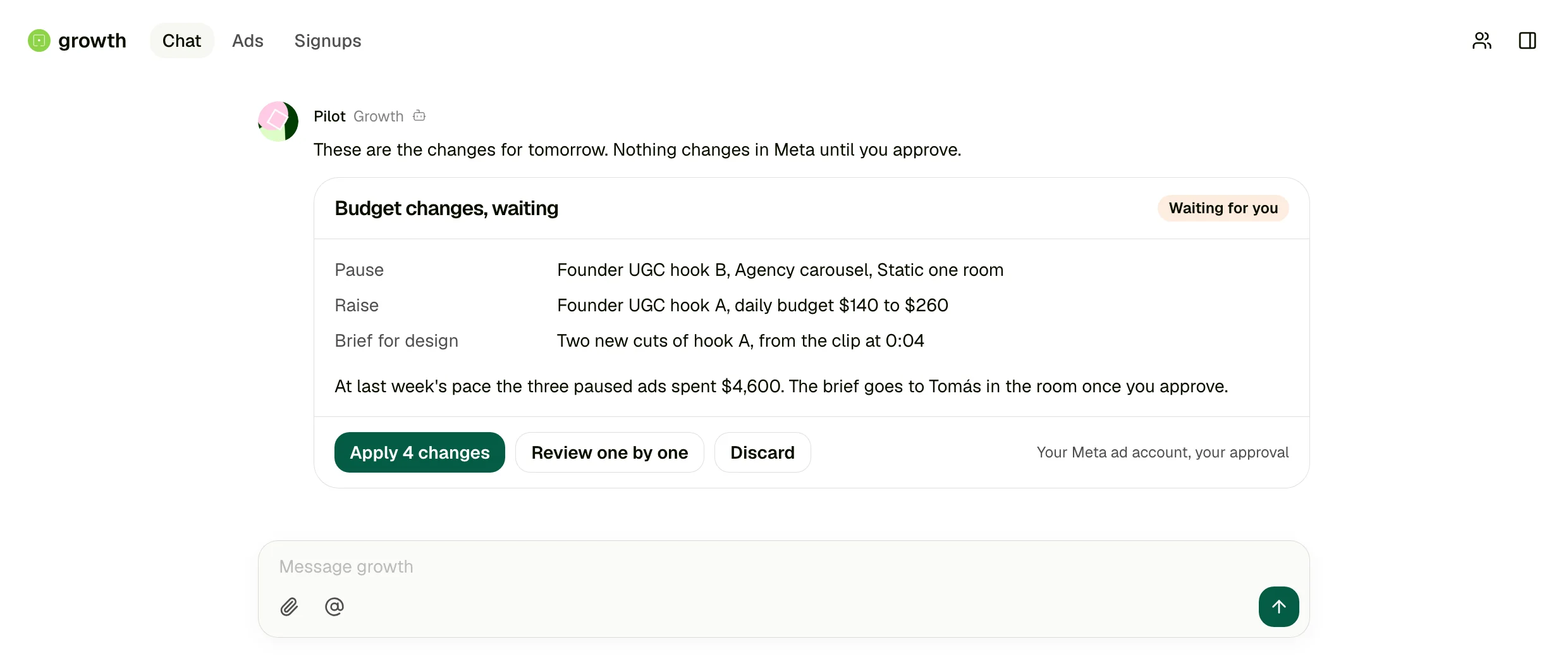
03 · Approve
Budget changes wait for the account owner
Three pauses and one budget raise, listed with the brief for design. Nothing changes in Meta until you approve.
What you end up with
A budget call about decisions, not exports.
Every ad judged on the signups and deals it brought, the changes ready to apply, and a brief already with the designer.
The full integration guide
Meta Ads + Kylon: Know which Meta ads to cut before Monday's budget call
An agent ranks your Meta ads by the signups and deals they brought and holds budget changes for you.
Ads Manager tells you what an ad cost and how many clicks or leads Meta counted. Whether those people signed up, and whether any of them became customers, is in your analytics and your CRM. Every budget meeting starts with someone joining the two by hand.
A Kylon agent does that join, ranks every ad by what it brought, and holds the budget changes for the person who owns the account.
What the connection can do
You connect your Meta ad account from your Kylon workspace and choose which rooms and agents can use it. An agent can:
- Read insights by campaign, ad set and ad: spend, impressions, CPM, clicks and results
- List campaigns, ad sets, ads, creatives, audiences and pixels in the account
- Create and change campaigns, ad sets, ads, custom audiences and lead forms, after a person approves
- Pause an ad or move a budget, only when the account owner says so
The agent works inside the access of the account you connected, and you can revoke it at any time.
Meta's own AI, and an agent that sees past the click
Meta offers an AI business assistant in Ads Manager and an ads MCP server for AI tools. Meta's own advice is to use the assistant for guidance in Ads Manager and your own AI tools for cross-channel insights. A Kylon agent is that second part: it reads Meta next to your analytics and CRM, and the decision happens in the room with the marketer and the designer.
What the day before a budget call looks like
Someone asks in the room: which Meta ads should we cut, keep or scale, judged on signups and not clicks?
The agent reads last week's spend by ad, matches each ad to the signups it brought in your analytics, and checks which signups became deals in the CRM. Twelve ads. Three of them took more than half the spend and brought a handful of signups. One cheap ad brought most of the week's signups and most of the new deals.
It proposes four changes: pause three ads, raise the budget on the one that works. It also writes a brief for the designer, asking for two new cuts of the ad that works. The marketer approves, the changes go to Meta, and the brief lands with the designer in the same room.
Getting started
Connect your Meta ad account and your analytics from your workspace, add an agent to your growth room, and ask what to cut. Keep it as a weekly Automation before the budget call.
Spend follows results only when someone joins the two.
Connect your Meta ad account and your analytics, add an agent to your growth room, and ask what to cut.
More Integrations
View allApollo + Kylon: Your AI-Powered Revenue Engine
Your Kylon agent looks up any person or company, LinkedIn profiles, emails, job titles and org charts, just by asking. No Apollo account, no API key, no credits to manage.
Give Your Content a Voice: Kylon's ElevenLabs Integration
Turn any document into natural-sounding audio. Clone a voice. Dub a video into 29 languages. Your Kylon agent handles all of it, with no ElevenLabs subscription required.
Questions
Is there a Meta Ads MCP server, and how does Kylon fit with it?
Meta hosts an ads MCP server for AI tools. Kylon connects to your ad account from your workspace, so an agent can read Meta results next to the signups in your analytics and the deals in your CRM.
Will the agent pause ads or change budgets by itself?
No. It lists the changes with the numbers behind them, and applies them in Meta only after the account owner approves.
Which numbers does it use?
Spend, impressions, CPM, clicks and results by campaign, ad set and ad from Meta, and the signups and deals from the analytics and CRM you connect.
Who can use the ad account I connect?
You connect it from your Kylon workspace, then choose which rooms and which agents can use it. You can revoke the connection at any time.