Design the App Before You Build It: One Spec, a Design Page and a Working App
Asking an agent to build a recruiting system gets you its guess. We ask for a design page first: the business flow, the tables, every field, where each field comes from and who sees what. Once that is signed off, the same spec builds the App. Here is the skill, with one prompt to run it in your own workspace.
Ask an agent to build you a recruiting system and it will. It will pick the tables, name the fields, guess where resumes come from and decide who can read interview feedback. Some of those guesses will be right. The wrong ones show up a month later, when real candidates are in the system and changing the structure means moving data.
We stopped asking for the App first. We ask for a design page, read it like a contract, and only then build. This post walks through what goes on that page, how the same spec turns into a working App, and the skill that does both, with one prompt you can paste into your own workspace.
What goes on the design page
The page has six parts, in the order a reviewer needs them.
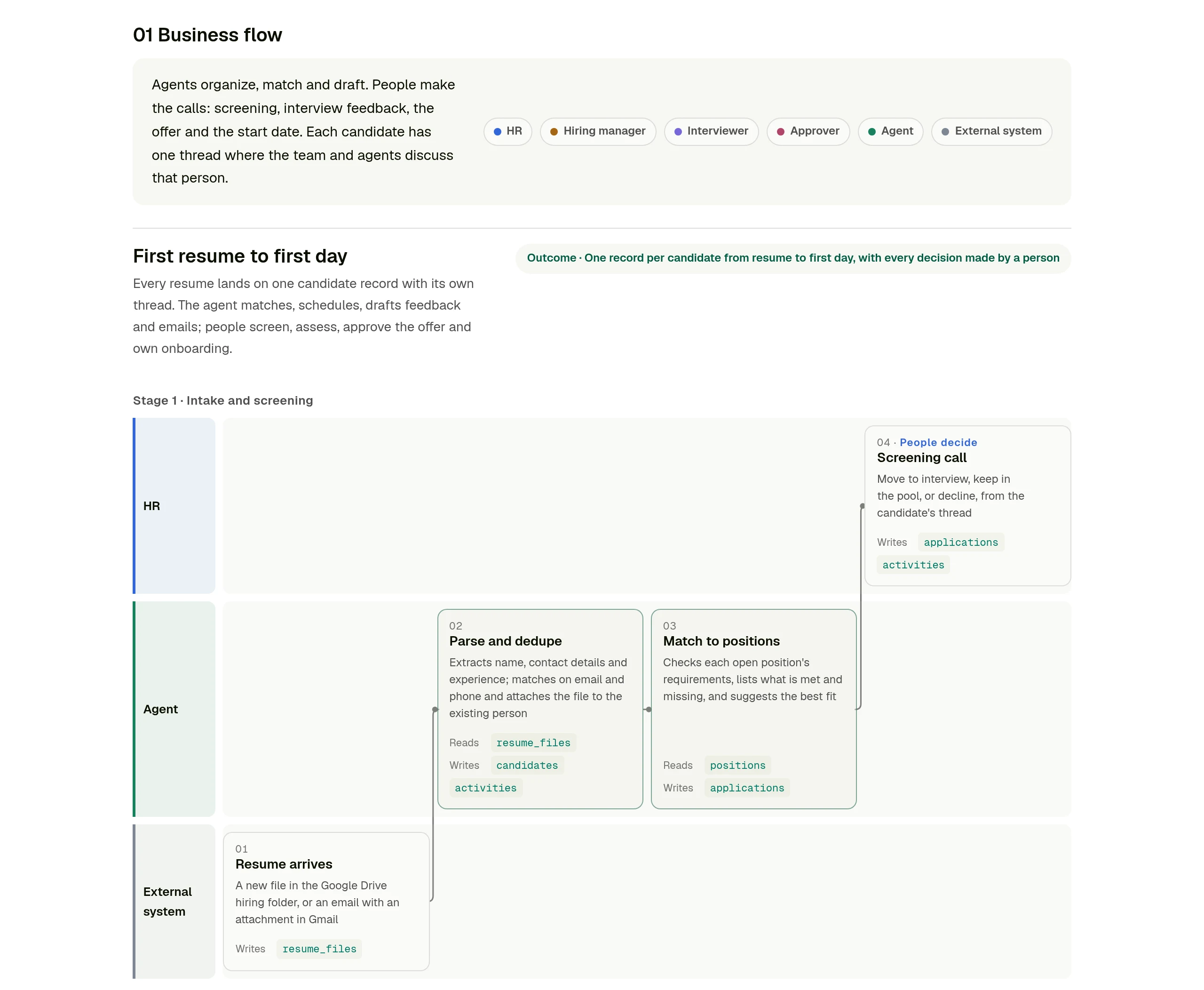
Business flow. Every step from the first event to the outcome, laid out as swimlanes: one lane per role, one for the agent, one for outside systems. Each step says what it reads and what it writes. The steps where a person decides are marked, so you can see at a glance that the agent organizes and drafts while people make the calls.
Tables. The tables the process needs and how they relate. In the recruiting example there are ten: positions, interview criteria, candidates, resume files, applications, interviews, feedback, offers, onboarding tasks and a timeline of everything that happened.
Fields. Every field in every table, with its type, whether it is required, its options and which roles can see it.
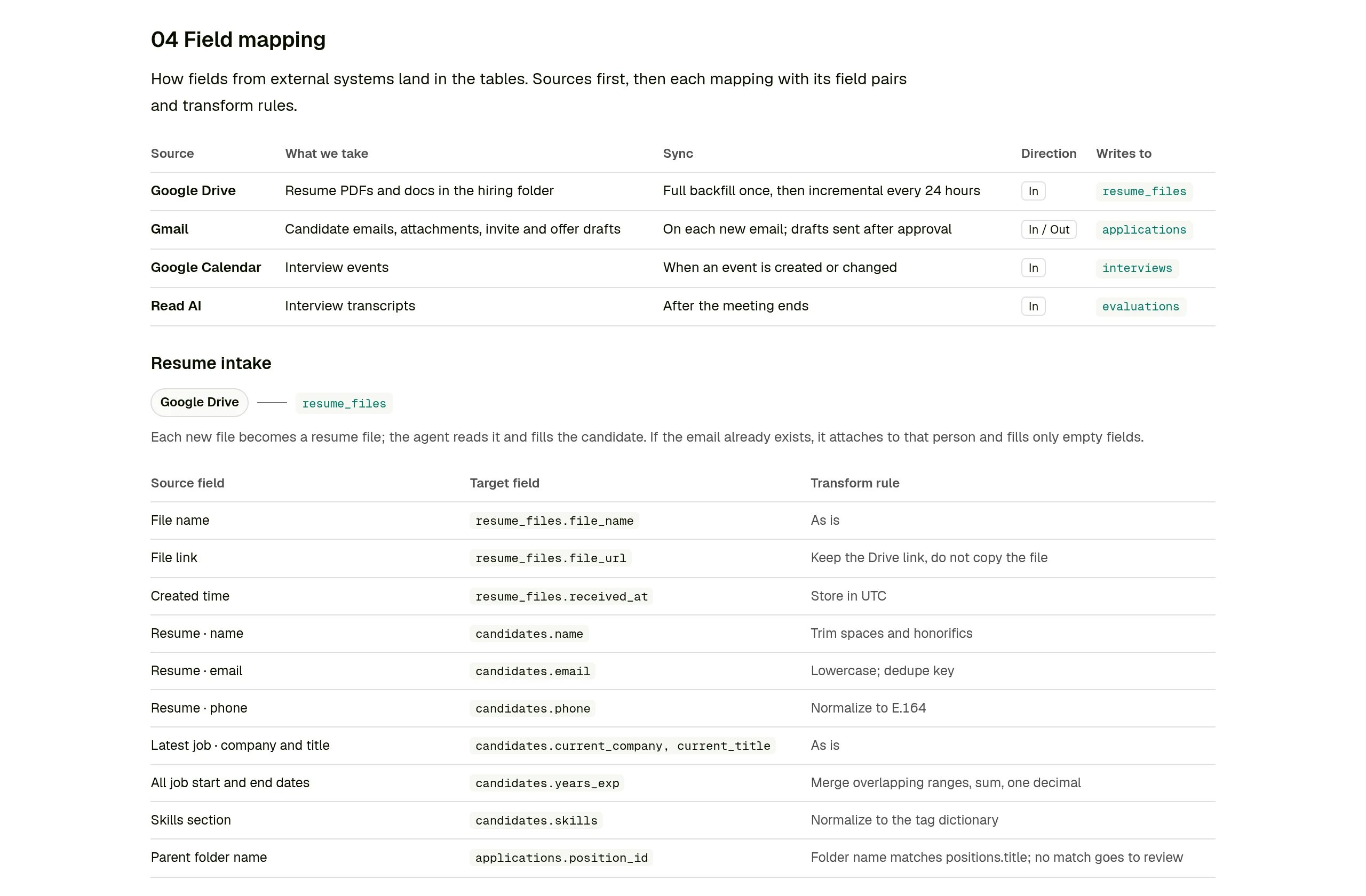
Field mapping. For each source system, what we take, how often it syncs, and which field each value lands in, with the rule that transforms it. This is the part people skip, and the part where most surprises live: a resume has no clean "years of experience" value, a calendar invite does not say which round it is.
Who sees what. A grid of roles against data. In recruiting, interviewers see their own interviews and their own feedback, and other interviewers' feedback stays hidden until they submit. Offer salary is visible to HR and the approver only.
The App. The pages the App will have and who uses each one.
You review the page the way you would review a proposal from a consultant. When something is wrong, you say so in plain words, the agent changes the spec and renders the page again. Nothing is built until you say it is right.
One record, one thread
Most internal tools end up as a stack of tables with a view on top. That is fine for a list of suppliers. It works badly for a process about a person, where the history matters as much as the current status.
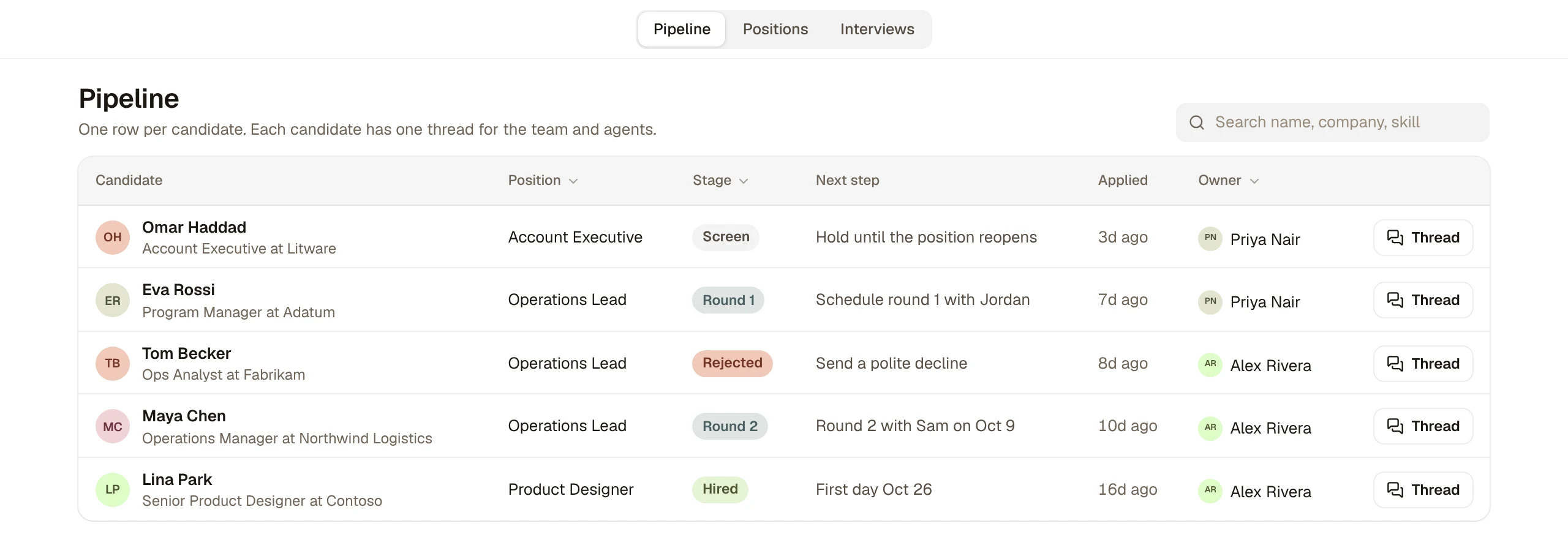
So the App the skill builds is centered on the main record. In recruiting, that is the candidate. The pipeline lists one row per candidate with their position, stage, next step and owner.
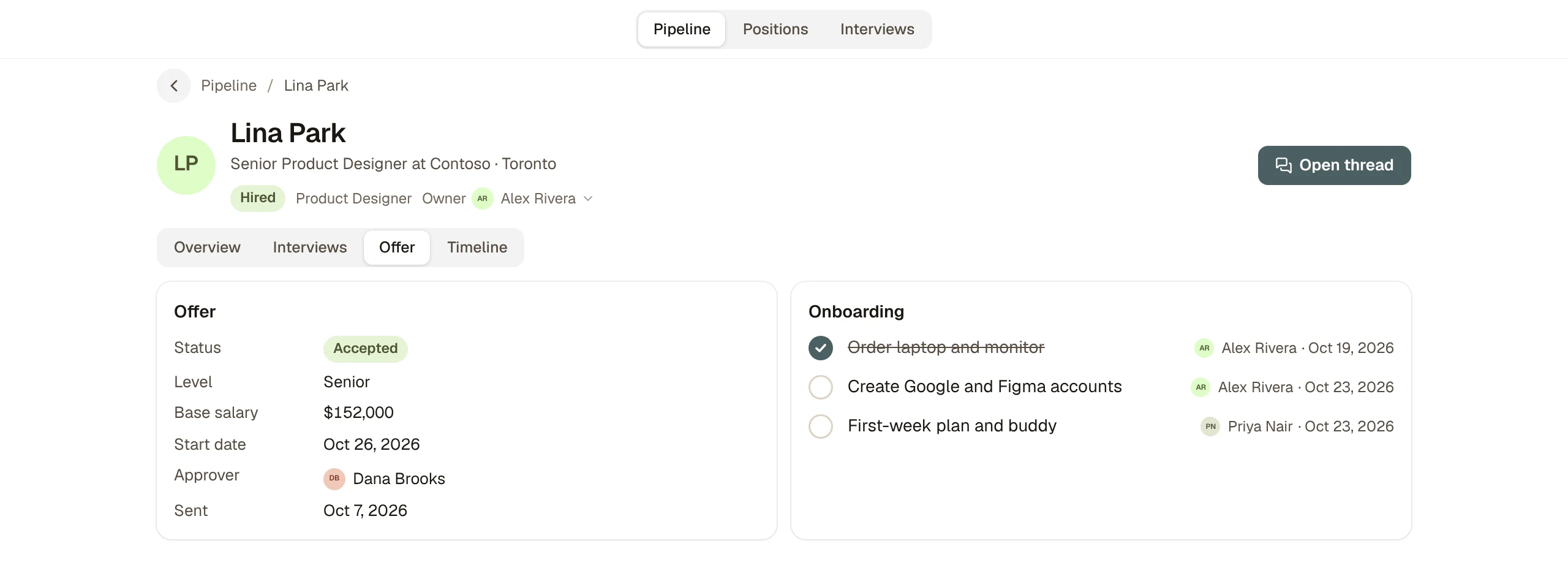
Open a candidate and everything about them is on one page: how they match the role's requirements, what is missing, the manager's call, their resume files, their interviews, the offer and the onboarding tasks once they are hired. Each candidate also has one thread, where the team and agents talk about that person. The resume, the interview notes, the offer discussion and the first-day checklist all stay attached to the same candidate instead of being spread across inboxes.
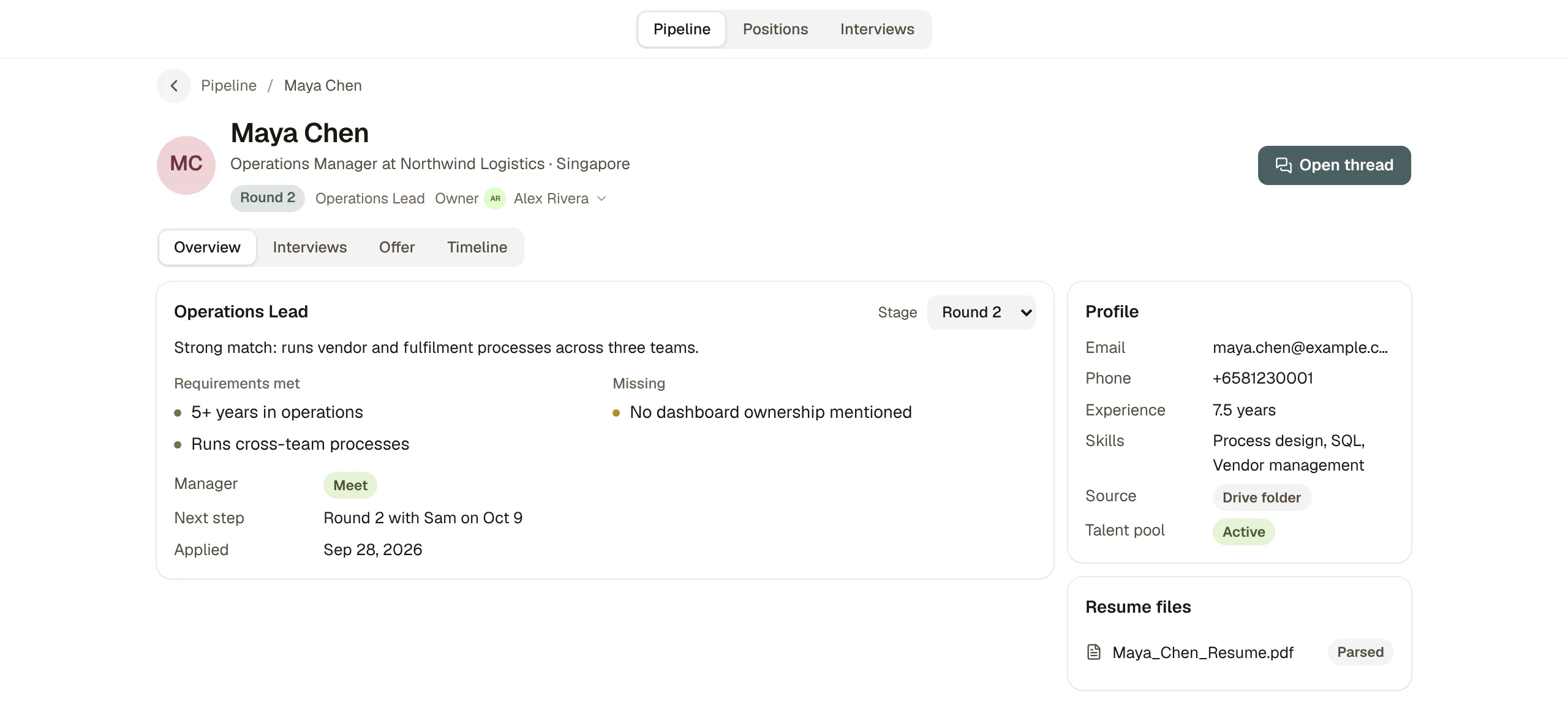
People fields such as owner, interviewer and approver are members of your workspace, shown with their names and avatars, so the person on the record is the person who gets the thread notification.
People make the calls
The flow on the design page draws a clear line, and the App keeps it. The agent parses resumes, attaches them to the right person, matches candidates to open positions, drafts interview invites, turns interview transcripts into a first draft of feedback, and drafts the offer email. People screen, interview, submit their own feedback, decide each round, approve the offer and own the onboarding tasks.
Every decision is a field someone sets, and every change writes a line to the candidate's timeline, so "who moved this candidate to Round 2, and when" always has an answer.
Run it in your own workspace
We packaged the skill with our internal names and data taken out. It contains the design page renderer, the spec format, the App builder, and the full recruiting example: the spec, its design page and the source of the App with about forty mock records across the ten tables. Download app-design-blueprint.zip, or paste this into a Kylon agent and it will do the setup itself:
Install the App design blueprint skill from https://kylon.io/skill-templates/app-design-blueprint.zip: download it, read SKILL.md, add it as a custom skill and install it on yourself. Then design an App for PROCESS. Ask me who is involved, which tools the data comes from today and what each person needs to see. Send me the design page first, with the business flow, tables, fields, field mapping and who sees what. Build nothing until I approve it. Once I approve, build it as a custom App with mock data and send me the draft link.Replace PROCESS with what you want to run, for example "our supplier onboarding" or "client project intake". To see the finished example first, ask instead for "the recruiting example from the skill, built as is", and you will have a working Recruiting Workspace with mock candidates in a few minutes.
If recruiting is all you need, the Recruiting Workspace in our apps gallery builds a ready hiring App from a single prompt.
Before real data goes in
The App opens on mock data on purpose. Click through it with the people who will use it, and change the spec while changes are still cheap.
Before real records go in, look again at the "who sees what" section. The design page states the rules, and the agent should add a check for each one to the App before you import anything private, starting with interview feedback and salary. Ask it to show you each rule working with a test user who should not see the data. Then connect the sources from the field mapping one at a time, starting with the one that creates the main record.
Your first company harness. Where humans and agents run your business together.