 vs
vs Relay.app
Relay.app pauses the workflow. Kylon starts from the question.
Relay.app is a workflow you build in advance, with a person pausing it at a fixed point. Kylon starts from the request itself, in the room where the work is already discussed, and keeps the review in the same thread.
01 In the product
The request comes first. The shape of the work follows.
Nobody knew in advance which renewals would go quiet or what each one would need, so there was no workflow to pause at the right step. The question is asked in the room, and the record changes and the drafts come back into the same thread for one approval.
One room, a CRM and a mailbox. The quiet accounts, what each one needs and the drafted replies arrive together, and one approval covers them. Illustrative data.
02 One real case
The weekly ad review, as a workflow and as a request
Same piece of work, same team. The difference is whether the steps have to be decided before anyone asks.
Someone notices the spend is off
A run only starts when a trigger fires or someone starts it, so the ad hoc version of this question has nowhere to go.
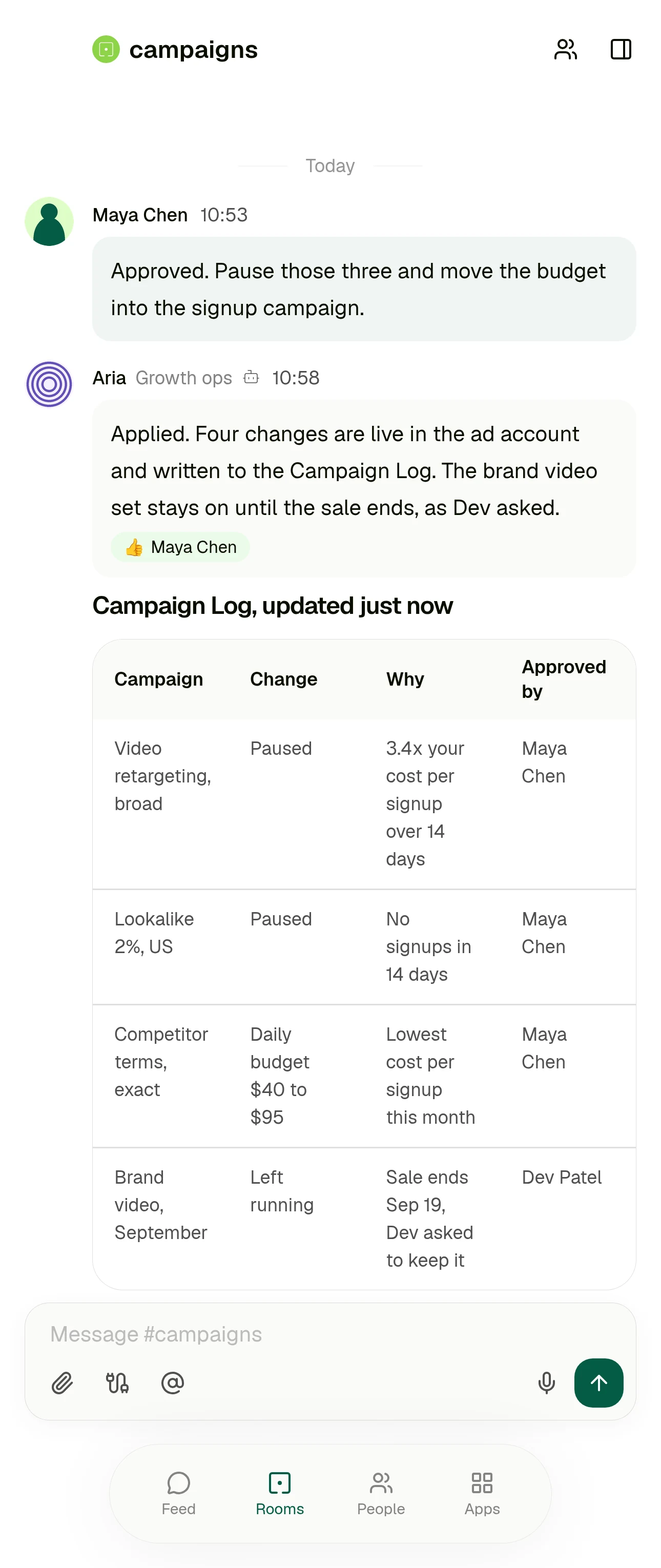
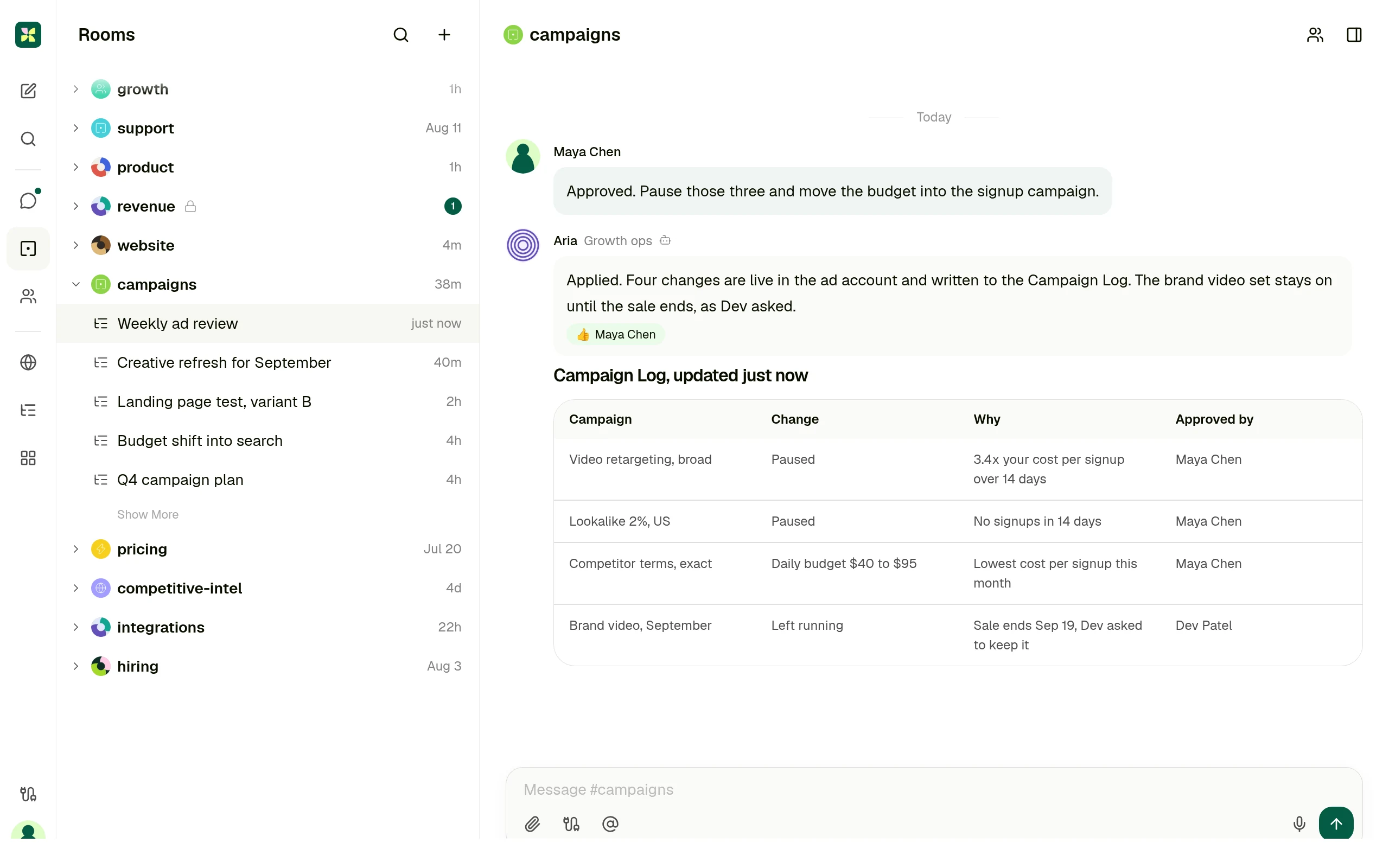
They ask in the room where the campaign is already discussed, in their own words.
Getting the context
AI steps read the data the earlier steps passed in, with built in actions for extraction, summarising and transcription.
The agent reads the thread, the records the team keeps in that room, and the connected ad account.
The result
A run in the runs list, with states such as Action required, Waiting and Completed.
A card in the thread, plus one row per change in the Campaign Log the whole team can sort.
The approval
A person approves the AI output as is, edits the values, re-prompts, or ends the run, notified over email or Slack.
In the same thread as the request, by the person who asked for it.
Next week
The same workflow runs again, and changes to the work mean editing it.
Keep it as a saved workflow that runs on Monday and posts into the same room.
Relay.app behaviour above is described from Relay.app's own documentation: Triggers 101, AI steps, AI output reviews and Runs. Checked 11 September 2026.
03 Who each product is for
Not every team should pick the same one.
Relay.app is the right answer when
The process is known in advance and the human step is part of its design: one named person approves at one point, with a due date and a path for when they do not.
Relay.app is also stronger when
You want the approval itself to be configurable: reminders, escalation after a deadline, reassignment to someone else, and a reviewer who can edit or re-prompt the AI output.
Kylon is the right answer when
The work starts as a question rather than a trigger, and the shape of it is decided while it happens instead of on a canvas beforehand.
Kylon is also the answer when
The output has to be a record the team can act on, and the person who signs off should see it next to the request rather than in a queue.
04 Operating model
Six decision dimensions
Operating models, not a checklist. Every statement about Relay.app cites Relay.app's own documentation. Checked 11 September 2026.
The work starts in
A trigger. Every workflow begins with one, usually an event in a connected app, narrowed with filters and checked against a preview of past events.
Source: Triggers 101, Relay.app docs
A message in the room where that work is already discussed. The request, the run and the result stay in one thread the team is reading anyway.
Business context
What the earlier steps pass in. AI steps cover built in actions such as extraction and summarising, custom prompts, and agentic tool use over the actions you allow.
Source: AI steps, Relay.app docs
The thread itself, the records the team keeps in the room, and the agent's own memory, without wiring the context in step by step.
Structured output
Runs. Each run sits in a list with states such as Pending, Running now, Action required, Waiting and Completed, and can be paused, retried, replayed or ended.
Source: Runs, Relay.app docs
Records in a workspace App, drafts, and saved workflows. The output is a row the team can sort, filter and act on, not only a run.
Human handoff
Two dedicated steps: request approval and send input form, over email or Slack, with an assignee, an optional due date, reminders and escalation. On AI steps a reviewer can approve, edit the values, re-prompt or end the run.
Source: Human-in-the-loop steps, Relay.app docs
Review happens in the thread the request came from, without deciding in advance where the pause belongs. Email leaves as a draft a person sends.
Who can ask
Whoever builds the workflow. Collaborators are added per workflow as editors or viewers, and someone who is only an assignee sees just the steps assigned to them.
Source: Collaborating on workflows, Relay.app docs
The person with the problem, in their own words, in the room they already work in. Nobody has to own a workflow first.
Best fit
Known processes with a person in the middle: a named assignee approving or supplying data at a fixed point, with deadlines, reminders and an escalation path when nobody acts.
Source: AI output reviews, Relay.app docs
Case dependent, cross functional work, where the discussion, the record and the person who signs off belong in one place.
05 Use cases
Four cases, written the way people ask for them
Each one starts as a message in a room. What comes back is a result someone can act on, plus the approval step in the same place.
Campaign review
Which campaigns are under our cost per signup rule, and where should the budget go instead?
A decision card in the room and one row per change in the Campaign Log, applied only after someone approves it.
CRM follow up
Who from last week's demos has not heard back from us?
A list with an owner per account, and a draft reply waiting for that owner to read and send.
Contract review handoff
What changed in this redline compared with our template?
The differences in the thread, with the decision recorded next to the request.
Weekly operating report
Put Monday's numbers together with what changed and why.
One post in the room with the figures and where each came from, kept as a workflow that repeats.
06 Switching
Switch without rebuilding anything
Nothing has to move on day one. The workflows that already run are not the part that hurts.
- 01
Keep your Relay.app workflows running
Processes with a fixed approval point can stay exactly where they are. Nothing is imported and nothing is rewritten.
- 02
Connect the tools, not the flows
Point Kylon at the same services your team already uses, and set what each agent is allowed to reach.
- 03
Bring one open ended case into a room
Pick the work that never fit a fixed workflow. Ask for it in the room and review what comes back.
- 04
Keep it if it should repeat
Once the shape settles, save it as a workflow that runs on a schedule and posts into the same room.
Questions people ask
- Is Kylon a replacement for Relay.app?
- Not for a known process that needs a named approver, a deadline and an escalation path. Kylon is the answer when the work starts as a question and the review belongs in the thread it came from.
- Do we have to rebuild our Relay.app workflows?
- No. Start with one piece of work that never fit a fixed workflow, ask for it in a room, and keep it as a saved workflow if it should repeat.
- Does anything get sent automatically?
- Email is drafted for a person to send, and sensitive actions wait for approval before they execute.
Keep reading
Some work cannot be drawn before it is asked for.
Start with one request. Ask for it in the room where the work is already discussed, give the agent the records and tools it needs, and review what it hands back before anything ships.