Customer Success · 1 App

Kylon for customer success

Hand the agent the welcome and the renewal dates. You decide what to say.

Client success, owner and an agent, in one thread. Names and numbers are examples.

The App in this Room

Client care runs on the General CRM: accounts, contacts, renewals and the next step for each.

Sales · App · sample data

General CRM

Take an enquiry from first contact to closed, without losing where it came from

Make your own
  • 01Every client is an account with its contacts and its deals, and a renewal is one more opportunity with a date.
  • 02Each account holds one next step with a due date, so the next check-in is on the record, not in someone's head.
  • 03Notes and issues sit on the record, so the renewal email starts from what happened this year.

Valein the Room

@Lumi which clients renew in the next 30 days, and who has an open issue?
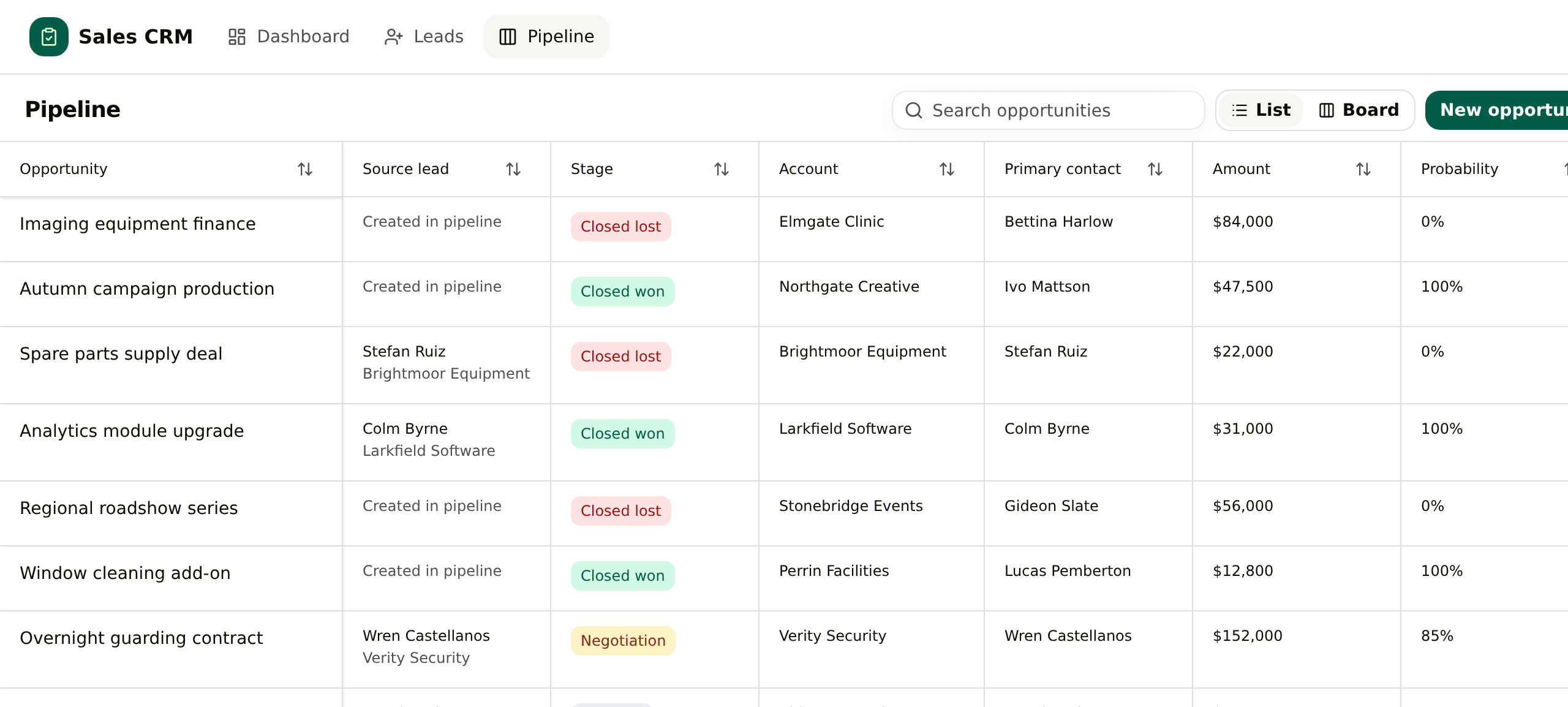
Pipeline list in the Sales CRM template, with a source lead column next to each opportunity
The pipeline. One line per opportunity, and the lead it was converted from in the second column.

What it works with

  • 01

    General CRM + Skills

    Write down your welcome and check-in steps once. The agent follows them for every new client.

  • 02

    General CRM + Automations

    Every Monday the agent posts the renewals in the next 30 days, with the draft for each one.

  • 03

    General CRM + email draft cards

    Welcomes, check-ins and renewal notes arrive as Gmail or Outlook drafts in the thread. You decide what goes.

  • 04

    General CRM + People Search

    A new contact at a client gets looked up, with the current role checked, before the first email.

  • 05

    General CRM + your own agent

    Bring Claude Code or Codex into the Room. It works on the same accounts and waits for the same approvals.

  • 06

    General CRM + your phone

    Approve a check-in from the Kylon app on iOS and Android.

Each stage with a client

Pick a stage. Each one has a line you can say in the Room as it is.

Welcome

On the day a client signs, the agent opens the account, drafts the welcome with who to call and what happens first, and sets the first check-in.

Say this in the Room

When a deal closes, open the account, draft the welcome email and set a check-in for day 30.

One client, start to finish, in one room

Elmgate Clinic, from the day they signed to the renewal. Two people and one agent in the same thread.
  1. 01

    Signed

    Bram Elmgate signed for 12 seats.

    LumiAgentLumi opened the account, drafted the welcome and set a check-in for day 30.

    ApprovedVale sent the welcome.

  2. 02

    Day 30

    Vale How is Elmgate doing?

    LumiAgentLumi drafted a check-in from the setup notes and the two questions they asked.

    ApprovedVale sent it.

  3. 03

    An issue

    Vale Elmgate asked about their invoice.

    LumiAgentLumi logged it on the account with Bram as owner and drafted a reply.

    ApprovedBram checked the figure. Vale sent the reply.

  4. 04

    21 days out

    Vale Anything I should know before the renewal?

    LumiAgentLumi posted the year's notes and drafted a check-in before the renewal note.

    ApprovedBram kept the price.

  5. 05

    Renewed

    Vale Elmgate renewed.

    LumiAgentLumi marked the renewal won and set next year's date.

    ApprovedBram confirmed the amount.

What comes with it

You connect

Nothing to start. It opens with sample data.

  • Gmail or Outlook, later, for welcomes, check-ins and renewal notes as drafts

What it connects to

The accounts and data this Room uses. Each logo opens its integration page when there is one.

Questions

Who is this for?

Service businesses and small teams with recurring clients: agencies, accounting and law firms, clinics, software sold on a plan.

Does it send anything without me?

No. Welcomes, check-ins and renewal notes wait as drafts in the thread until someone on your team sends them.

Where does the data come from?

From the accounts in the General CRM App, the notes your team leaves on them, and the email and calendar you connect.

How do I start?

Press Start with this. The instruction is copied and Kylon opens. Paste it into the chat in your workspace and the agent builds the General CRM with sample data. New here, you sign up first.

I already use HubSpot. Do I switch?

Keep HubSpot. Connect it and the agent reads the accounts and renewal dates you already have, and drafts the emails from the Room.

Start with your next renewal.

Tell the Room which client renews next. The agent pulls the year together and drafts the note for you to send.