People · 1 App

Kylon for people teams

Hand the agent the applicants and the calendar. You make the offer.

Hiring lead, hiring manager and an agent, in one thread. Names and numbers are examples.

The App in this Room

Recruiting Workspace holds the job, every applicant, the interviews, the offer and the first day.

Hiring · App · sample data

Recruiting Workspace

Take a role from approved to first day without a spreadsheet in the middle

Make your own
  • 01One approved job holds its openings, and each hire takes a seat out of the count.
  • 02Each interview takes one scorecard per reviewer, so the shortlist is argued on written feedback.
  • 03An offer moves through draft, approval, sent and accepted, and acceptance opens the onboarding handover.

Kitin the Room

@Penn which applicants match the Senior Designer role, and when are Iris and I both free?
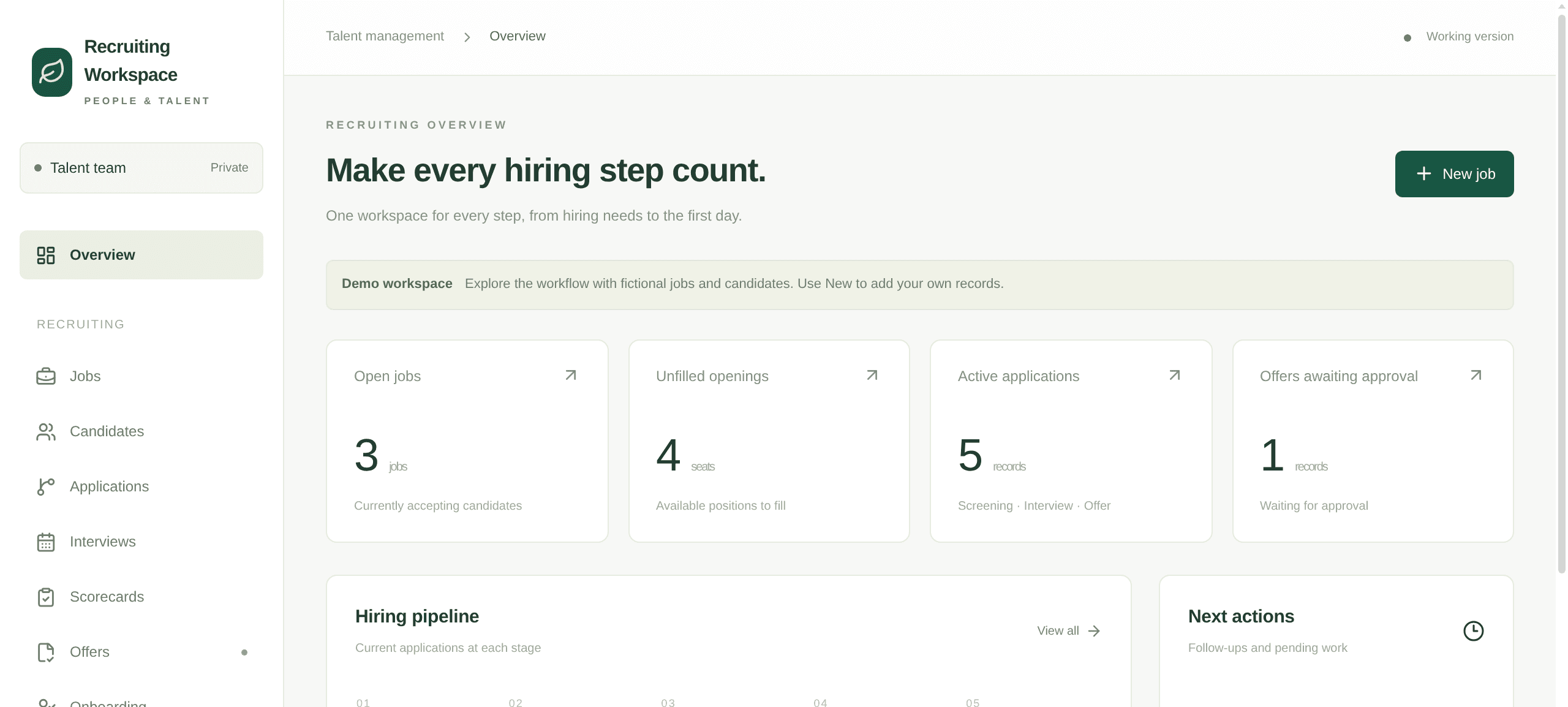
Recruiting overview with open jobs, unfilled openings, active applications and offers awaiting approval
The overview. Open jobs, unfilled openings, where the applications sit, and the offers waiting on an approver.

What it works with

  • 01

    Recruiting Workspace + Skills

    Write down what the role needs once. The agent checks every new applicant against it and says what matches and what needs a look.

  • 02

    Recruiting Workspace + Automations

    Every morning the agent posts the new applicants for each open role in the Room.

  • 03

    Recruiting Workspace + email draft cards

    Interview invites and offer letters arrive as Gmail or Outlook drafts in the thread. The hiring lead sends them.

  • 04

    Recruiting Workspace + People Search

    Look up a referral or a sourced candidate's current role and public work before the first call.

  • 05

    Recruiting Workspace + your own agent

    Bring Claude Code or Codex into the Room. It works on the same applications and waits for the same approvals.

  • 06

    Recruiting Workspace + your phone

    Approve an offer from the Kylon app on iOS and Android.

Each stage of a hire

Pick a stage. Each one has a line you can say in the Room as it is.

Post the role

Once a job is approved, the agent writes the post from the hiring manager's notes and opens the seats it covers.

Say this in the Room

The Senior Designer role is approved for one seat. Draft the job post from Iris's notes.

One hire, start to finish, in one room

A Senior Designer, from the approved role to the first day. Two people and one agent in the same thread.
  1. 01

    The role

    Iris Senior Designer is approved, one seat.

    PennAgentPenn opened the job with one opening and drafted the post from Iris's notes.

    ApprovedIris edited the post. Kit published it.

  2. 02

    Applicants

    Kit Who should we meet first?

    PennAgentPenn listed the new applicants who match the role and the one that needs a look.

    ApprovedKit picked two.

  3. 03

    Interviews

    Iris Thursday afternoon works.

    PennAgentPenn held two slots, drafted the invites, and opened a scorecard for each interviewer.

    ApprovedKit sent the invites.

  4. 04

    The offer

    Kit We want Dana.

    PennAgentPenn drafted the offer at the approved band and sent it to Iris for approval.

    ApprovedIris approved. Kit sent it.

  5. 05

    First day

    Kit Dana accepted.

    PennAgentPenn opened the onboarding handover with documents, equipment and accounts.

    ApprovedIris named Dana's buddy.

What comes with it

You connect

Nothing to start. It opens with sample data.

  • Gmail or Outlook, later, for interview invites and offers as drafts
  • Your calendar, later, for holding interview slots

What it connects to

The accounts and data this Room uses. Each logo opens its integration page when there is one.
  • Gmail
  • Outlook
  • Google Calendar
  • Google Drive
  • LinkedIn

Questions

Who is this for?

Companies that hire in-house without a recruiting team: a founder, a hiring manager and whoever books the interviews.

Does it send anything without me?

No. Interview invites and offers wait as drafts in the thread until someone sends them, and every offer goes to its approver first.

Where does the data come from?

From the applications you bring in, the notes and scorecards your interviewers write, and the email and calendar you connect.

How do I start?

Press Start with this. The instruction is copied and Kylon opens. Paste it into the chat in your workspace and the agent builds the Recruiting Workspace with sample data. New here, you sign up first.

I already use an applicant tracking system. Do I switch?

Keep it. The Recruiting Workspace is there for teams that hire from a spreadsheet and an inbox today.

Start with one open role.

Tell the Room what you are hiring for. The agent opens the job and shows you who matches it.