 vs
vs monday.com
monday.com works from the board. Kylon works from the conversation.
The difference is not whether agents exist. It is what has to be true before one can help you: on monday.com a board, an agent build and a trigger. In Kylon, a message in the room where the work is already discussed.
01 In the product
Nobody had to open a board to ask.
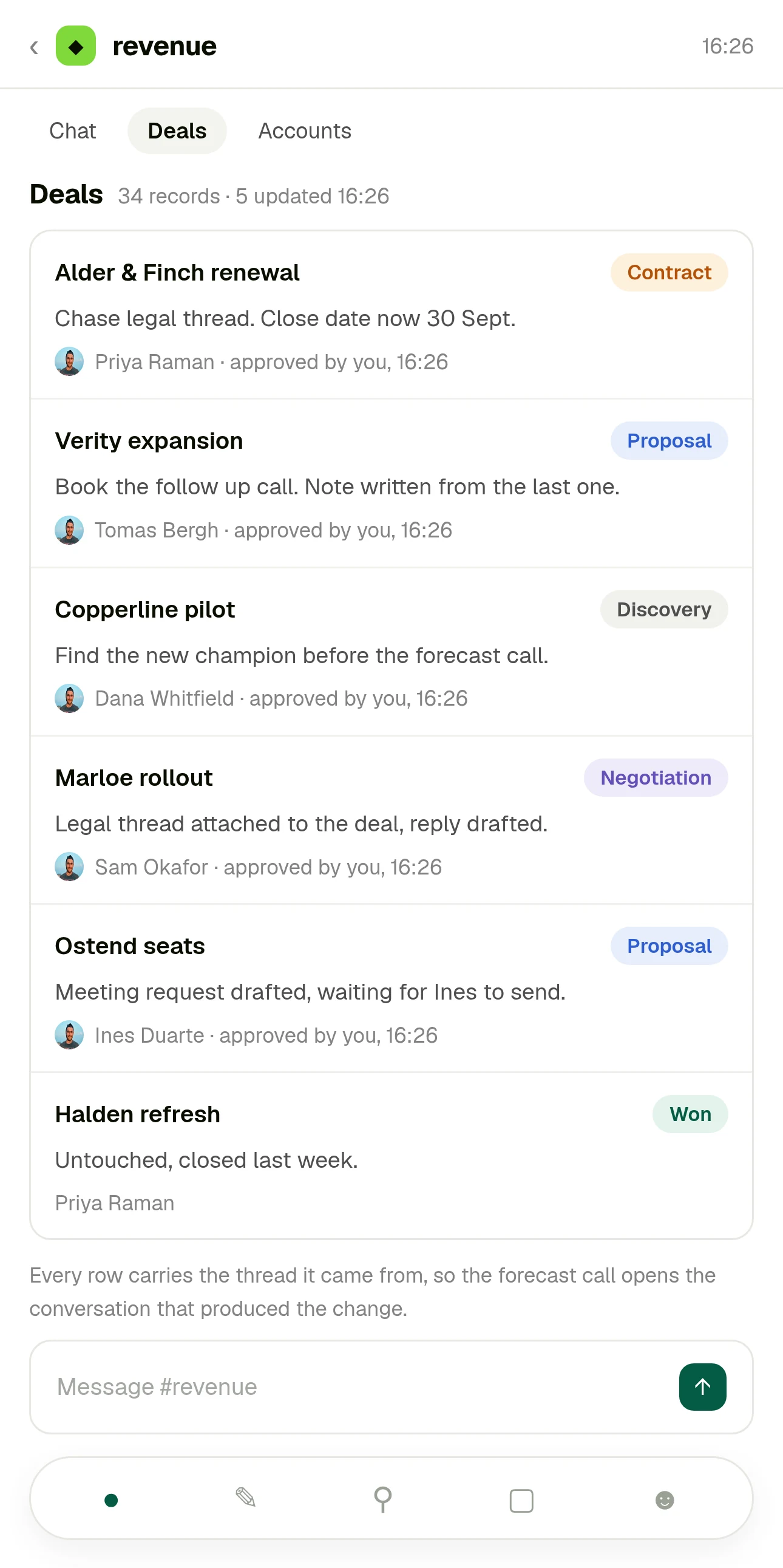
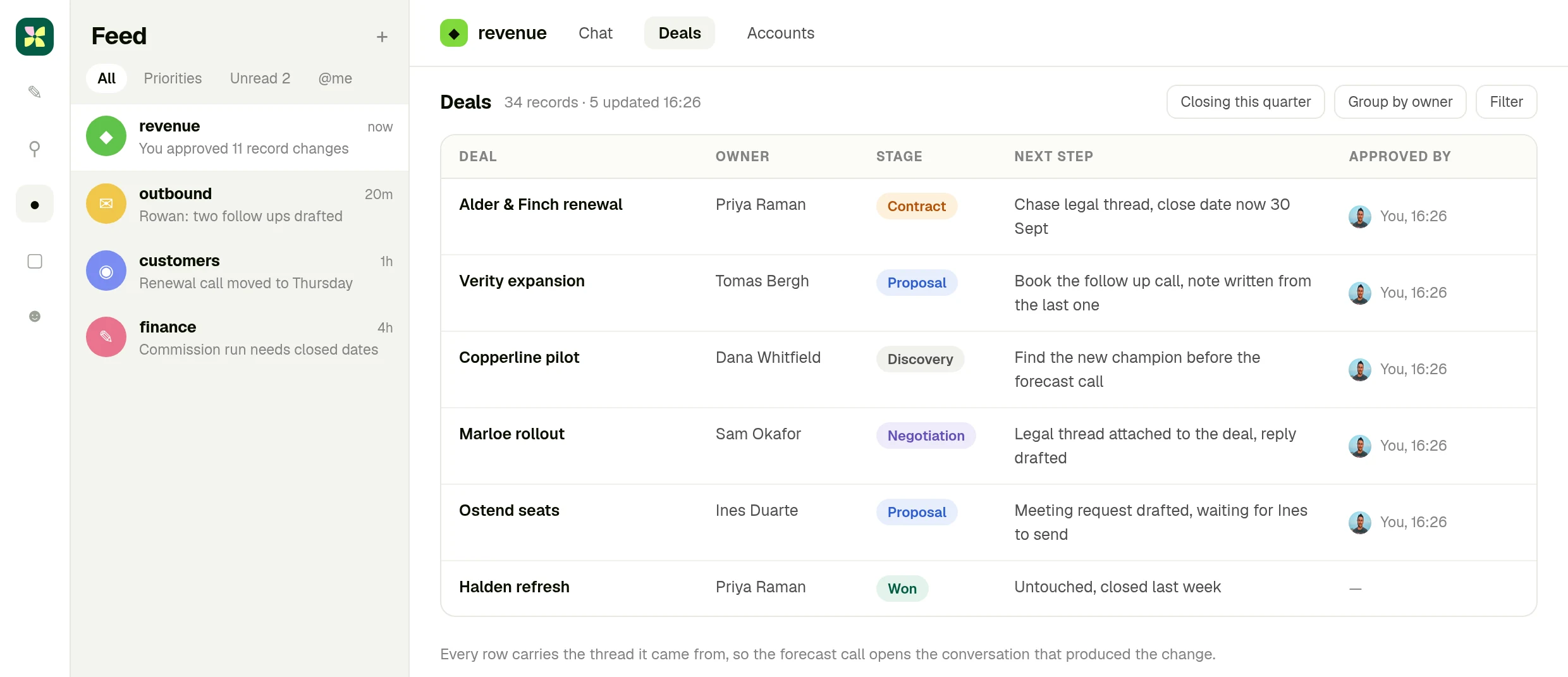
The question is the kind that comes up in conversation the day before a forecast call. It is asked in the room where the deals are already discussed, and the answer, the record changes and the follow-up drafts come back into that same thread behind one approval.
One room, a CRM and a mailbox. The quiet deals, what each one needs, the record changes and the drafted replies arrive together, and one approval covers them. Illustrative data.
This scene runs on the Sales CRM app
The same pipeline, already built: leads with their own status, one click conversion into account, contact and opportunity, and six stages.
02 The same request in both products
“Score our open deals and send proposals to anyone above 80%.”
That sentence is monday.com's own homepage example of a sales director handing work to an agent, and sales is where the two products overlap most: monday CRM on one side, a revenue room on the other. Here is what each one asks of you between the sentence and the answer.
Before anyone can ask
There is an agent to put in place. You pick an Expert Agent for a common end to end use case, or open the AI agent builder and describe the one you want in plain text.
The agents are already members of the room, the way people are. You type the request and send it.
Giving it context
The Brain tab, where you set instructions, grant access to specific boards and files, connect tools, add skills and choose the model.
The thread above the request, the records the room already keeps, and whatever tools that agent is allowed to reach.
Deciding when it runs
The Jobs tab. The work is split into focused jobs, each with its own trigger and instructions, so the agent fires on an event, a schedule or a cadence.
When you ask. If it turns out to be weekly, you keep it as a workflow afterwards rather than designing one first.
Where the answer appears
On the board. Agents act inside boards and workflows, and you interact with them from boards and monday docs, with runs listed in the Activity tab.
In the thread, as a reply under the request, with the sources and the reasoning attached to it.
Who checks it
Governance set ahead of the run: the agent reaches only the data you allowed, simulation mode validates its actions before you activate it, and a real time log records every action taken.
The person who asked, in the same thread, before anything is applied. Email leaves as a draft, sensitive changes wait for approval.
The monday.com column is taken from monday.com's own material: the homepage example and control section, and the AI Agents on monday.com support article. Checked 11 September 2026.
03 Who each product is for
Not every team should pick the same one.
monday.com is the right answer when
The work is already tracked as items with owners, statuses and dates, and the value of an agent is that it keeps those items moving without being asked.
monday.com is also stronger when
You need the project surface around it: timelines and Gantt, portfolios, dashboards across many boards, intake forms, and separate products for CRM, dev and service in one account.
Kylon is the right answer when
The request is the unit of work. Nobody wants to model it as a board and build an agent before finding out whether the answer is useful.
Kylon is also the answer when
The review should happen in the conversation. The person who asked reads the result and approves it in the same thread, rather than checking a run log afterwards.
04 Operating model
Six decision dimensions
Both products put people and agents on the same team. These rows are about how each one gets there. Every monday.com statement cites monday.com's own pages. Checked 11 September 2026.
What an agent is
Something you build. Expert Agents cover common end to end use cases, and the AI agent builder creates custom ones, configured across four tabs: Brain for instructions, board access, tools, skills and model; Jobs for tasks and triggers; Channels for external apps; Activity for runs.
Source: AI Agents on monday.com, monday support
A member of the workspace with a name, a profile and its own memory, already sitting in the room. You address it the way you address a colleague, and configuration is optional rather than the first step.
Where the work is asked for
Around the board. Agents act inside boards and workflows, and once live you interact with them from boards and monday docs.
Source: AI Agents on monday.com, monday support
In the room where that work is already discussed. The request, the agent's reply and the decision stay in one thread, next to the messages that led to it.
What holds the work
Boards made of items, groups and columns, inside workspaces, with workdocs for longer documents, WorkForms for intake, views for angles on one board and dashboards for reporting across boards.
Source: Introduction to monday.com, monday support
Rooms hold the conversation. Structured results land as records in a workspace App when the work produces them, so the table is an output rather than a prerequisite.
The rest of the AI surface
Layered by function: AI blocks in columns, automations and workflows, AI workflows for repetitive multi step tasks, board suggestions, AI templates, and monday sidekick as the personal assistant.
Source: Get started with monday AI, monday support
One surface. A message can be a question, a piece of work or the start of a saved workflow, and the same agent handles all three without switching to a different AI feature.
Oversight
Set before the run and audited after it: define exactly which data an agent can access and whether it may read, create or edit, validate behaviour in simulation mode before activating, and track every action in a real time log.
Source: monday.com homepage, Gain full control
Set inside the run. Sensitive actions pause for the person who asked, email leaves as a draft someone sends, and the approval is a message in the thread rather than an entry in a separate log.
Agents that work outside the platform
Two routes. Bring your own agent connects agents from other AI providers into monday workflows, and Agent Factory is a separate product outside the Work OS, with its own terms, for agents that run on schedules, a phone number or a public page.
Source: Create a Digital Workforce with Agent Factory, monday support
One workspace. Agents run against the tools the team connected, and anyone can bring their own agent into a room as a member alongside the built in ones.
Keep monday.com, and run the work from Kylon.
monday.com is one of the tools you can connect to Kylon. Keep using it for what it does well, and let the agents in Kylon work across it and the rest of your tools, with the request, the approval and the result in one room.
See all integrations05 Use cases
Four requests, typed the way people actually type them
None of these start with a board or an agent build. They start as a message, and what comes back is reviewable in the same place.
Vendor and contract check
Research vendors for Q1 and flag anything in these contracts we should not sign.
A shortlist with the risky clauses quoted in the thread, and the decision recorded next to the request.
Campaign review
Which campaigns are under our cost per signup rule, and where should the budget go instead?
A decision card in the room and one row per change in the log, applied only after someone approves it.
Inbound triage
Go through this week's inbound and tell me which ones are worth a call.
A shortlist with the reason per account, and a draft reply waiting for the owner to send.
The weekly report nobody wants to write
Put Monday's numbers together with what changed and why.
One post in the room with the figures and where each came from, kept as a workflow once the shape settles.
06 Switching
Nothing has to leave monday.com
This is not a board migration. Your projects can stay exactly where they are.
- 01
Keep the boards for what boards are good at
Projects, roadmaps, pipelines and anything you report on across teams stay in monday.com. Nothing is imported and nothing is rewritten.
- 02
Connect the tools, not the boards
Point Kylon at the services the team already uses, and set what each agent is allowed to read and change.
- 03
Bring one request into a room
Pick the work that never justified a board or an agent build. Ask for it in the room and read what comes back.
- 04
Keep it only if it repeats
When the shape settles, save it as a workflow that runs on a schedule and posts into the same room.
Questions people ask
- monday.com already says people and agents work as one team. What is different here?
- Where the agent sits. On monday.com an agent is built and scoped around boards, then triggered. In Kylon it is a member of the room you are already writing in, so the first step is a sentence rather than a build.
- Is Kylon a replacement for monday.com?
- Not for planning and tracking projects. It replaces the part where a request has to be turned into a board and an agent before anyone can act on it. Plenty of teams run both.
- Do we have to move our boards?
- No. Start with one request that never fit a board, ask for it in a room, and keep it as a saved workflow if it should repeat.
- Can Kylon still give us a table at the end?
- Yes. Results land as records in a workspace App the team can sort and filter, next to the thread that produced them.
- Does anything get sent or changed automatically?
- Email is drafted for a person to send, and sensitive actions wait for approval from the person who asked before they execute.
Keep reading
Ask for the work. Do not build the place it has to live first.
Bring one request into the room where your team is already talking about it, give the agent the tools it needs, and read what it hands back before anything ships.