 vs
vs Make
Make
Make runs the scenario. Kylon takes what does not fit it.
Make is a scenario builder: you draw the modules, and an agent lives inside one of them. Kylon puts the agent in the room where the work is already discussed, with the review in the same thread as the request.
01 In the product
The review that never fits the same scenario twice.
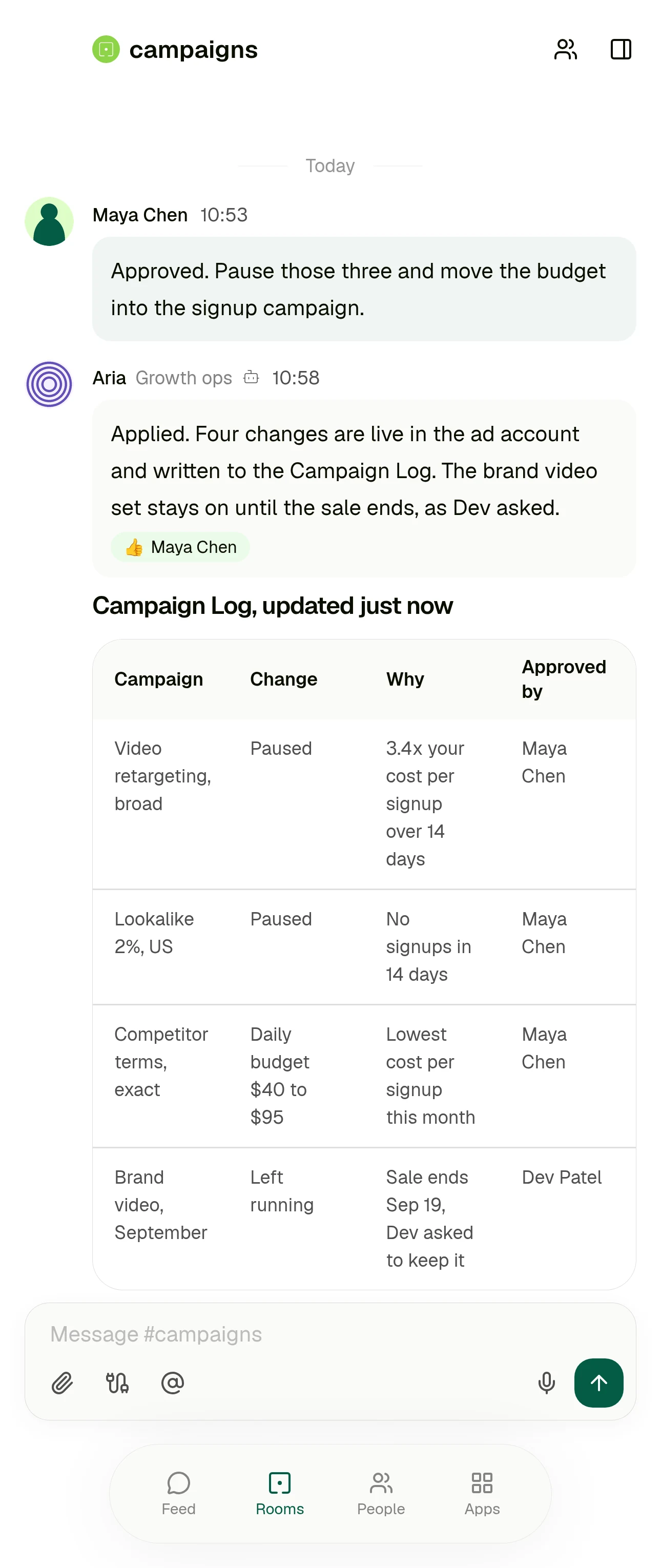
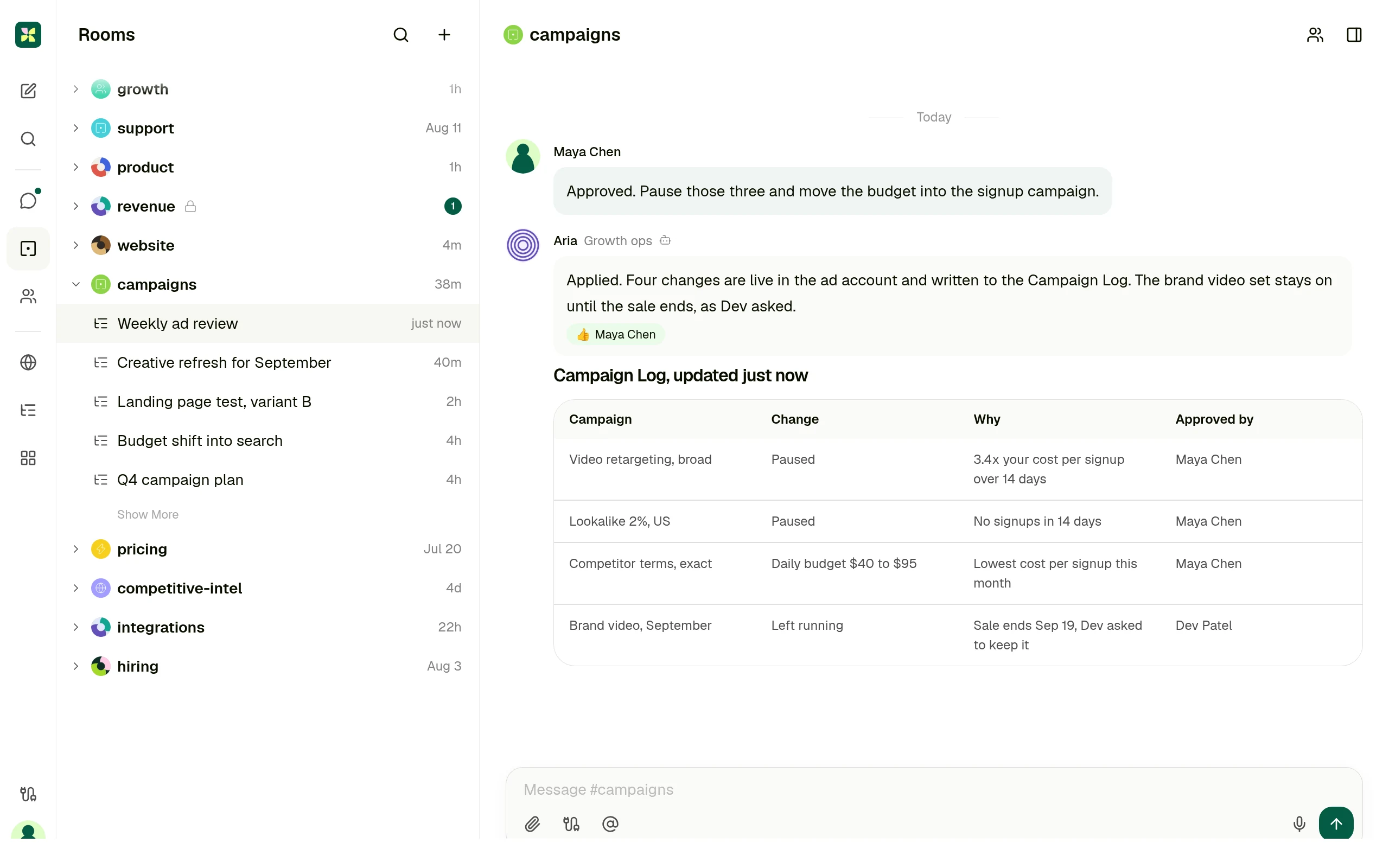
Pausing a campaign is the easy half. What differs week by week is which campaigns are outside the rule, what the spend should do instead, and who needs telling. That request starts as a message in the room, and the account changes and the notes come back into the same thread behind one approval.
One room, two ad accounts and a mailbox. The campaigns outside the rule, the budget changes and the notes to their owners arrive together, and one approval covers them. Illustrative data.
02 One real case
The weekly ad review, in a scenario and in a room
Same piece of work, same team. The difference is who has to be involved before anything happens, and where the finished result ends up.
Someone notices the spend is off
They ask whoever owns the scenario, because the agent only runs where a scenario puts it.
They ask in the room where the campaign is already discussed, in their own words.
Getting the context
You upload context files to the agent, which Make stores in its own retrieval database, and map data in from earlier modules.
The agent reads the thread, the records the team keeps in that room, and the connected ad account.
The result
The agent response is mapped into the modules that follow, and the run ends when the last module completes.
A card in the thread, plus one row per change in the Campaign Log the whole team can sort.
The approval
Make's Human in the Loop app adds the approval step, documented as Enterprise plan and closed beta.
In the same thread as the request, by the person who asked for it, on every plan.
Next week
The scenario runs again on its schedule, and changes to the work mean editing the scenario.
Keep it as a saved workflow that runs on Monday and posts into the same room.
Make behaviour above is described from Make's own documentation: Create your first AI agent, the Make AI Agents app, and the Human in the Loop app. Checked 11 September 2026.
03 Who each product is for
Not every team should pick the same one.
Make is the right answer when
The process is stable and repetitive, someone owns automation as a job, and the value is in connecting many apps reliably at volume.
Make is also stronger when
You need deep control of the run itself: routers, iterators, aggregators, error handlers, and a module library that already covers the long tail of tools you use.
Kylon is the right answer when
The people who need the work done are not the people who would build the scenario. The request starts as a message in a team room, and the answer has to land there too.
Kylon is also the answer when
Someone has to look at the result before it ships, and you do not want the approval to be a separate build or a separate plan.
04 Operating model
Six decision dimensions
Operating models, not a checklist. Every statement about Make cites Make's own documentation or product pages. Checked 11 September 2026.
The work starts in
A scenario. Make's own guide is explicit that the agent belongs to a scenario: you create the scenario, add a trigger module, optionally add more modules, then add the Run an agent module and write its instructions.
Source: Create your first AI agent, Make docs
A message in the room where that work is already discussed. The request, the run and the result stay in one thread the team is reading anyway.
Business context
Context files uploaded to the agent. Make converts chunks of each file into vectors held in its own retrieval database, and a conversation is only remembered when you set a Conversation ID.
Source: Make AI Agents app, Make docs
The thread itself, the records the team keeps in the room, and the agent's own memory. Connected services stay where they are, nothing has to be indexed first.
Structured output
The agent's answer is a value you map into the modules that follow, with execution steps and token usage in the run output. Where it lands depends on the modules you wire after it.
Source: Make AI Agent (New) app, Make docs
Records in a workspace App, drafts, and saved workflows. The output is a row the team can sort, filter and act on, not only a message.
Human handoff
A separate Human in the Loop app adds approval steps to a scenario. Make's own app documentation says it is available on the Enterprise plan and is currently in closed beta, open to invited customers.
Source: Human in the Loop, Make apps documentation
Review happens in the thread the request came from, on every plan. Email leaves as a draft a person sends, and sensitive actions wait for someone in the room.
Who can ask
Whoever builds and runs scenarios. Even a single module handed to an agent as a tool is itself a scenario, saved, scheduled on demand and activated before the agent can use it.
Source: Module tools for AI agents, Make docs
The person with the problem, in their own words, in the room they already work in. Nobody has to own a builder first.
Best fit
High volume app to app automation on a visual canvas: triggers, routers, iterators and error handling across a very large module library, with an agent available inside the flow.
Source: Create your first AI agent, Make docs
Case dependent, cross functional work, where the discussion, the record and the person who signs off belong in one place.
05 Use cases
Four cases, written the way people ask for them
Each one starts as a message in a room. What comes back is a result someone can act on, plus the approval step in the same place.
Campaign review
Which campaigns are under our cost per signup rule, and where should the budget go instead?
A decision card in the room and one row per change in the Campaign Log, applied only after someone approves it.
Inbound lead triage
Anything in this week's inbound worth a call?
A shortlist with the reason per account, and a draft reply waiting for the owner to send.
Vendor renewal check
What renews next month, and what did we agree to last time?
A table with the renewal date, the owner and the terms, linked back to the thread each one came from.
Weekly operating report
Put Monday's numbers together with what changed and why.
One post in the room with the figures and where each came from, kept as a workflow that repeats.
06 Switching
Switch without rebuilding anything
Nothing has to move on day one. The scenarios that already run are not the part that hurts.
- 01
Keep your Make scenarios running
Fixed, well understood automation can stay exactly where it is. Nothing is imported and nothing is rewritten.
- 02
Connect the tools, not the flows
Point Kylon at the same services your team already uses, and set what each agent is allowed to reach.
- 03
Bring one case into a room
Pick the work you keep editing the scenario for. Ask for it in the room and review what comes back.
- 04
Keep it if it should repeat
Once the shape settles, save it as a workflow that runs on a schedule and posts into the same room.
Questions people ask
- Is Kylon a replacement for Make?
- Not for stable app to app automation running at volume. Kylon is the answer when the work changes case by case and the person with the problem should be able to ask for it in the room they already use.
- Do we have to rebuild our Make scenarios?
- No. Start with one recurring piece of work, ask for it in a room, and keep it as a saved workflow if it should repeat. Nothing has to move on day one.
- Does anything get sent automatically?
- Email is drafted for a person to send, and sensitive actions wait for approval before they execute.
Keep reading
Not every piece of work fits a scenario.
Start with one request. Ask for it in the room where the work is already discussed, give the agent the records and tools it needs, and review what it hands back before anything ships.