Every creator campaign, from the first search to the payout.
Standards, research, outreach, rates and payouts, in one Room with your team. Saul checks creators against your standards, and Joy drafts every email and keeps each deal on the creator's record. Nothing goes to a creator and nobody gets paid until the right person on your team says ok.
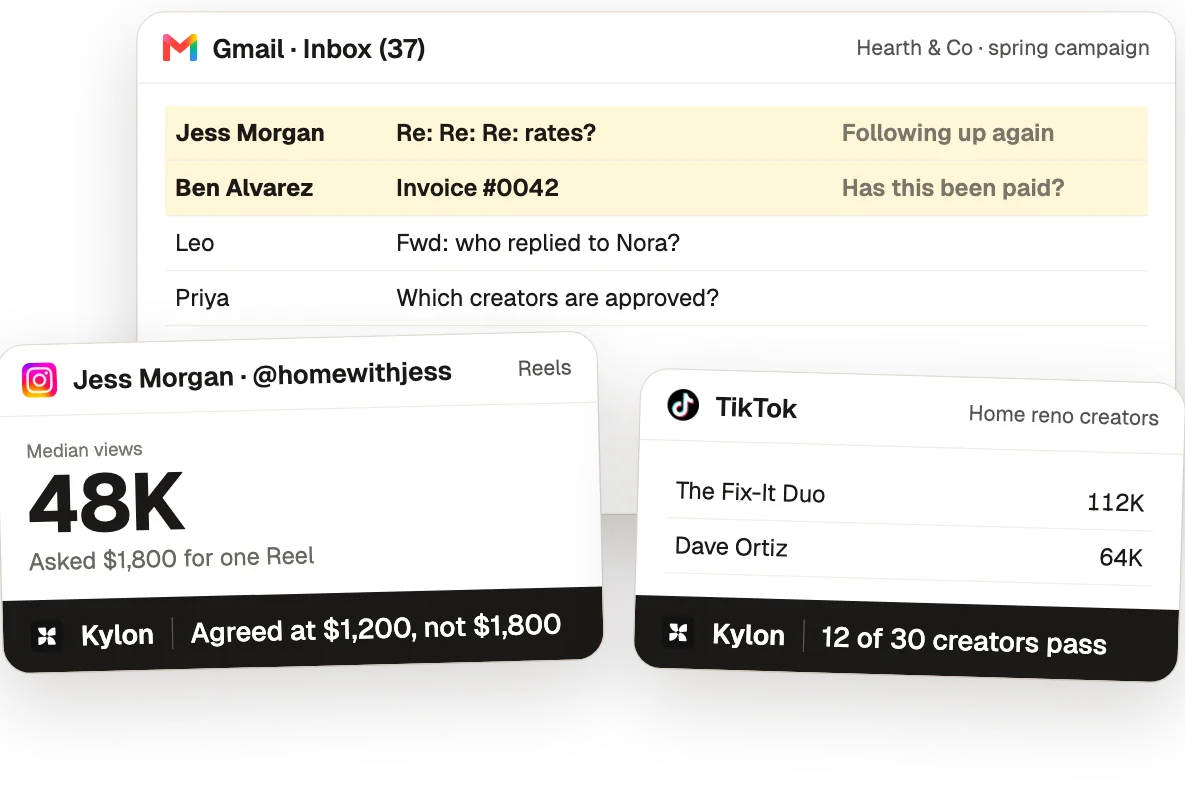
Hearth & Co, its people, the creators, their handles and all numbers are made up for the film. Product names and logos belong to their owners.
One spring campaign, from the standards to the payout.
Seven steps from the film: how a creator campaign runs today, what Saul and Joy do in the Room, and who decides.
- 01Standards
Write the standards once
- Today
- The campaign lives in a spreadsheet called creator tracker v7 FINAL and a group chat, and finance has to ask which creators are approved.
- In Kylon
 JoyCreator outreachMaya posts the spring campaign standards in #creator-campaign: US home and DIY creators, real engagement with no bought views, and no paid deals with competing brands. Priya has set the spring budget at $8,000.
- Who decides
 MayaMaya approves budgets. Priya handles payouts.
- 02Research
Find creators who fit
- Today
- Handles go into the tracker by hand, with rates marked TBD or "$1,800??".
- In Kylon
- JoyCreator outreachMaya asks Saul for home reno creators on Instagram, TikTok and YouTube. Saul checks 30 creators against the standards and 12 pass. He puts them in the Creator Pipeline App with median views and why each one fits, sends Maple Room to review for view spikes and passes on Lumber & Linen for a competitor deal.
- Who decides
- MayaMaya reviews the list in the App before anyone is contacted.
- 03Pick
Pick who to contact
- Today
- In the group chat, Maya asks who is following up with @homewithjess and Leo answers "I thought you did."
- In Kylon
- JoyCreator outreachSaul puts his top 5 first and asks Maya who to contact. She says go with the top 5, the 5 rows turn Picked, and Saul hands them to Joy for outreach.
- Who decides
- MayaMaya picks the 5 creators in the thread.
- 04Outreach
Send the first emails
- Today
- Creators chase the team: "Re: Re: Re: rates?" in a Gmail inbox of 37, and "still waiting on a brief" in Instagram messages.
- In Kylon
- JoyCreator outreachJoy drafts 5 first emails, each in its creator's thread. Jess Morgan's comes from leo@hearthco.example and asks her rate for one paid Reel with Hearth & Co's new tool kit this spring.
- Who decides
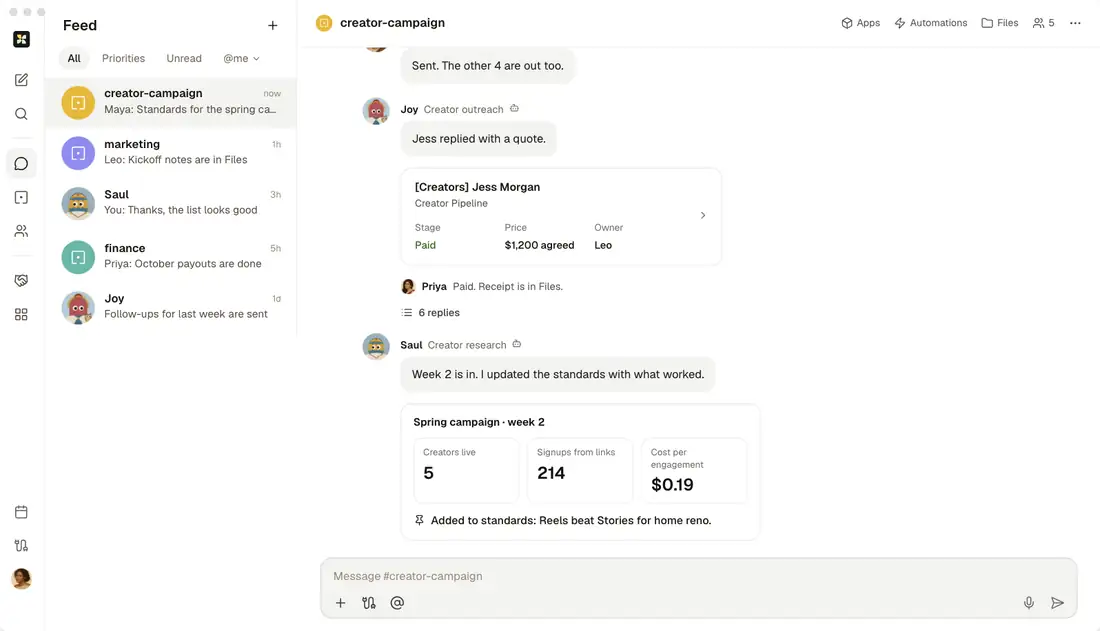
 LeoLeo reads the draft and presses Send. The other 4 go out too, and the 5 rows turn Contacted.
- 05Negotiate
Agree on the rate
- Today
- The quote sits in an email thread and the tracker still says "$1,800??".
- In Kylon
- JoyCreator outreachJess replies with $1,800 for one Reel. In her record thread, Joy notes that her Reels get a median of 48K views, so the team's formula puts her near $1,200, and asks Maya to counter at $1,200.
- Who decides
- MayaMaya picks Counter at $1,200. Joy counters and Jess accepts $1,200.
- 06Pay
Pay when the post is live
- Today
- Ben Alvarez emails "Invoice #0042, has this been paid?" and Priya asks the group chat if anyone paid Ben yet.
- In Kylon
- JoyCreator outreachJoy checks that Jess's Reel is live and the tracking link works, then tells Priya it is ready to pay $1,200. Jess's record goes from Agreed to Paid.
- Who decides
 PriyaPriya pays Jess and puts the receipt in Files.
- 07Learn
Feed results back into the standards
- Today
- The tracker has columns for Contacted? and Paid?, and none for results.
- In Kylon
- JoyCreator outreachSaul posts week 2 of the spring campaign: 5 creators live, 214 signups from links and $0.19 cost per engagement. He adds a line to the standards: Reels beat Stories for home reno.
- Who decides
- MayaMaya and the team see the new line before the next search runs against it.
Your inbox and the platforms your creators post on.
Joy drafts outreach from your Gmail and waits for someone to press Send. Saul searches Instagram, TikTok and YouTube for creators. Payments stay with your finance team.
 Connection
First emails to creators, drafted by Joy from your own address. Leo reads each one and presses Send.
 Your access
Where Saul finds creators like Jess Morgan and Nora Lane and reads their median views.
 Your access
Where Saul finds creators like The Fix-It Duo and Dave Ortiz.
 Your access
Where Saul finds creators like Ben Alvarez, and flags channels with view spikes for review.
Maya sets the standards and approves budgets and rates, Leo sends every creator email, and Priya pays each creator once the post is live.
Start with your campaign standards.
- 1Make a Room for your campaignInvite marketing, partnerships and finance, and add a research agent and an outreach agent.
- 2Connect what you useGmail from Connections, so outreach drafts come from your own address. Drop your kickoff notes in Files.
- 3Post your standardsWho fits, what counts as real engagement, who approves budgets and who pays. Then ask for your first list of creators.
I run influencer marketing for a brand. Set up our creator campaigns in Kylon with me, one step at a time, and show me each result before you move on. 1. Make an App called Creator Pipeline with tabs for Creators, Deals and Results, and a record for each creator with the handle, platform, median views, fit, price, owner, post and payment. 2. Connect Gmail. 3. When I post campaign standards, search Instagram, TikTok and YouTube for creators, check each one against the standards and add the ones that pass, with the reason. 4. For each creator I pick, draft a first email in the creator's own thread. When they quote a rate, compare it with their median views and suggest a counter. 5. When a post is live and the tracking link works, tell finance it is ready to pay. Every week, add what worked to the standards. Rules: never send an email, agree to a rate or mark anything paid without approval from the person who owns that step.

Run every creator campaign from one Room.
Start free, connect Gmail and post your standards. Nothing goes to a creator until your team says ok.