Agent Tools Benchmark · Episode 1 · Meeting notetakers

Once the call ends, can your agent use the notes?

We scored 8 meeting notetakers on that one question, including Claude Meetings and Grok Bot. Then we turned what we learned into two workflows you can install in one click, whichever notetaker you use.

KylonOne Room
Maya
Theo
Sam
Kylon agent
Claude
Codex

Read AI

Granola

Fireflies

Fathom
tl;dv

Otter

Claude Meetings
Grok Bot
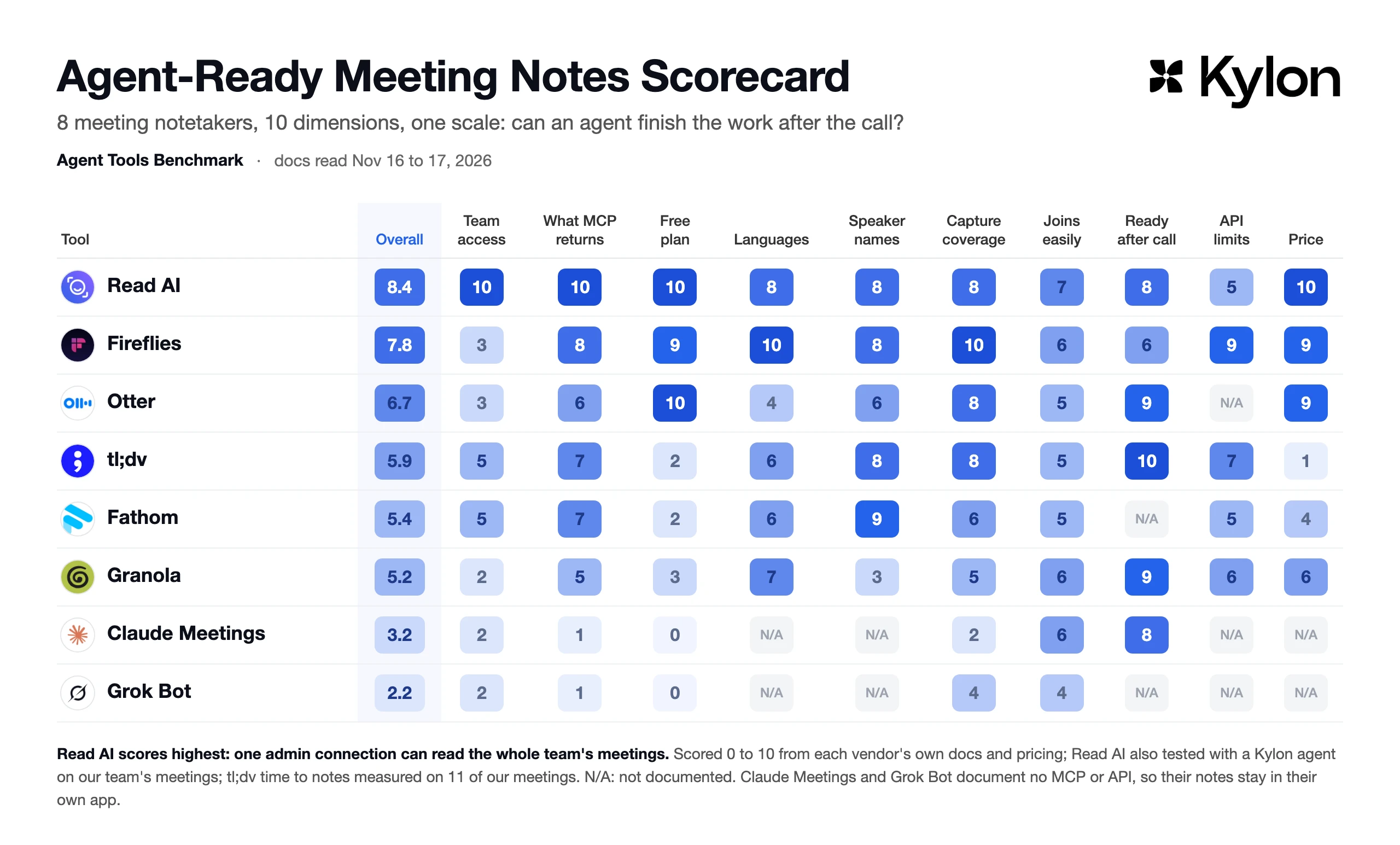
Which notetaker can your agents read?

Ten dimensions, each scored 0 to 10, all about what a notetaker hands your agent after the call.

Agent-Ready Meeting Notes Scorecard. Overall: Read AI 8.4, Fireflies 7.8, Otter 6.7, tl;dv 5.9, Fathom 5.4, Granola 5.2, Claude Meetings 3.2, Grok Bot 2.2, across 10 dimensions

Scores come from each vendor's own docs and pricing, read on Nov 16, 2026 (Claude Meetings, Grok Bot and tl;dv on Nov 17). We also live-tested Read AI with a Kylon agent on our team's meetings, and measured tl;dv's time to notes on 11 of our meetings; the others are not live-tested yet.

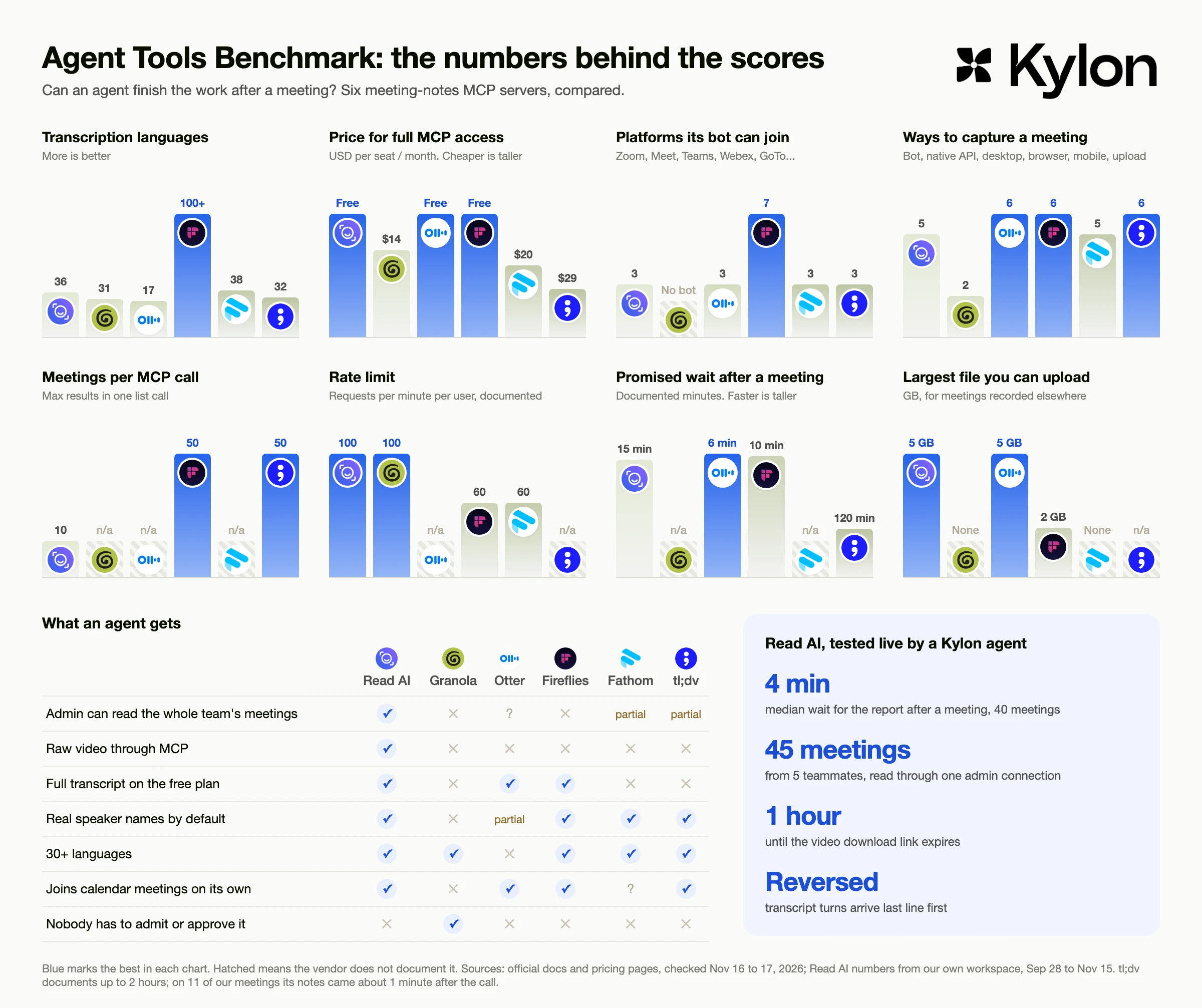
See the raw data behind the scoresBar charts of the raw data behind each score: languages, platforms, capture methods, time to notes, page size and price for each notetaker

Pick your notetaker

One click sets up the post-meeting follow-up in a new Room, with your notetaker already chosen. Your agent walks you through connecting it.

The meeting ended. Move the work forward.

Two workflows, whichever notetaker you use. Bring meeting context into Kylon, where your team and agents work on the next step together.

Post-meeting follow-up

After each client call: a recap in the client's thread, action items with owners, and the follow-up email drafted from the host's mailbox. Missing recaps are flagged the same day.

The host reviews and sends every email. After a clean first week, an Automation checks every 15 minutes for meetings that ended.

Connect: Google Calendar, Gmail, Your notetaker

Meeting prep brief

Before each client call: who's coming and their role, what their company does, the last meeting, the last email and anything you still owe them.

Needs only your calendar and email. Your notetaker and CRM add more when you connect them.

Connect: Google Calendar, Gmail

What we learned the hard way

We ran our own meetings through five notetakers this year. These are the problems that cost us a follow-up.

  1. 01

    A client's own Zoom never got recorded.

    We looked through all 332 meetings our notetaker had. The client-hosted call wasn't one of them.

  2. 02

    Leave and rejoin, and the recording stops.

    Rejoining the same link ended the recording for the rest of the call. We lost a customer meeting this way.

  3. 03

    Some recaps came back empty, with no error.

    No summary, no transcript, and the tool still reported success. Others came back with the transcript in reverse order.

  4. 04

    One meeting, 4 bots' notes.

    Gemini, tl;dv, Otter and Read AI all took notes on the same call, because each person's tool joined on its own.

  5. 05

    Switching tools is expensive.

    Our old notetaker had no bulk export and keeps recordings about 3 months after a downgrade. Importing the history into the new one costs $0.04 a minute.

That's why the follow-up workflow treats an empty report as missing, puts transcript turns back in time order, and checks the host's inbox for a reschedule before flagging a recap that never came.

How we scored

Ten dimensions, each scored 0 to 10 by our own rules from the vendor's docs, not the vendor's claims about itself. Overall is the average, leaving out N/A (not documented). 1 of 8 live-tested (Read AI), plus tl;dv's time to notes; docs read Nov 16, 2026, Claude Meetings, Grok Bot and tl;dv on Nov 17.

DimensionRead AIFirefliesOttertl;dvFathomGranolaClaude MeetingsGrok Bot
Overall8.47.86.75.95.45.23.22.2
Team accessCan one connection read the whole team's meetings? 10: an admin's MCP connection reads everyone. 5: visibility widens per person, private meetings excluded. 3: only an Enterprise console or the API sees everyone. 2: your own and shared meetings only.10Global Report Access for an admin3Super Admin sees everyone through the API only3Super Admin exists; MCP coverage not documented5Team admins set default sharing rules; private meetings stay private5Visibility set per person; private meetings stay with the host2Your own, shared and team spaces2People from your org on the invite; the meeting page can be shared inside the org2You ask the Bot that joined; meetings use the settings of the person who started them
What MCP returns10: summary, action items, a timestamped full transcript and the recording. A point off for each one missing.10All of it, including an MP4 link8Timestamped transcript, summary, action items; recording through the API only6Search and full transcript; timestamps and recording not documented7Notes and full transcript; recording through the API only7Summary, transcript, action items; recording through the API only5Notes and transcript (transcript on paid plans); no audio or video1Notes and transcript stay on a meeting page in Claude; no MCP or API in its docs1Summary and transcript stay in your chat with the Bot; no MCP or API in its docs
Free plan10: the free plan already returns the full transcript through MCP. Lower the more it is limited.10MCP on every plan9Any account can connect; the upload tool is paid10MCP on every plan2Pro and above, and the meeting organizer must be paid too2Paid plans only since Nov 103Free plan: last 30 days, no transcript0Team and Enterprise plans only0Team, Enterprise and Ultra plans only
LanguagesHow many languages are transcribed, whether they are detected automatically, and whether a call can mix them.836 languages, detected automatically10100+ languages, detected automatically417 languages, picked by hand before the call630+ languages, set in your preferences before the call638 languages, no Chinese731 on desktop, detected automatically, mixed languages supportedN/ANot documentedN/ANot documented for meetings
Speaker namesReal names by default. 10: real names with identity. 3: only "me" and "them".8Real names in meetings; Speaker 1 and 2 for rooms and uploads8Real names when the bot joins6Voice profiles; new people are tagged by hand8Speakers named when the bot joins; Speaker 1 and 2 for uploads9Real names plus the calendar invite email3"Me" and "them" by defaultN/ANot documentedN/ANot documented
Capture coverageHow many meeting platforms the bot joins, plus how many ways it can capture a meeting.83 platforms; bot, Meet API, desktop, phone, upload107 platforms, 6 ways to capture83 platforms, 6 ways to capture83 platforms; bot, browser, desktop, phone, upload, import63 platforms, no uploads, desktop capture on Mac only5Local capture from any app; no bot, no uploads2Google Meet only, by bot4Meet, Zoom and Teams, by bot only
Joins easilyPoints for joining calendar meetings on its own; points off when a host or admin has to let it in.7Joins by default; the Meet API needs someone to accept6Joins by default; Zoom and Teams need admin settings5Joins by default; Zoom and Teams need an admin first5Joins by default; the host admits it every time, Meet flags it as a risk5Zoom bot needs a linked Zoom account; personal default not documented6Nobody has to let it in, but you press start every time6Auto-join is each person's own setting; usually joins without asking4Paste the link and approve, or it follows your calendar; the host admits it
Ready after callHow soon notes are ready, from each vendor's docs. Read AI and tl;dv use our own measured medians.84 minute median in our test (40 meetings)65 to 10 minutes92.5 to 6 minutes for a 30 minute call10About 1 minute median in our test (11 meetings); docs say up to 2 hoursN/ANo time given9Live transcript, notes in minutes8Live transcript on the meeting page; notes time not statedN/ASummary when the call ends; no time given
API limitsHow many meetings one call returns, and how many calls a minute are allowed.510 meetings a page, search takes 20 to 90 seconds950 per call, clear rate limitsN/ANot documented750 meetings a search, 100 a page through the API; rate limit not documented560 calls a minute, 10 meetings a page6About 100 calls a minute; page size not documentedN/ANo meeting API documentedN/ANo meeting API documented
PriceLowest monthly price for full MCP access. Free scores 10; the higher the price, the lower the score.10Free9Free (Pro $18)9Free (Pro $16.99)1Pro $294Premium $206Business $14N/ANo plan gives other agents the notesN/ANo plan gives other agents the notes; Bot from $30 a seat

Read AI's time to notes is our own measurement: the median gap between the meeting end and Read AI's report email across 40 of our meetings, Sep 28 to Nov 15. tl;dv's is the median gap between the meeting end Read AI recorded and tl;dv's notes email, on 11 meetings both recorded, Sep 17 to Nov 16. Every other cell links to the vendor page it comes from.