How to Spot Fake YouTube Views Before You Pay a Creator
A sponsorship quote is priced on views, and views, likes and comments can all be bought. Here is how we check a YouTube channel's hourly data with vidIQ before paying, the skill we built for it, and one prompt to run it in your own workspace.
A YouTube sponsorship is usually priced off views. The creator or agency sends a channel, an average view count and a quote, and the math looks fine. Then the video goes live, the campaign link delivers a fraction of what the view count promised, and there is nothing left to negotiate.
Views, likes and comments can all be bought. YouTube's own fake engagement policy exists because services sell exactly that, and the same page notes that traffic YouTube finds to be artificial is not counted. That second point is useful: when YouTube removes views after the fact, it leaves a mark in the data.
We screen every creator in our own program before we talk price. This post covers what we look at, the skill that runs it, and a single prompt you can paste into your own workspace to do the same.
Why the public numbers are not enough
The numbers on a channel page are a snapshot: subscribers, views, likes, comment count. A snapshot cannot tell you how the views arrived.
The shape over time can. Organic views on a new upload rise quickly while YouTube tests the video, then settle into a curve. Bought views tend to arrive in blocks: a burst of thousands of views in an hour or two, almost no likes alongside them, and a return to the old rate right after. Bought likes leave the opposite trace: likes that keep pace with views from the first minutes, then stop at a round number while views keep climbing.
To see that shape you need hourly data per video, for more than one video.
Where the data comes from
The skill reads everything from vidIQ's MCP server. As of September 24, 2026, vidIQ describes it as built on data from more than 135 million channels, available on every plan including Free, and read-only for your YouTube channel. You connect it with an API key that is scoped to MCP access and can be revoked at any time.
For each creator the skill pulls the channel's stats, its latest ten videos that are at least 48 hours old, the hourly and daily view and like history for each of those videos, and a sample of recent comments. Raw responses are cached, so re-running a check on the same channel costs nothing.
What the check looks at
Every dimension comes back with a value, the rule it was judged against, a judgment (OK, Check, Fail or No data) and a score. Any Fail means the report recommends passing on the creator, whatever the total score says.
| Signal | What it can mean | What to do |
|---|---|---|
| Subscribers and average views of the latest 10 | Whether the channel clears your size bar at all | Set your own gates, the defaults are 100K and 10K |
| Views per like outside 50 to 100 | Far above: views without an audience. Far below: likes without an audience | Read it with the curve check |
| Near-identical totals across uploads | Views or likes bought in fixed packages | Ask how the videos were promoted |
| Cumulative views falling 15% or more | YouTube removed views it judged invalid | Treat it as a Fail |
| Likes near 1:1 with views at 3 hours, or likes that stop while views grow | A like package running out | Treat it as a Fail |
| A VPH spike that snaps back | Paid or ad traffic in that window | Ask for the traffic-source screenshot and price only the views outside it |
| The same commenters across videos, repeated text | Comment packages | Compare the accounts against your own flagged list |
Two rules keep the check from punishing healthy channels.
The first 12 hours. YouTube pushes every new upload for roughly its first half day. A bump inside that window that keeps growing afterwards is the algorithm, and the skill records it as information only. What it flags is a huge jump after which growth runs slower than before the jump.
The channel's own rhythm. Large channels often get a second wave four to six hours after publishing, on most uploads. When most videos show the same wave, it is how that audience watches, and it is not scored.
Two numbers that change the conversation
The non-spike estimate. After the launch push, any hour running three times or more above the recent clean baseline is treated as spike traffic and its excess is taken out. The report shows the average and median views that remain, and what share of the latest ten videos' views came from spikes. On a healthy control channel we tested, that share was about 2%. On one channel we were pitched, it was about 60%, with bursts of ten to twenty thousand views landing in the same few hours on most days. Smoothly paced paid traffic cannot be separated this way, so the estimate is an upper bound, and we treat it as a question for the creator rather than a verdict on them.
Price per like. CPE is the quote divided by the median likes of the latest ten videos, judged against a target you set. Bought likes tend to leave the launch-hour trace described above, which is why we price on likes and keep CPM as a reference only. A CPE that looks like a bargain is itself a signal: on the channels whose likes arrived almost one per view at launch, the price per like came out far lower than on any healthy channel we compared.
What the report looks like
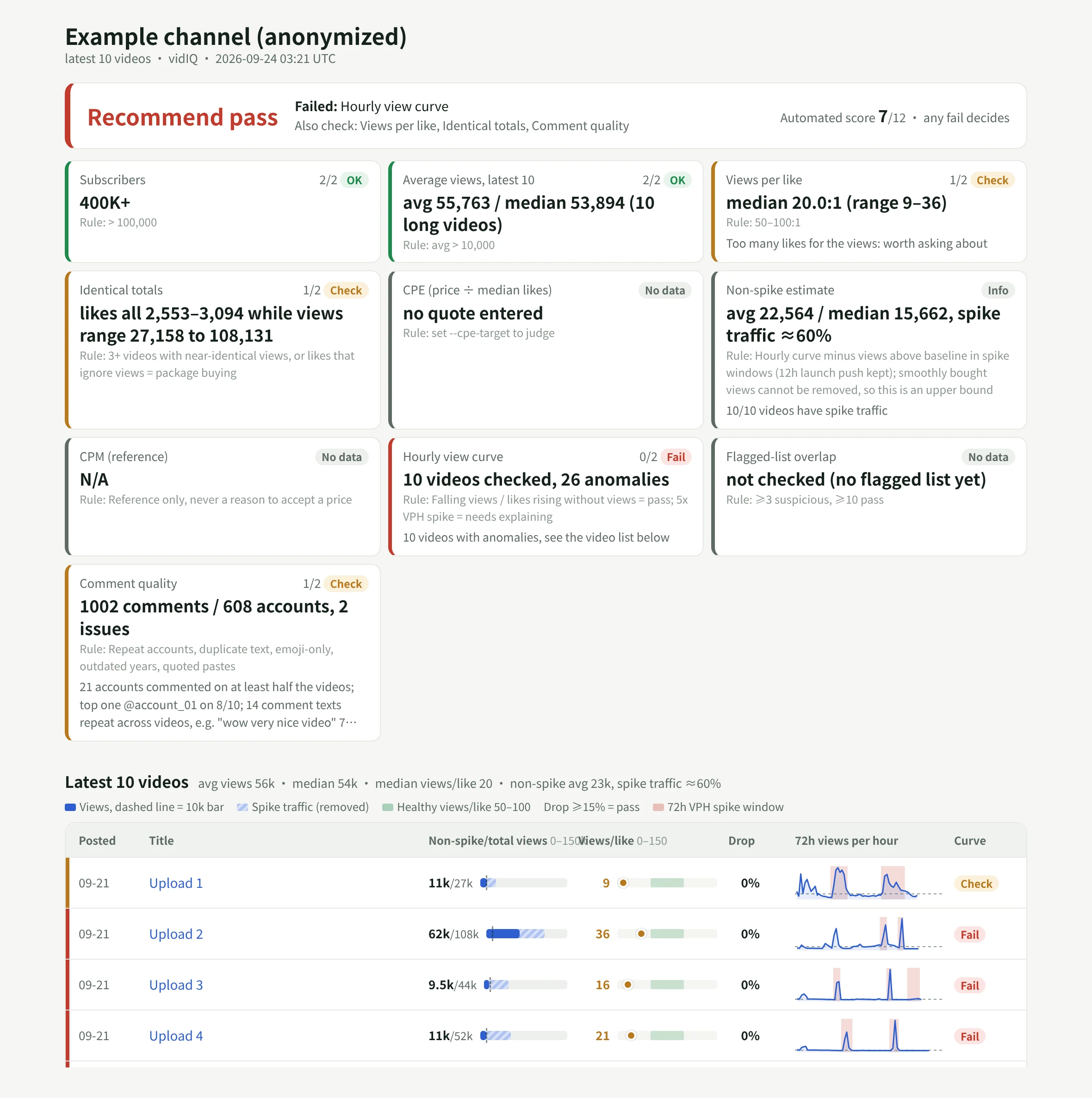
The report opens on the verdict and the checks that decided it. Below that, one card per dimension, then one row per video: the views bar against your size gate with the spike share hatched, views per like on the healthy band, the largest drop, and a 72-hour views-per-hour line with any spike window shaded. Videos with a problem get their own section with the views-versus-likes chart, and the comment section lists repeat accounts and repeated text. It reads on a phone as well as a laptop, because that is usually where the quote arrives.
The example above is a real run on a channel we were pitched, with the channel, titles and quote removed.
Where the result goes
A report nobody can find next month does not help the next negotiation. In our workspace, the verdict is written to the creator's row in our creator tracker App: verdict, score, non-spike average views, spike share and a link to the report. A workflow runs the check automatically within half an hour of a quote being recorded, so the verdict is usually there before anyone replies to the agency.
The same App holds the outreach thread, the follow-ups, the agreed deliverables and the posts once they go live, with the campaign link's results beside them. The agent working in that Room can see all of it, so a question like "which creators we passed on last month came back with a lower quote" has an answer.
If you do not have a creator tracker yet, the Creator Management template in our apps gallery builds one from a single prompt, with a roster, one row per platform account and posts tracked through to signups. Ask your agent to add a channel check field group to the creator's YouTube account, and the skill writes into it.
Run it in your own workspace
We packaged the skill with our internal names, thresholds and creator data taken out. It is a folder with a SKILL.md and three scripts: the check, the report renderer and the write-back. Download youtube-creator-check.zip, or paste this into a Kylon agent and it will do the setup itself:
Install the YouTube creator check skill from https://kylon.io/skill-templates/youtube-creator-check.zip: download it, read SKILL.md, add it as a custom skill and install it on yourself. Then send me a connection card for my vidIQ API key, saved as VIDIQ_API_KEY and never pasted in chat. Once it is connected, check @CHANNEL against a $PRICE quote for a long-form integration, post the report here, and if we have a creator tracker App, write the verdict to that creator's row.Replace @CHANNEL and $PRICE with the creator you are looking at. If you already have a price-per-like target, add "use a CPE target of $N" to the prompt; without one, CPE is reported but not judged.
What the check cannot tell you
A flag is a reason to ask, and most creators answer. A VPH spike can be a newsletter, a Reddit thread or a legitimate ad campaign the creator ran, and the YouTube Analytics traffic-source screen will show which. Paid traffic delivered at an even pace blends into the curve and will not show up as a spike at all.
It also cannot judge fit. Whether the channel's topic, format and audience match your campaign, and whether that audience lives in the market you are buying, still needs a person to watch a few videos. The skill gets you to that conversation with the numbers already on the table.
Your first company harness. Where humans and agents run your business together.