Operations · 1 App

Kylon for operations

Hand the agent the brief and the files. Everyone sees whose turn it is.

Project lead, account lead and an agent, in one thread. Names and numbers are examples.

The App in this Room

Task Map holds every goal and task, and who the next move belongs to.

Operations · App · sample data

Task Map

See every goal and task, whose court the ball is in, and what to do first

Make your own
  • 01Goals and one-off tasks on a matrix you reclassify by dragging.
  • 02Each task says whose court the ball is in: waiting on me, waiting on others, in progress, blocked or done.
  • 03Matrix, Board, Gantt, Timeline and List read from the same tasks, each at its own address.

Rookin the Room

@Atlas what is waiting on Acme, and since when?
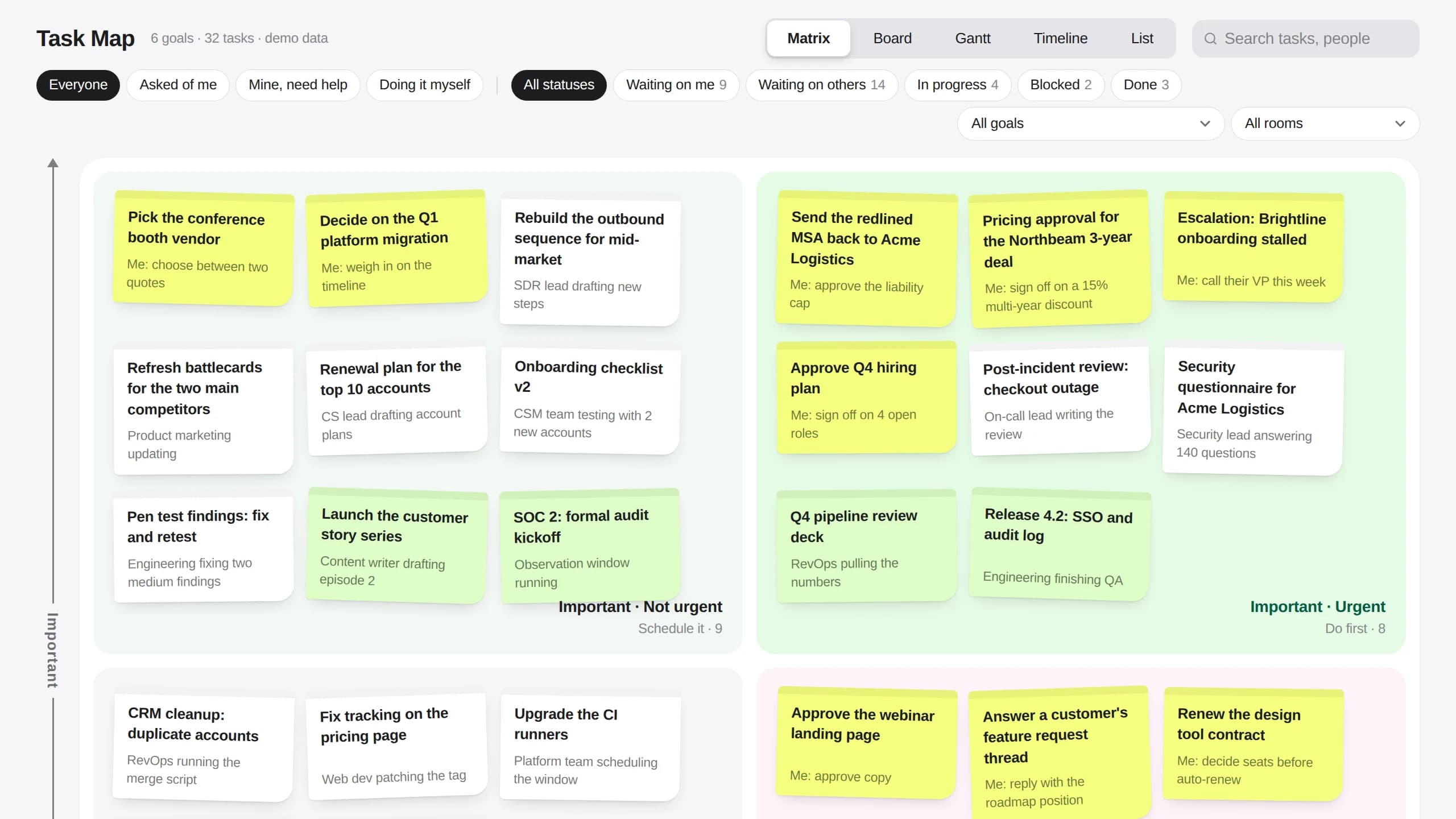
Task Map matrix view with sticky notes sorted into important and urgent quadrants
The matrix. Every open task as a note, sorted by important and urgent, with what is pending written under the title.

What it works with

  • 01

    Task Map + Skills

    Write down once how your team breaks a brief into tasks. The agent splits every new brief the same way.

  • 02

    Task Map + Automations

    On Friday afternoon the agent drafts the status update for each client from the tasks that moved that week.

  • 03

    Task Map + email draft cards

    The chase for a client item arrives as a Gmail or Outlook draft in the thread. The account lead sends it.

  • 04

    Task Map + Room files

    Briefs, decks and brand files stay in the Room, and the agent reads them when it writes a task.

  • 05

    Task Map + your own agent

    Bring Claude Code or Codex into the Room. It picks up its own tasks and marks them done on the same board.

  • 06

    Task Map + your phone

    See what is waiting on you, and approve a chase, from the Kylon app on iOS and Android.

Each stage of a project

Pick a stage. Each one has a line you can say in the Room as it is.

Brief to tasks

Drop the client's brief and files into the thread. The agent splits them into goals and tasks with dates, and asks about anything the brief leaves open.

Say this in the Room

Turn Acme's brief into tasks for the first two weeks, with an owner and a date on each.

One project, start to finish, in one room

Acme's rebrand, from the brief to the first Friday update. Two people and one agent in the same thread.
  1. 01

    The brief

    Hana Acme's brief and brand files are in the thread.

    AtlasAgentAtlas read the files and split the work into six tasks with owners and dates.

    ApprovedRook moved one date and kept the rest.

  2. 02

    Who owns what

    Rook Lina takes the logo round.

    AtlasAgentAtlas assigned it and marked two items as waiting on the client.

    ApprovedRook confirmed the board.

  3. 03

    The chase

    Hana Acme still has not sent the colour sign-off.

    AtlasAgentAtlas drafted a short chase with the two items and the date they are needed by.

    ApprovedHana sent it.

  4. 04

    Round one

    Rook Logo directions are in the files.

    AtlasAgentAtlas marked the task done and opened the review task for Acme.

    ApprovedRook checked the files before they went out.

  5. 05

    Friday update

    Hana Send Acme the week.

    AtlasAgentAtlas drafted the update: what moved, what slipped, what comes next.

    ApprovedHana edited one line and sent it.

What comes with it

You connect

Nothing to start. It opens with sample data.

  • Gmail or Outlook, later, for client chases and updates as drafts

What it connects to

The accounts and data this Room uses. Each logo opens its integration page when there is one.

Questions

Who is this for?

Agencies, studios and service teams that deliver projects for clients and lose time working out whose turn it is.

Does it send anything without me?

No. Chases and status updates wait as drafts in the thread until the account lead sends them.

Where does the data come from?

From the brief and files you put in the Room, and the email, drive or Slack you connect. Tasks and notes are saved in the Task Map App in your workspace.

How do I start?

Press Start with this. The instruction is copied and Kylon opens. Paste it into the chat in your workspace and the agent builds Task Map with sample data. New here, you sign up first.

I already use Notion. Do I switch?

Keep Notion. Connect it and the agent reads the pages you already have and drafts the updates from the Room. Task Map is there for teams that run projects from a chat and a spreadsheet today.

Start with one brief.

Drop the next client brief into the Room. The agent turns it into tasks with owners, and asks you what it could not tell.