AIOS infrastructure: deploy and maintain an AI operating system at scale
An AI operating system connects a company's context, data and tools, then lets you build agents, automations and apps on top. The idea is settled. Here is where a Claude Code AIOS stops scaling, and how Kylon makes deploying and maintaining one repeatable for every client.

In short. An AI operating system (AIOS) puts a company's context, data and tools in one place, then lets you build agents, automations and apps on top. Creators like Liam Ottley and Nate Herk teach the idea to large communities of builders and agency owners, and the definition is settled. What is changing is the ground it runs on. A Claude Code AIOS works well for one person, but every new client costs another day of setup and leaves behind a system the client cannot maintain. Kylon is the infrastructure underneath. The AIOS layers come built in, the whole team shares them, and a partner can deploy and maintain them in every client's workspace, through the app or from their own Claude Code.
What an AIOS is
Liam Ottley has installed these systems for businesses on site and taught groups of founders to build their own. Here is how he defines one in The End Is Near for Claude Code AI Operating Systems:
"In its most simple form, an AI operating system was a flexible workspace that connected the context of a business with your data and your integrations and then allowed you to rapidly build agents and automations and build applications on top of that stack."
Nate Herk's free AIS-OS starter kit teaches the same architecture as the Four Cs of an AI OS™:
- Context: knows your business.
- Connections: reaches your stuff.
- Capabilities: knows how to do the work.
- Cadence: runs without being asked.
His test for whether it works is a good one to keep in view: "While you're not at your desk, your AIS-OS observes one real-world event and produces an output that's faster and more accurate than what you'd produce yourself" (AIS-OS).
In a three-hour livestream course, Liam's list goes past context, data and agents. It adds a workspace where people do their work alongside agents, a ledger of all the human and agent work, an admin panel for who can see what and where the money goes, and custom software on top, such as a "bottleneck buster" built for the business's vertical (livestream).
Both lists describe what the system has to do. Neither settles where it should run, and that is now the question that matters.
Where a Claude Code AIOS stops scaling
The first generation of AIOS builds ran on a coding agent. Liam's early setups were Claude Code workspaces split into a context OS, a data OS, a productivity OS and an intelligence OS (video). Nate's kit turns Claude Code or Codex into a personal AIOS with a folder structure, an onboarding interview and a set of skills (AIS-OS).
After four on-site makeovers and three group sessions, one of them with about 35 founders in Montenegro, Liam named three problems with that approach (video):
- Setup. "We spent basically a day collecting all these different API keys, setting up their context, exporting stuff out of ChatGPT, going through a questionnaire." (video)
- Training. The founder has to understand a coding environment full of skills and context files before the value shows up.
- Building and maintaining after the handoff. "Particularly with stuff like building and hosting and maintaining and managing and improving agents, there's a big technical learning curve." (video)
Two structural limits sit underneath those three. A coding agent on one machine is a single-player system: "Right now, when you have Claude Code or Codex on your machine, you are chatting to a harness that plugged into all your tools, and it's kind of like a single-player experience" (livestream). And everything around the agent is yours to build and keep running: "Claude Code is not multiplayer either... you'd have to build your own ledger... Custom software, you have to know how to build it and test it and refine it and host it" (livestream).
None of this makes the Claude Code AIOS a mistake. Liam still runs his own: "An AI operating system on Claude Code is fantastic, and I still use mine every day" (livestream). Nate's kit is a strong place to start, and it says plainly that it teaches a personal AI OS first, with team rollout as the next step, "where everyone has theirs" (AIS-OS).
The limit appears when one setup has to become many. Ten clients means ten installs, ten sets of keys to keep valid and ten copies of every skill to update. One company with ten people means ten personal systems that cannot see each other's context or hand each other work. That is not a prompt problem. It is an infrastructure problem.
What should be infrastructure
Liam describes the shift as models, then harnesses, then platforms. In a platform, "you've got lots of these harnessed agents working alongside humans" (livestream), and "the agents are using the same database as the humans" (livestream).
For anyone delivering an AIOS, that splits the system in two. The parts that differ for every business stay yours: the audit, the context, the workflows worth automating, the custom software for the bottleneck. The parts that are the same everywhere should be infrastructure you never rebuild: the context store, the connections, the agent runtime, the shared workspace, the scheduler, access control, hosting for apps and the record of who did what.
Kylon is that second part. Liam's summary: "What Kylon does is brings all of the key pieces of an AIOS into one place" (video). In the livestream he went further and called it "the best all-in-one platform right now for delivering AI operating systems," as far as he can tell (livestream).
The AIOS layers in Kylon
| AIOS layer | What it has to do | Where it lives in Kylon |
|---|---|---|
| Context | Know the business, its people and their roles, and stay current | Onboarding researches the company on the web, offers the owner a quick call, and asks the rest in chat, including from accounts you choose to connect. It becomes Workspace Knowledge that every Agent reads, and each Agent keeps its own memory. |
| Data and connections | Reach the tools and records the business already uses | Most Connections take a few clicks to authorize, and built-in tools such as Apify and Apollo need no account of their own (tools). Database Apps keep records in the workspace. |
| Agents and capabilities | Specialists with a role, skills and only the access they need | Each Agent has a name, a persona, skills and its own access list. It starts private, and joining a Room does not open it to everyone there (access). Claude Code, Codex and Devin Cloud can join as Agents too. |
| Workspace | One place where people and agents do the work together | Rooms and threads where people and Agents message, mention and hand work to each other (workspace). |
| Cadence | Run without being asked | Automations that run on a schedule, from a webhook or when an App record changes, each with its own run history (Automations). |
| Ledger | Keep track of what humans and agents did | Requests, replies and handoffs stay in their Room and thread, and every Automation run keeps its steps, outputs and credits (run history). |
| Admin | Control who can reach what, and see where the spend goes | Access lists for Agents, Rooms and Connections. Workspace admins see credits by Room, Agent, person and Automation (usage). |
| Custom software | Remove the bottleneck the business actually has | Apps built by asking an Agent and published inside Kylon, with no separate repository or hosting account, plus App chat to discuss an App and ask for changes later. |
Walking through onboarding on camera, Liam matched it to the context layer of his Claude Code builds, "basically one-to-one." The rest, he said, follows the same pattern: "all of those key pieces of an AI operating system are simplified down into a platform that basically your clients can walk through themselves," with your know-how on top to "give them the most powerful version of the system possible" (video).
Deployment: install the system, spend the time on the business
On a Claude Code AIOS, the first day goes to plumbing. On Kylon, that day goes to the business.
Context in one sitting. Onboarding researches the company, asks what it still needs to know, and saves the answers as Workspace Knowledge for every Agent to use. Liam: "This is literally the exact same process just built into a very easy to do application" (video).
Connections in clicks. His comparison with the old way: "a full day of collecting API keys, setting up a Google Cloud... In this case, it's literally just a couple clicks" (video).
Agents that arrive equipped. The default Agent comes with skills for research, browsing, design, App building and more. "When you're talking about setting stuff up for clients... they've done all the hard work here" (video). Your own skills import from a folder or ZIP, and each one can be shared with the Agents that need it. Liam imported his deep research skill once and connected it to every Agent in his workspace (video).
A first working system in under an hour. In his recorded demo, Liam set up the business context, connected YouTube and Gmail, created an Agent, built a database App and set up an Automation "in the space of about 20-30 minutes" (video).
A back door for builders. What changes the economics for an agency is that Kylon has a CLI. In Liam's words (video):
"When I built this on site for a client, we were just using the CLI. We didn't have to come in here and click through the UI. We could plan out the structure of the Kylon workspace, the agents we wanted to be in there, the different permissions... and the different skills."
In the livestream he put the result plainly: "We can manage our clients on Kylon through Claude Code" (livestream). Your own Claude Code or Codex, with the playbooks you have already written, can set up and change a client's Rooms, Agents, skills, Automations and Apps from the command line (Kylon CLI). The Kylon Partner Academy's delivery module rests on the same idea: one local Claude Code or Codex window works across several client workspaces, refines the accepted build in private, then sends it to each client as a separate draft for that client to review (Deliver to each client).
That is what lets deployment scale. The second client does not start from an empty folder. It starts from the Rooms, Agents, skills and Apps you already proved, installed into a workspace the client owns.
A real deployment: a 46-person accounting firm in four days
In I Rebuilt This 46-Person Accounting Firm With AI (in 4 Days), Liam's team works on site with Thomas & Co, a UK accountancy and tax advisory firm where 25 accountants spend more than half of every work week filling in working papers by hand.
The team audited all 17 working paper types on a whiteboard and picked one wedge: VAT reconciliation, which every client needs and which takes about an hour each time. Liam's reasoning is the AIOS argument in small: "We can get VAT working with this new system, and that infrastructure can be sort of scaled and just added on all the other working papers" (video).
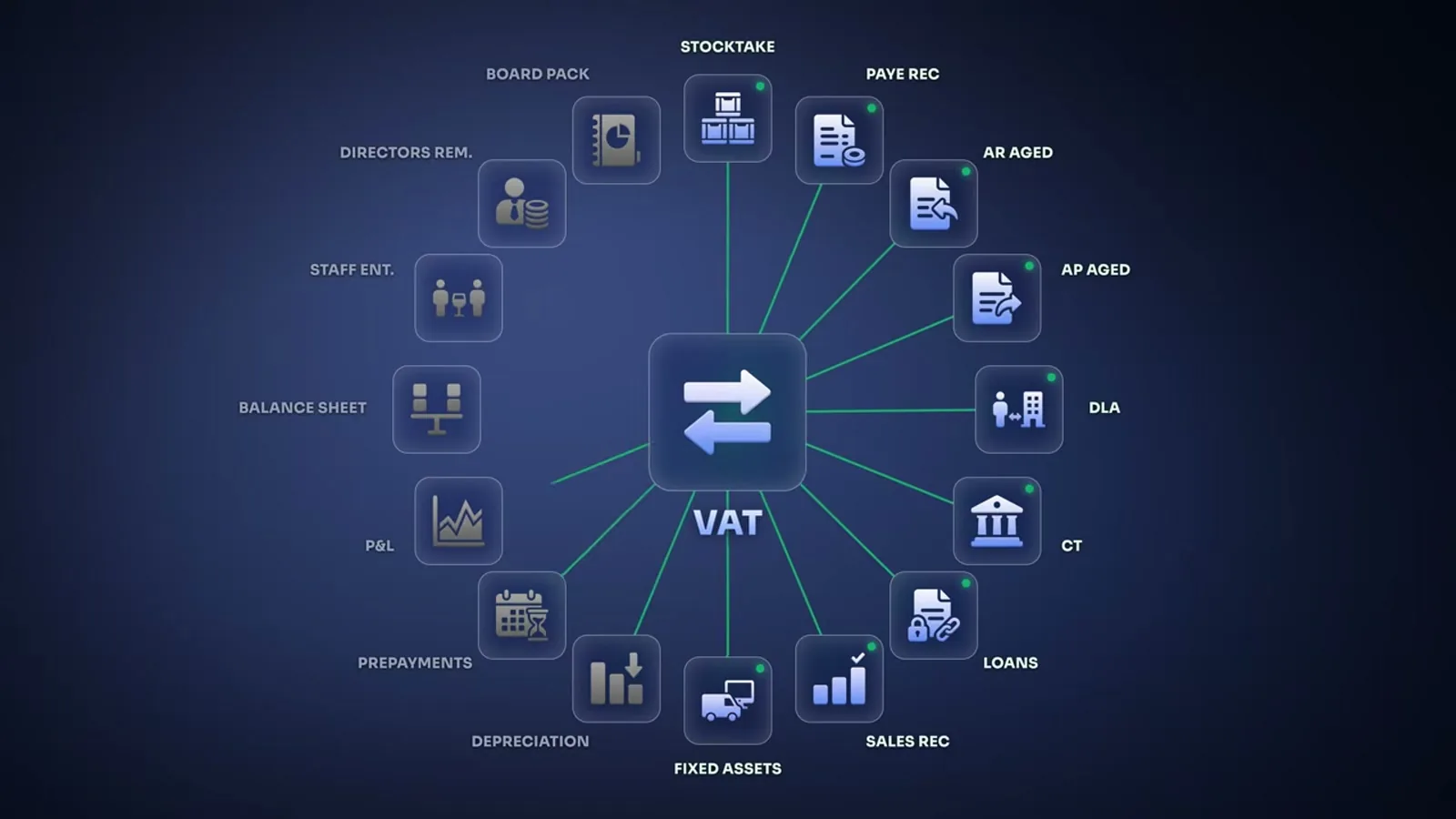
Here is how the build used Kylon:
- Context. The team woke up an Agent, named it and gave it the firm's website. It summarized the business and checked its understanding with the founder, Josh Thomas (video).
- Data. Overnight, the firm's developer set up an API so the numbers came straight out of the firm's accounts, with the tax rules chopped up behind them so the system could find the one rule it needed instead of reading the whole book (video).
- Knowledge that lived in people's heads. A voice Agent called Josh and asked about the firm's working papers, blockers, client communication and what he wanted to see at a glance. "Rather than me having to type back and forth and spending an hour doing it, I just had a voice call conversation," he said afterwards (video).
- Work in threads. Josh starts a VAT reconciliation in a thread, the firm's Agent hands it to a VAT Specialist Agent, and people review only what gets flagged. "The goal isn't to remove the human, it's to stop wasting the human's time on manual data entry" (video).
- An App for the owner. A board shows each client's return, the reviews pending and the requests still waiting on the client (video).
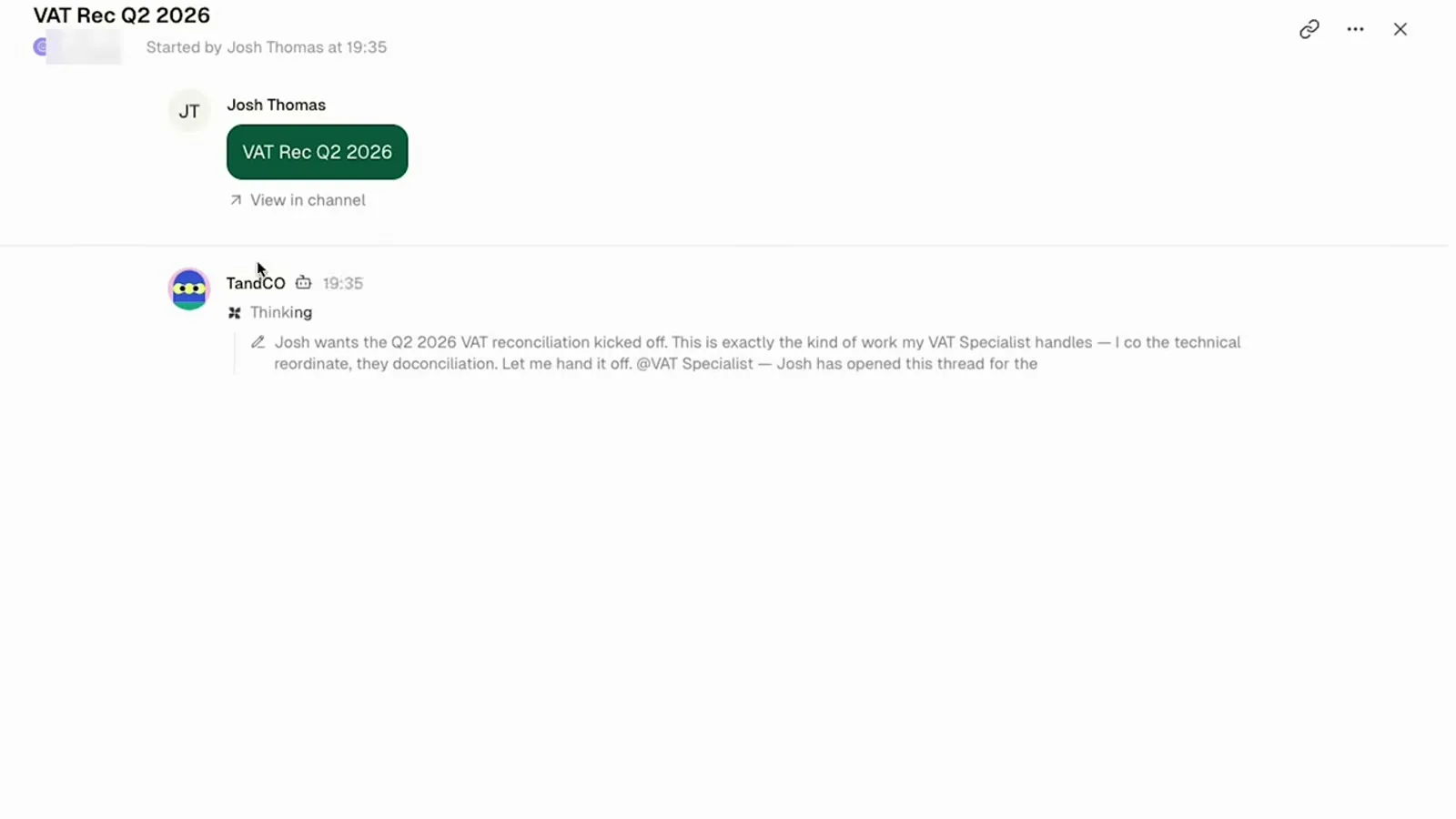
On the last day, the pipeline ran end to end for the first time, and in Liam's words, "it looks like everything matched as it should" (video). The team spent that morning on handover rather than on the build, so "the next one of these doesn't need us in the room" (video).
Maintenance: the retainer runs on the platform
Liam's view of where AI agencies go next is the forward-deployed engineer: a builder who specializes in one platform and is paid for more than the install. "Step one is getting the person on the platform... which is like setup. Now that is a monetizable event" (livestream). After that comes the retention offer: "managing their AI stack, managing their install on say Kylon, optimizing it, looking for patterns, seeing like, 'Hey, there's this skill that we could build'" (livestream). His one-line version: "It's the setup, and it's the maintenance, and it's the custom builds on top" (livestream).
A retainer only scales if each client is cheap to maintain. On a custom stack, it is not. Liam's own verdict on the custom software he builds for clients: "the maintenance, and it's brittle, and they can't do it themselves" (livestream). On Kylon, maintenance splits three ways.
Kylon maintains the infrastructure. Hosting, model access, connections and the built-in tools are kept current for every workspace at once. As Liam puts it, platform companies "are spending their millions and millions of dollars to manage a platform, to build a platform that allows you to do that and deliver your work on top of it rather than having this duct-taped-together Claude Code thing" (livestream).
The client handles the everyday. People ask an Agent in the Room, and App chat opens a conversation about an App where they can ask questions or ask for a change. Josh Thomas, after the voice call: "The fact that I'll be able to have further conversations with the Kylon agent moving forward for any blocker is just mind-blowing" (video).
You handle the improvements. Run histories, threads and usage show what the Agents did and what it cost, which is where the next skill, Agent or App comes from. Liam's list for the retainer: "structure the rooms, build new agents for them, analyze the work that's been done, figure out new opportunities for building agents" (livestream). Through the CLI, that work runs from your own Claude Code, in every client workspace that gives you access.
His summary of the long-term difference: "the management long term is easier" (livestream). And every improvement you prove with one client becomes a skill or an App you can bring to the next, so the library you deploy from grows with each client you keep.
Keep the Claude Code AIOS you already built
Moving onto Kylon does not mean throwing away a working setup. Claude Code, Codex and Devin Cloud can join a Kylon workspace as Agents and work in Rooms next to the Agents Kylon hosts (Bring your own agent). Their model use stays on their own provider accounts (Usage metering). A Codex Agent can also run in Kylon's cloud, in beta, on the ChatGPT plan you already pay for (Run a Kylon agent on your ChatGPT subscription).
Your personal AIOS keeps doing what it does well. Kylon adds what one machine cannot: shared context, a team of people and Agents, work that runs on schedule, and a record of all of it, in a workspace the client owns.
How to deploy your first AIOS on Kylon
Liam's advice for agencies is to start with small businesses, not enterprise or mid-market, and to work with the client's team in person (livestream). From there:
- Pick one wedge. Choose a workflow that is frequent, slow and easy to check, the way Thomas & Co started with VAT reconciliation.
- Run onboarding with the client. Let the onboarding Agent research the business, then answer its questions together, in chat or on a call.
- Connect what the workflow needs. Start with the accounts that workflow touches, and add more as the work grows.
- Design the Rooms and Agents. One Room per stream of work and one Agent per role, each with the access it needs and nothing more.
- Add the cadence and the App. Put the repeatable part on an Automation, and give the owner an App that shows what needs a person.
- Hand over, then stay on. The client runs the workspace. You keep a retainer for the improvements and bring what you proved to the next client.
Questions people ask
What is an AI operating system (AIOS)? An AIOS connects a company's context, data and tools in one place, then lets you build agents, automations and apps on top. Liam Ottley describes it as a flexible workspace that connects a business's context with its data and integrations. Nate Herk describes its layers as Context, Connections, Capabilities and Cadence.
Is Kylon an AI operating system? Kylon is the infrastructure an AIOS runs on. It provides the layers every AIOS needs, including business context, connections, Agents, shared Rooms, Automations, Apps, access control and usage, so the builder can spend their time on what is specific to each business.
Can I keep my Claude Code or Codex setup? Yes. Claude Code, Codex and Devin Cloud can join a Kylon workspace as Agents, and their model use stays on their own provider accounts. Your Claude Code or Codex can also manage a Kylon workspace through the Kylon CLI.
How long does an AIOS deployment take on Kylon? In Liam Ottley's recorded demo, the business context, two connections, an Agent, a database App and an Automation took about 20 to 30 minutes. A full client engagement takes longer. Liam's team spent four days on site with a 46-person accounting firm to take one workflow from audit to its first end-to-end run.
How do agencies charge for AIOS work on Kylon? Liam Ottley describes a paid setup that gets the client onto the platform, followed by a retainer to maintain and optimize the system, with custom builds on top.
Who owns the workspace? The client. In the Kylon partner model, the client sets up a workspace they own, and the partner joins it for the project, builds and tests there, then hands over.
Partner AcademyDeliver an FDE projectBuild in the client's workspace, get the first version accepted, then adapt it for each new client.Read the delivery module Bring your own agentAdd Claude Code, Codex or Devin Cloud to a workspaceKeep the agent you already run and give it the team's Rooms, context and access control.See how it worksKylon sponsored the two videos and the livestream by Liam Ottley quoted here. Quotes from video are lightly edited to remove filler words. The Four Cs of an AI OS™ is a trademark of Nate Herk, quoted from his public AIS-OS repository.
Your first company harness. Where humans and agents run your business together.