Marketing · 2 Apps · 17 Skills · 9 films

Kylon for marketing

Hand the agent the creators, the content and the launch film. You approve every post, every DM and every dollar.

Marketing, owner and an agent, in one thread. Names and numbers are examples.

The Apps and films in this Room

Creator Management carries the search, the price and the tracking. Sampling Desk is the ecommerce version, for product seeding. The films below were each made by an agent on Kylon, and each one can come back with your name, logo and colour.

Marketing · App · sample data

Creator Management

Source creators, track every post, and see what each one returned

Make your own
  • 01Every creator in one roster, with one row per platform, the handle, the follower count and their quote.
  • 02Price comes from the median of their last ten posts, never from followers, scored against your own bar.
  • 03Campaign links carry sign-ups back, so each post shows what it paid back.

Piain the Room

@Echo find 30 people our field listens to on X and price the ones who post every week.

Creator roster table with agency pitched and self sourced creators and a core score for each
One roster. Agency pitched and self sourced creators in the same table, each with a core score.

Industry versions

Ecommerce version

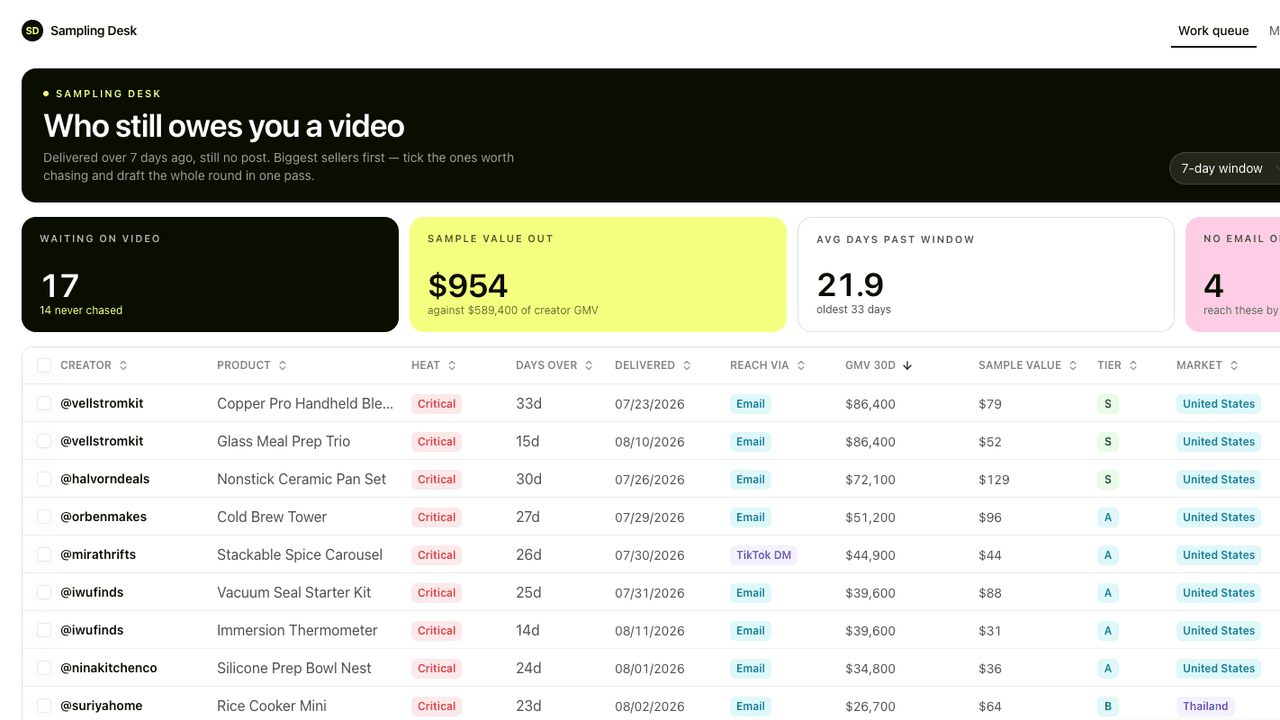
Work queue listing overdue samples ranked by creator GMV

Sampling Desk

Track every sample from shipped to posted, and the sales it brought

  • 01Every sample sits against one creator, with value, carrier and tracking.
  • 02The posting window starts the day it lands, and overdue creators rank by what they sell.
  • 03Chase messages render per creator and wait as drafts until you send them.

Piain the Room

@Echo who has had a sample for more than 30 days and not posted?

Make your own

What it works with

  • 01

    Creator Management + Skills

    Quote verdict reads a creator's recent posts, checks for bought views and what you paid before, then gives one call: take it, counter, pass or test first.

  • 02

    Creator Management + Automations

    A daily run refreshes views and engagement on every sponsored post against the price paid.

  • 03

    Creator Management + DM drafts

    First DMs only ask whether they would like to work together. Each one waits in the creator's thread until someone sends it.

  • 04

    Creator Management + Sampling Desk

    Product seeding runs next to paid posts, with the same creators and one queue for samples that never became a video.

  • 05

    Creator Management + your own agent

    Bring Claude Code or Codex into the Room. It reads the same roster and waits for the same approvals.

  • 06

    Launch films from your website

    Give the agent your site. It makes a launch film with your name, logo and colour, cut on the beat, and posts each cut in the thread for you to approve.

Each stage of a campaign

Pick a stage. Each one has a line you can say in the Room as it is.

Find

Name 20 to 50 accounts your field already trusts. The agent reads who they follow, turns that into the ruler every creator is checked against, and finds people posting in your field.

Say this in the Room

Build a ruler from these 30 accounts and find creators on X that most of them follow.

One creator, start to finish, in one room

Maya, from a name on a list to a paid post with its sign-ups counted. Two people and one agent in the same thread.
  1. 01

    Found

    Pia Find people our field actually listens to.

    EchoAgentEcho built a ruler from 30 trusted accounts. Maya made the list because 18 of them follow her.

    ApprovedPia kept 12 of the 25 names.

  2. 02

    First DM

    Pia Start with Maya.

    EchoAgentEcho drafted a first DM that only asks whether she would like to work together.

    ApprovedPia sent it.

  3. 03

    The quote

    Moss Keep it under $500.

    EchoAgentEcho read her last ten posts, put the fair range at $380 to $450, and drafted a counter at $450.

    ApprovedMoss approved the cap. Pia sent the counter.

  4. 04

    The post

    Pia Maya's video is live.

    EchoAgentEcho started the daily refresh of views and engagement, and the campaign link began counting sign-ups.

    ApprovedPia checked the first week.

  5. 05

    Paid

    Pia Maya sent her invoice.

    EchoAgentEcho matched it to the agreed $450 and the live post, and put it in the thread.

    ApprovedMoss approved the payment.

What comes with it

Skills · 17

  • Creator outreach

    Drafts or sends paid-partnership outreach from your creator inbox and moves each creator along the pipeline.

    Runs: From the App, or when you pick creators.

  • Outreach reply sync

    Matches replies and bounces to the email they answer, records them and posts them to the thread.

    Runs: On a schedule, or after a batch.

  • Outreach resend

    Sends one second email to creators who got one message and did not reply.

    Runs: Weekday mornings, or after review.

  • Creator metrics fetch

    Pulls each creator's recent posts so views, engagement and price per view update.

    Runs: On demand, or on a schedule.

  • Influencer enrichment

    Fills missing profile fields and account numbers and leaves what people typed alone.

    Runs: Every two hours, small batches.

  • Sponsored video tracking

    Refreshes views and engagement on published sponsored videos against the price paid.

    Runs: Daily.

  • Post campaign stats

    Counts visits and new sign-ups from each creator's campaign link.

    Runs: On a schedule.

  • Core circle ruler

    Takes 20 to 50 accounts your field already trusts, reads who they follow, and turns that into the ruler every creator is scored on.

    Runs: Once per field, refreshed when you ask.

  • X creator search

    Finds people posting in your field on X, drops the ones your ruler does not recognise, and adds the rest to the roster with the reason they made it.

    Runs: When you describe a field.

  • Quote verdict

    Gives one call on a quote (take it, counter, pass or test first) from recent-post medians, fraud checks and what you paid this creator before.

    Runs: When a quote comes in.

  • X DM drafts

    Writes a first DM that only asks whether they would like to work together, and leaves it in the creator's thread until someone on your team sends it.

    Runs: When you pick creators.

  • Viral teardown

    Takes a post that already took off and works out whether the reach is real, who carried it and what you can reuse, marking each finding as fact, inference or unprovable.

    Runs: When you paste a post link.

  • Creator metrics refresh

    Keeps follower counts and 30-day GMV current so the queue starts with the biggest sellers.

    Runs: Weekly.

  • Chase draft cards

    Turns a batch of chase messages into email drafts you review and send.

    Runs: When you press the button in the App.

  • Daily overdue digest

    Posts the morning read of who is overdue on a post into the Room.

    Runs: Weekday mornings.

  • Launch film

    Remakes the 56-second launch film with your name, logo, colour and website, keeping its shots, timing and music.

    Runs: When you ask for your version.

  • The harness iceberg

    Remakes the 45-second 3D iceberg film with your name, logo and accent colour.

    Runs: When you ask for your version.

Included with Kylon

  • Instagram, TikTok, X and LinkedIn public data, for creator profiles and posts
  • Bright Data, for pages the other sources cannot reach
  • Kalodata, for what a creator's videos sold
  • TikTok public profile data, for followers and recent videos
  • Seedance, for generated footage
  • ElevenLabs, for music, voice and sound
  • GPT-Image-2, for stills and frames

Reached through Kylon on your workspace credits, with no API key of your own.

You connect

Nothing to start. It opens with sample data.

  • AgentMail inbox, later, for sending outreach and reading replies
  • Your analytics, later, for sign-ups from campaign links
  • Your X account, later, for sending the DMs your team approves
  • Gmail or Outlook, later, for chase emails as drafts

What it connects to

The accounts and data this Room uses. Each logo opens its integration page when there is one.

Questions

Who is this for?

Marketing teams, brands and agencies that pay creators for posts, run content every week or need a launch film this week: software teams sponsoring videos, ecommerce brands seeding product, agencies running rosters for clients.

Does it send anything without me?

No. DMs and emails wait as drafts in the creator's thread until someone on your team sends them, and payments go to the person who approves spend.

Where does the data come from?

Public posts and profiles on X, Instagram, TikTok and LinkedIn, Bright Data for pages those cannot reach, and Kalodata for what a creator's videos sold. All of it is reached through Kylon on your workspace credits, with no API key of your own.

How do I start?

Press Start with this. The instruction is copied and Kylon opens. Paste it into the chat in your workspace and the agent builds Creator Management with sample data. New here, you sign up first.

I already track creators in a spreadsheet. Do I start over?

Keep the sheet. Give it to the agent and it imports each creator with their accounts and quotes, then fills in the recent posts.

Start with one quote.

Paste the next quote into the Room. The agent reads the posts, gives you a range, and drafts the reply for you to send.