 vs
vs Gumloop
Gumloop alternative for teams that need the work finished.
Gumloop is a builder: you configure an agent, then chat with it. Kylon puts the agent in the room where the work is already discussed, on the records the work runs on, with the review step in the same thread as the request.
01 One real case
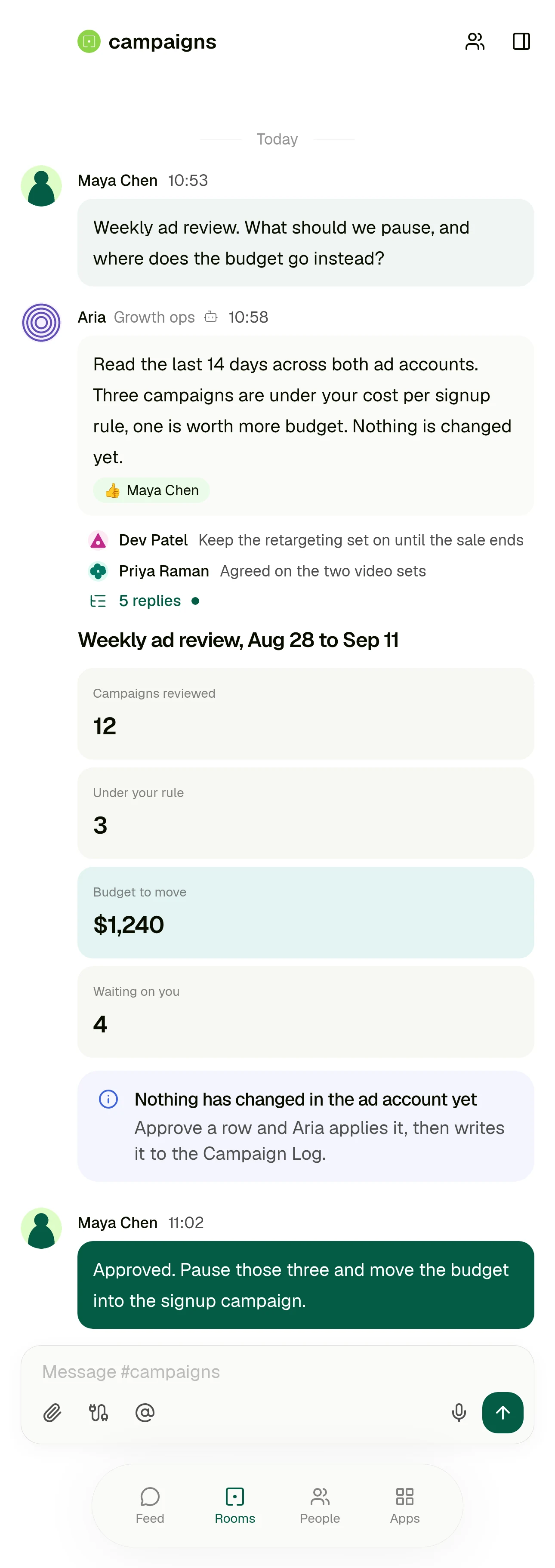
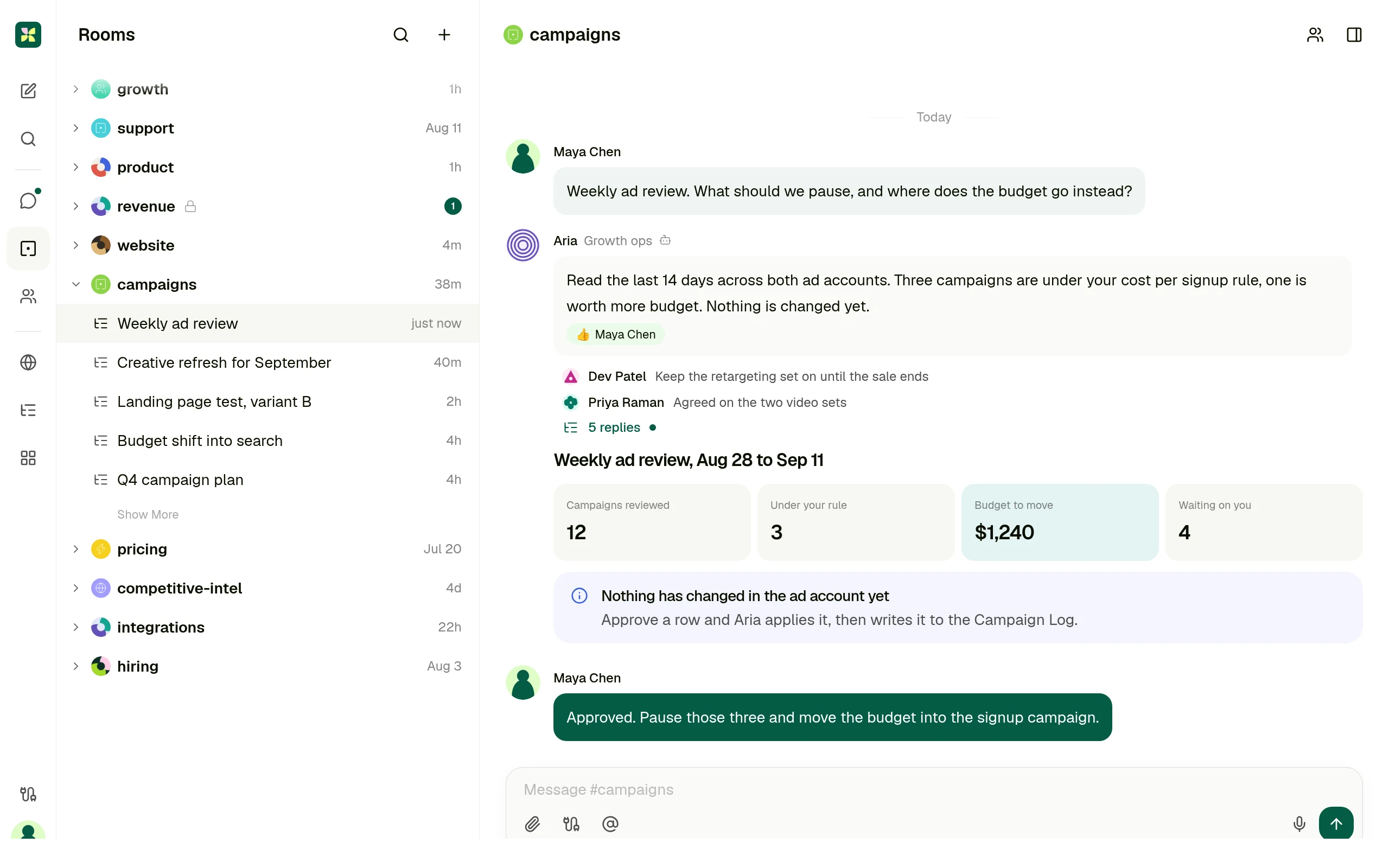
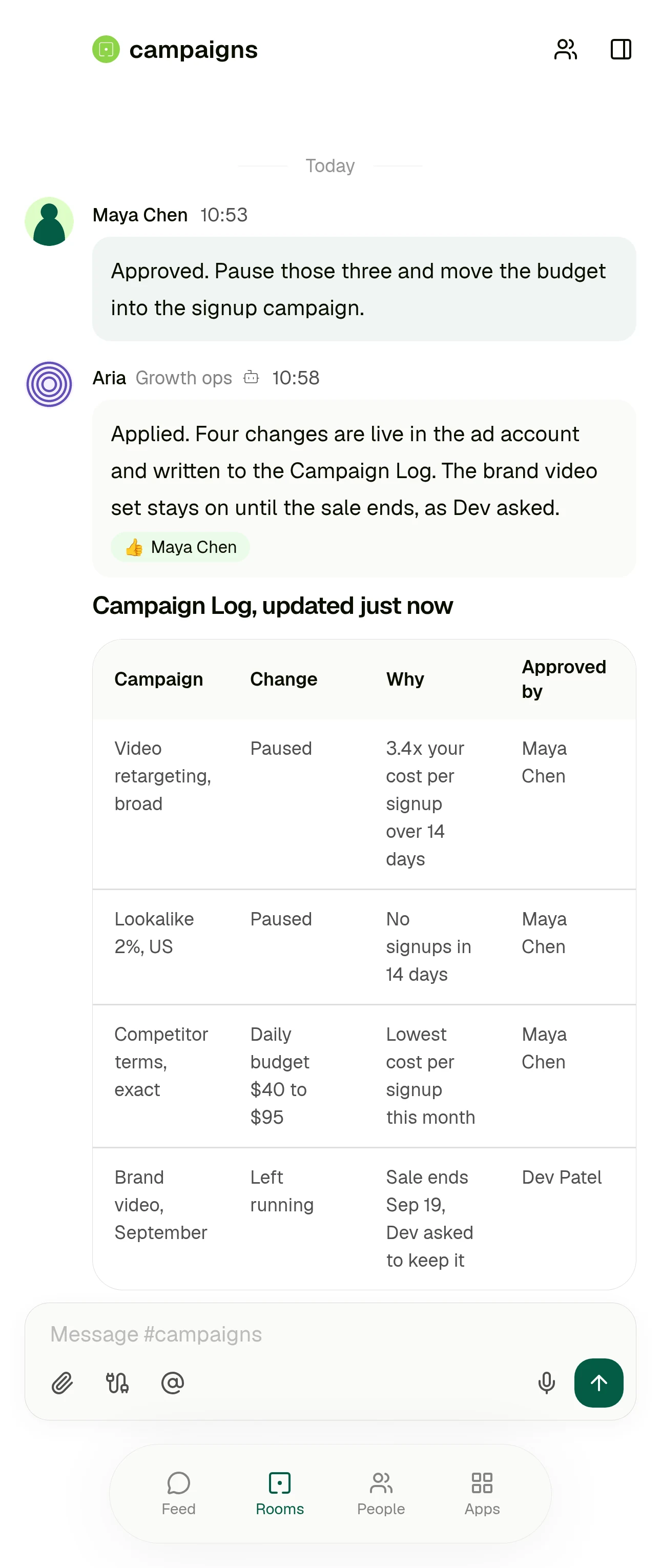
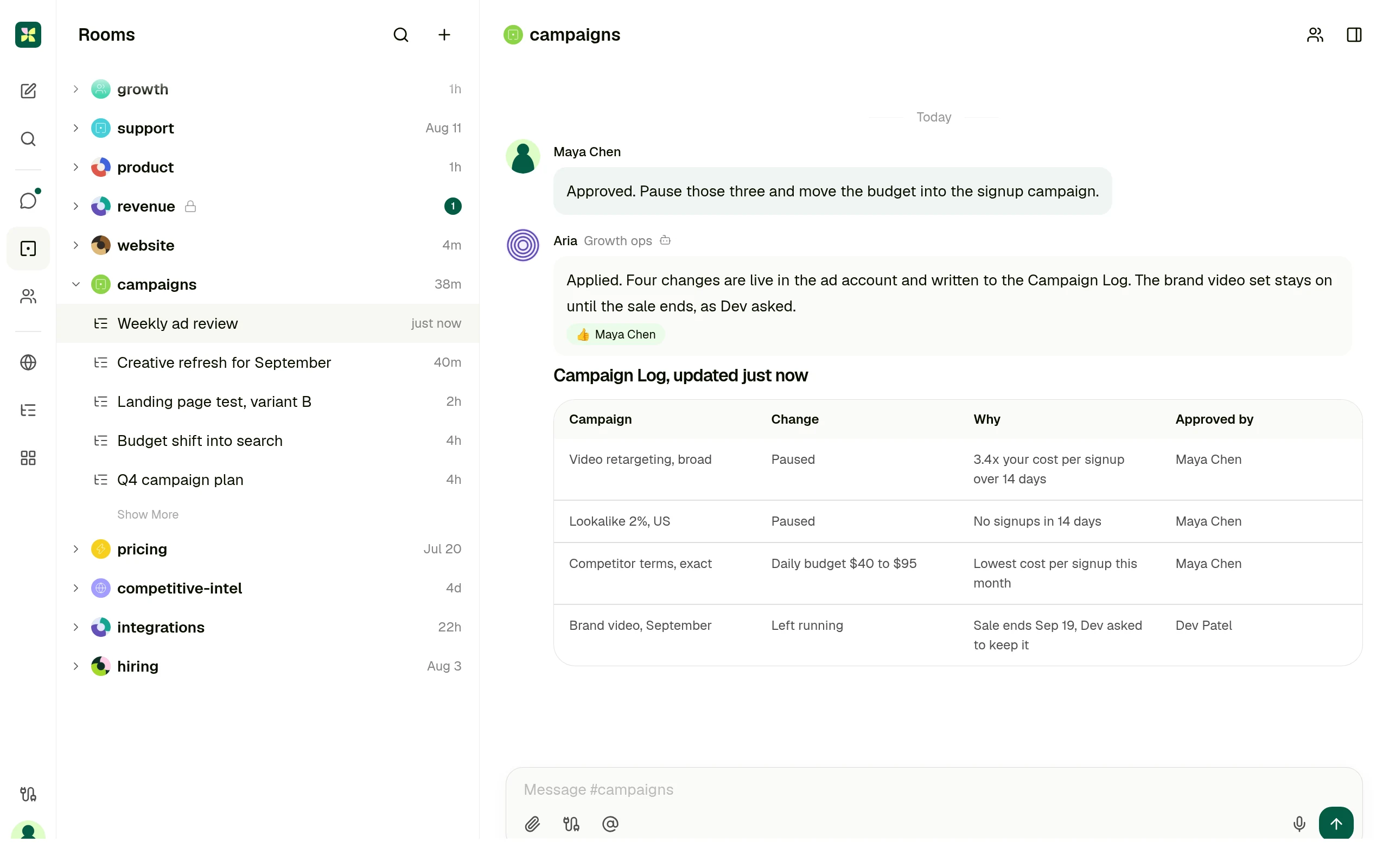
The weekly ad review, in a builder and in a room
Same piece of work, same team. The difference is not how clever the agent is, it is who has to be involved and where the finished result ends up.
Someone notices the spend is off
They tell whoever owns the agent, because building and configuring one is its own job.
They ask in the room where the campaign is already discussed, in their own words.
Getting the context
The agent searches the sources you indexed into Company Brain, and answers with citations.
The agent reads the thread, the records the team keeps in that room, and the connected ad account.
The result
It comes back in the agent chat, and can be kept as an artifact that gets indexed for reuse.
A card in the thread, plus one row per change in the Campaign Log the whole team can sort.
The approval
An approval card in the chat, the notification bell, the Tasks page, or a Slack message.
In the same thread as the request, by the person who asked for it.
Next week
You correct the agent and have it rewrite its own instructions or turn the correction into a skill.
Keep it as a saved workflow that runs on Monday and posts into the same room.
Gumloop behaviour above is described from Gumloop's own documentation: Agents, Brain, and Human in the Loop. Checked 11 September 2026.
02 Who each product is for
Not every team should pick the same one.
Gumloop is the right answer when
Someone owns automation as a job. They want a deep builder with subagents, skills and evaluations, and approval rules written as expressions over the actual arguments of a tool call.
Gumloop is also stronger when
Only one or two people ever open the builder, and everyone else is content to receive what it produces rather than ask for work themselves.
Kylon is the right answer when
The people who need the work done are not the people who would build the agent. The request starts as a message in a team room, and the answer has to land there too.
Kylon is also the answer when
The output has to be a record the team can act on, and the person who signs off should see it next to the request rather than in a separate queue.
03 Operating model
Six decision dimensions
Operating models, not a checklist. Every statement about Gumloop cites Gumloop's own documentation or pricing page. Checked 11 September 2026.
The work starts in
A chat with an agent you configure in a two tab builder covering Agent Preferences, Triggers, Connectors, Skills, Subagents and Abilities. The documented way to get a useful one is to run a real task in that chat, then tell the agent to write its own instructions.
Source: Agents, Gumloop docs
A message in the room where that work is already discussed. The request, the run and the result stay in one thread the team is reading anyway.
Business context
Company Brain indexes connected sources such as Google Drive, Notion, Slack, GitHub and Confluence, and agents search it with citations. Brain is available on the Pro and Enterprise plans.
Source: Brain, Gumloop docs
The thread itself, the records the team keeps in the room, and the agent's own memory. Connected services stay where they are, nothing has to be indexed first.
Structured output
Results come back in the agent chat. Artifacts an agent produces can be indexed at personal or team level so it can search and reuse past outputs, with only the newest version indexed.
Source: Brain, Gumloop docs
Records in a workspace App, drafts, and saved workflows. The output is a row the team can sort, filter and act on, not only a message.
Human handoff
Per app approval presets are Always allow, Ask each time, Ask for writes and deletes, and Custom per tool. App Rules add conditional approval as CEL expressions over the actual arguments. Approvals arrive in chat, the notification bell, the Tasks page, or Slack.
Source: Human in the Loop, Gumloop docs
Review happens in the thread the request came from. Email leaves as a draft a person sends, and sensitive actions wait for someone in the room.
Who can ask
Whoever configures and runs the agent. Team members can share credentials and collaborate on the same agents.
Source: Gumloop pricing
The person with the problem, in their own words, in the room they already work in. Nobody has to own a builder first.
Best fit
Deep, configurable agents for the person who owns automation: subagents that delegate in parallel, skills the agent writes itself, evaluations, and approval control down to a single tool call.
Source: Agents, Gumloop docs
Case dependent, cross functional work, where the discussion, the record and the person who signs off belong in one place.
04 Use cases
Four cases, written the way people ask for them
Each one starts as a message in a room. What comes back is a result someone can act on, plus the approval step in the same place.
Campaign review
Which campaigns are under our cost per signup rule, and where should the budget go instead?
A decision card in the room and one row per change in the Campaign Log, applied only after someone approves it.
Customer feedback into product work
Anything in support this week that should become an issue?
Grouped themes in the thread, and issues created with the original quotes attached to each one.
CRM follow up
Who from last week's demos has not heard back from us?
A list with an owner per account, and a draft reply waiting for that owner to read and send.
Weekly operating report
Put Monday's numbers together with what changed and why.
One post in the room with the figures and where each came from, kept as a workflow that repeats.
05 Switching
Switch without rebuilding anything
Nothing has to move on day one. The flows that already run are not the part that hurts.
- 01
Keep your Gumloop agents running
Fixed, well understood automation can stay exactly where it is. Nothing is imported and nothing is rewritten.
- 02
Connect the tools, not the flows
Point Kylon at the same services your team already uses, and set what each agent is allowed to reach.
- 03
Bring one case into a room
Pick the work that changes case by case, the kind that makes you reconfigure a builder every time. Ask for it in the room and review what comes back.
- 04
Keep it if it should repeat
Once the shape settles, save it as a workflow that runs on a schedule and posts into the same room.
Questions people ask
- Is Kylon a replacement for Gumloop?
- Not if you have someone whose job is building automations and who wants a deep builder to do it in. Kylon is the answer when the person with the problem should be able to ask for the work themselves, in the room where the work is already discussed.
- Do we have to rebuild our Gumloop flows?
- No. Start with one recurring piece of work, ask for it in a room, and keep it as a saved workflow if it should repeat. Nothing has to move on day one.
- Does anything get sent automatically?
- Email is drafted for a person to send, and sensitive actions wait for approval before they execute.
- How is Kylon different from Gumloop?
- Gumloop is a builder: someone configures the agent, then people chat with it. In Kylon the person with the problem asks in their own words in the room where the work is already discussed, and the result lands in that same thread.
- Who asks for the work in Kylon?
- Anyone in the room. There is no builder to own first, and the approval sits next to the request rather than in a separate queue.
- What does Kylon cost?
- Kylon is a paid workspace. Current plans are on the pricing page.
Keep reading
The person with the problem should be able to ask for the work.
Start with one workflow. Ask for it in the room where the work is already discussed, give the agent the records and tools it needs, and review what it hands back before anything ships.