Post

People SearchApp · Sales · sample data

Find out who someone is, or find the right people for a brief, with a source for every line

One table of people, each with their current title and company checked as current, how much say they have, where they are, their LinkedIn and X, and how they relate to you. Identity comes first: when two people share a name it says so instead of guessing. It arrives with eight invented people so the table is full the first time you open it.
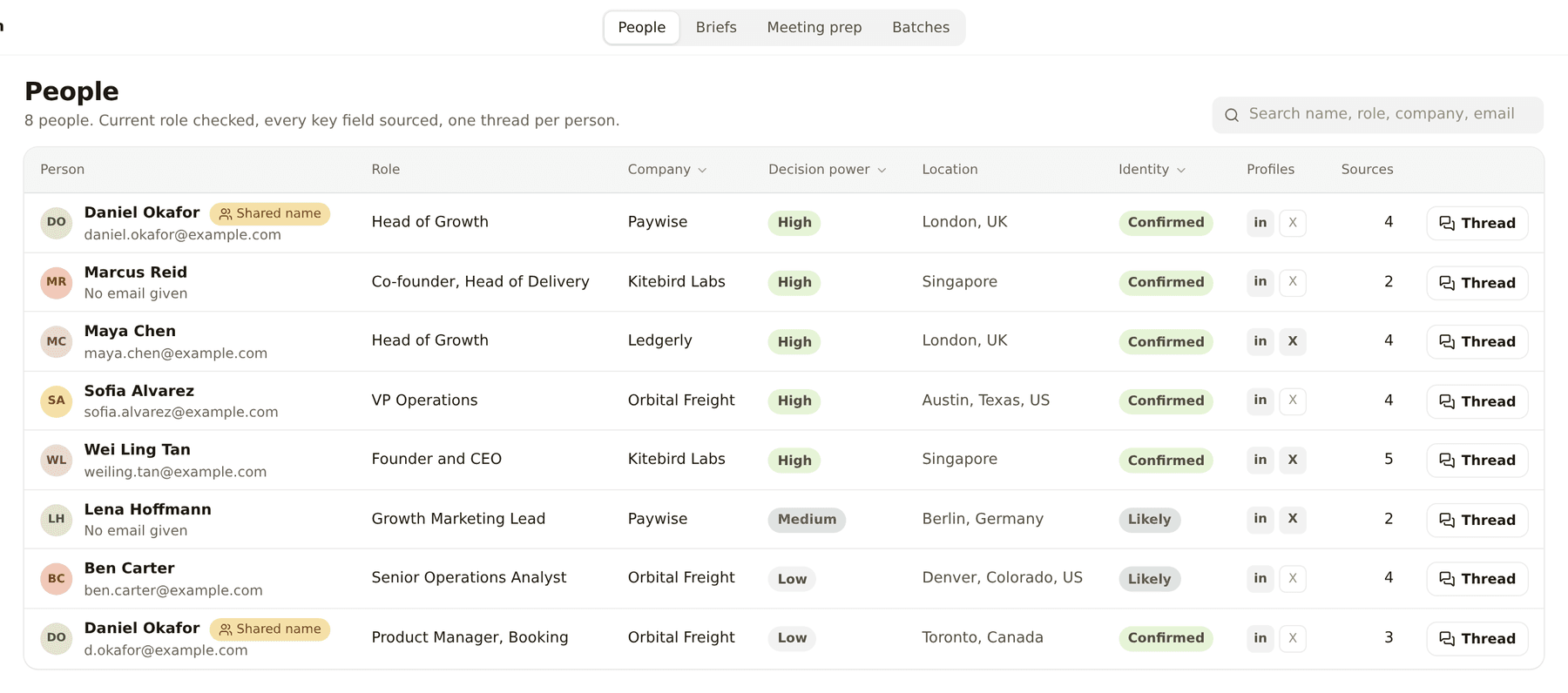
People table with role, company, decision power, location, identity and source count for eight invented people

People. One row per person, the role checked as current and a source behind every key field.
What it puts on screen

  • People. One row per person: role, company, decision power, location, links, and the source behind each field.
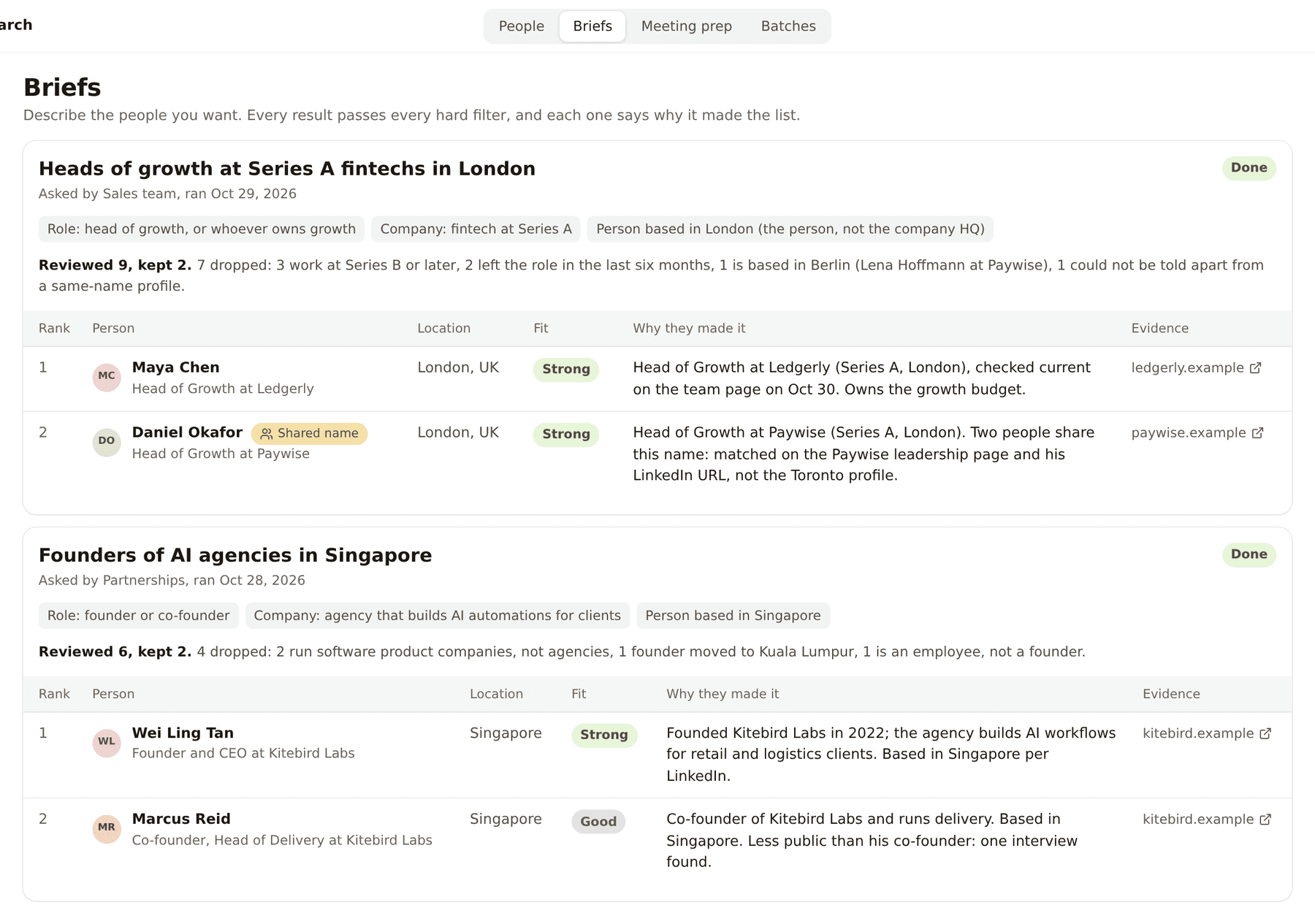
  • Briefs. A request like heads of growth at Series A fintechs in London, and the shortlist it produced, with why each person made it.
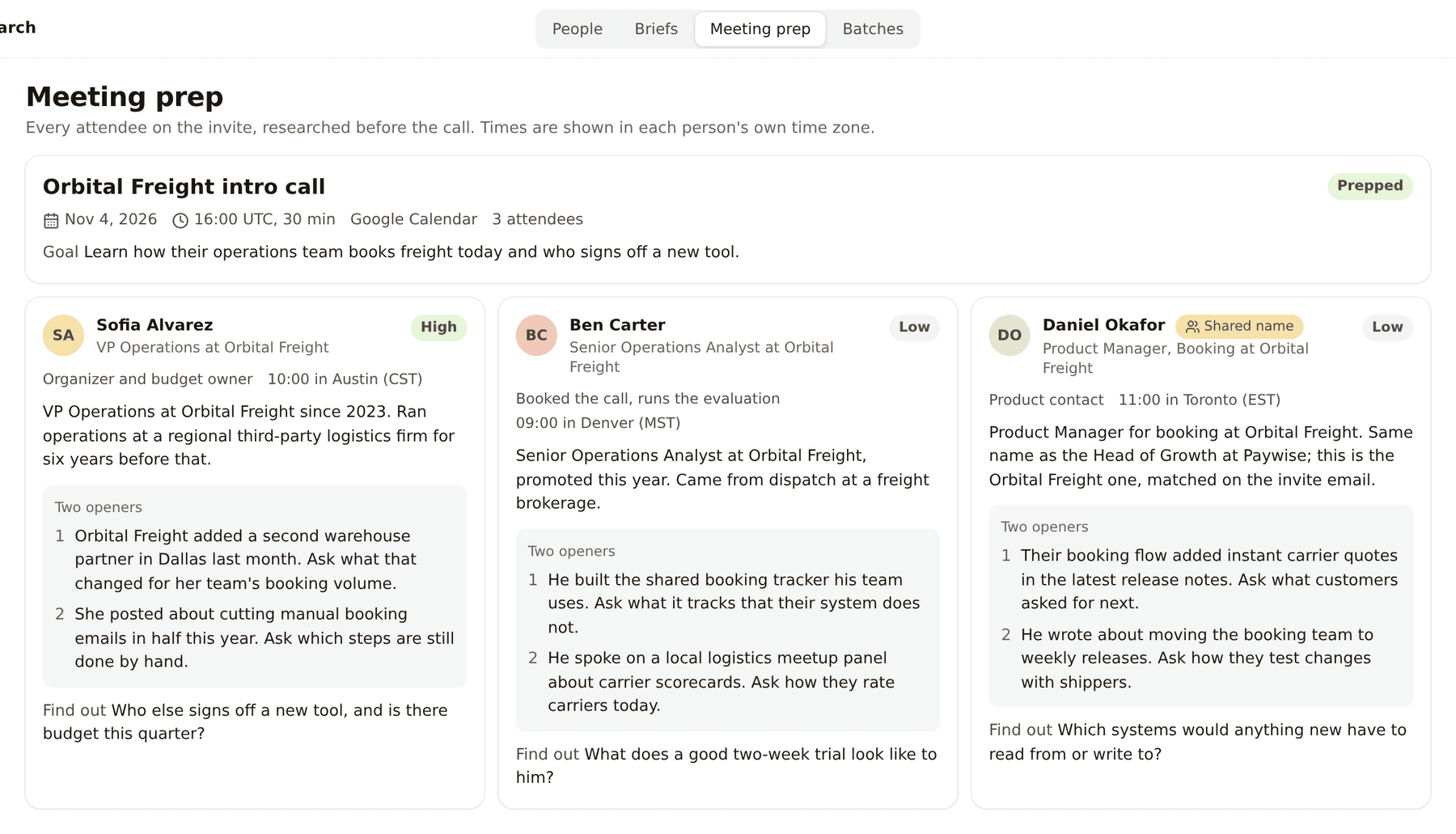
  • Meeting prep. Everyone on tomorrow's invite, with background and two openers each.
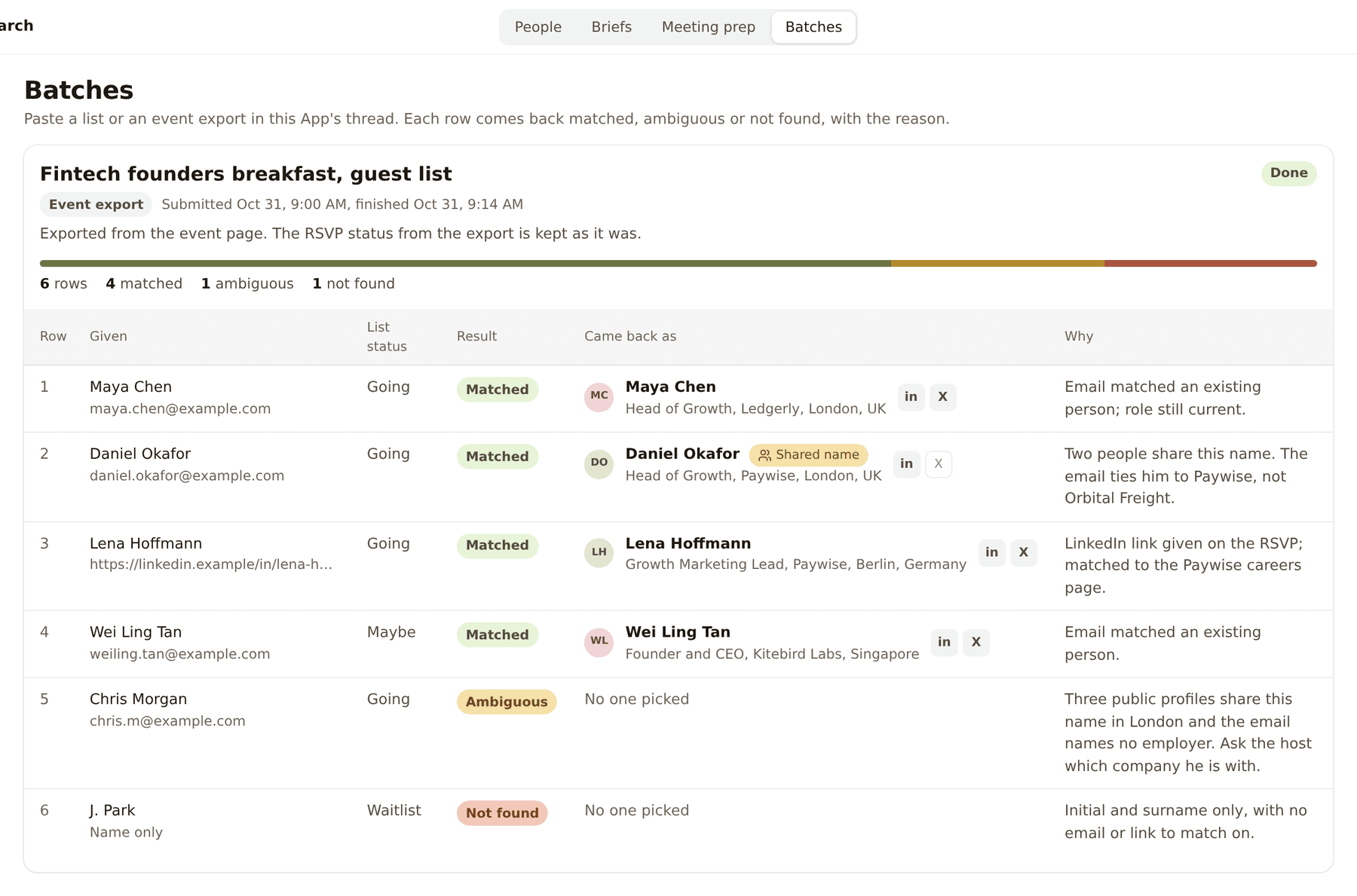
  • Batches. Paste a list or an event export and every row comes back filled in.

What comes with it

Skills · 5

  • Person lookup. Takes an email, a LinkedIn link or a name and company and works out who it is, checking the job is current. Runs: When you paste one.
  • Find by brief. Turns a description of the people you want into a ranked shortlist that passes every hard filter, with evidence. Runs: When you write a brief.
  • Find at a company. Names the one to five people at a company who own what you are asking about. Runs: When you name a company and a topic.
  • Meeting prep. Researches every attendee on a calendar invite before the call. Runs: The day before, or on demand.
  • Work email. Finds and verifies a work email, only after identity is settled. Runs: When you ask for one.

Included with Kylon

  • Apollo, for B2B people and company search
  • Exa, for web research with citations
  • LinkedIn and X public profiles, for current role, location and history

Reached through Kylon on your workspace credits, with no API key of your own.

You connect

Nothing to start. It opens with sample data.

  • Your calendar, later, for meeting prep
  • Your CRM, later, for knowing who you already talk to

The screens

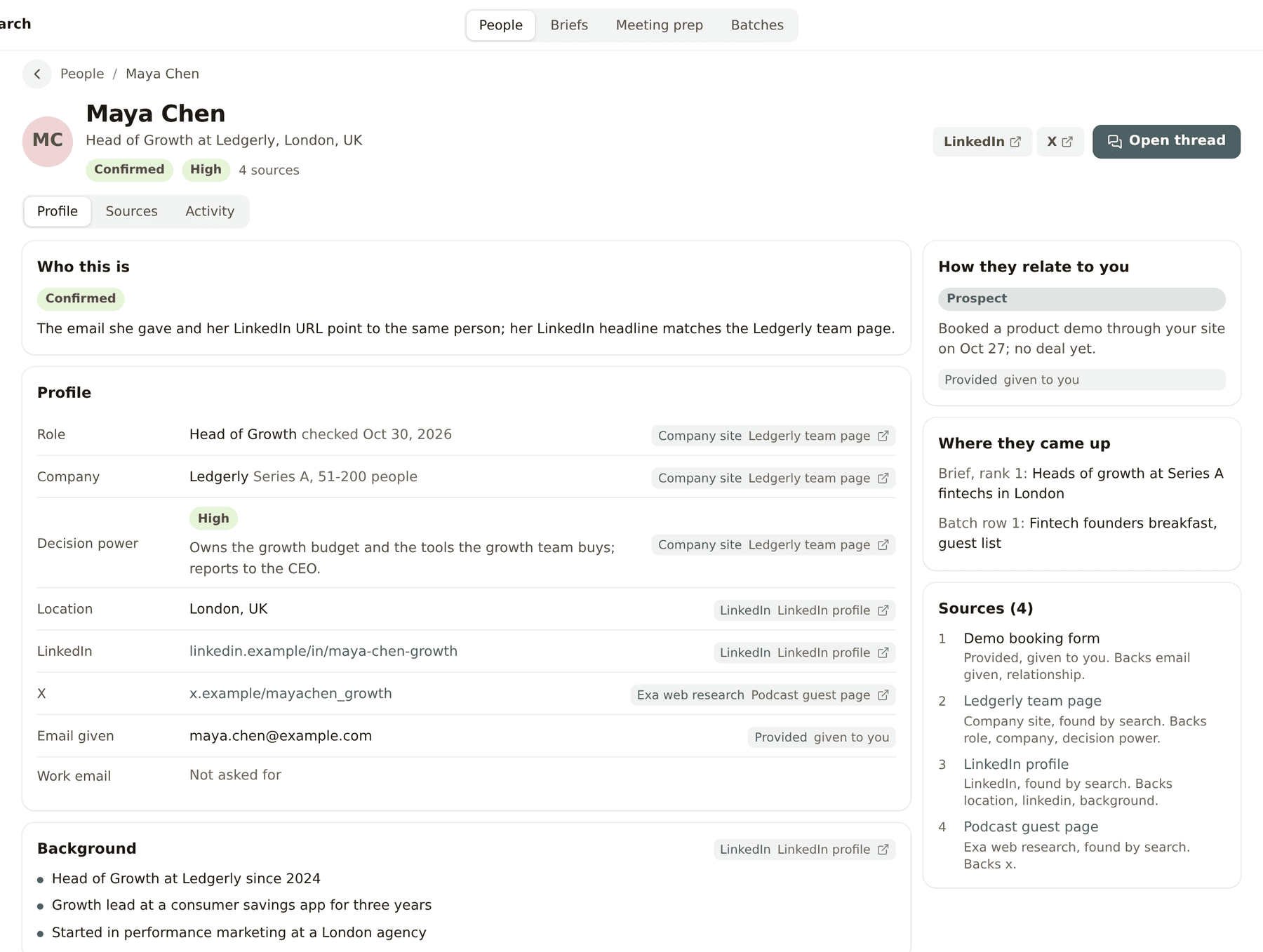
A person profile with each field next to its source, how they relate to you and the list of sources
A profile. Every field sits next to where it came from, and each person has one thread.
Two briefs with their hard filters, how many people were reviewed and the ranked shortlist
Briefs. The hard filters, how many people were reviewed, and why each one made the list.
Meeting prep for a call with three attendees, each with background, two openers and one thing to find out
Meeting prep. Everyone on the invite, with background, two openers and the time in their own zone.
A finished batch from an event guest list with every row matched to a profile
Batches. Paste a list or an event export and every row comes back filled in.

Three things the template leaves to you

  • What counts as high decision power for what you sell.
  • The hard filters every brief has to pass.
  • Which calendar and CRM it reads, if any.

The setup guides inside the archive walk your agent through each one.

Questions

How is this different from Apollo or a LinkedIn search?

Those give you a database row. This checks the job is current across several sources, writes down where each fact came from, and keeps the result in your workspace next to your own history with that person.

Does it reach out to anyone?

No. It researches. Any email or message it drafts waits for a person to send.

Is the demo data real?

No. The eight people and their companies are invented. Ask your agent before the first real lookup, because that is where credit spend starts.

The instruction behind it

Paste this at an agent that can build Apps. It downloads the archive itself, so there is nothing to upload first.

Build me a people search App from https://kylon.io/app-templates/people-search-app-template.zip

Download it, read setup/01-build-the-app.md and app/TEMPLATE_GUIDE.md, and follow them: create the App, provision its database, copy app/. into the checkout, set the app id, name and base URL, then push a draft and send me the link. Never run SQL by hand, db/migrations applies itself, and it seeds eight invented people so the table is full on the first open. Leave those rows in.

Then stop. Do not look anyone up and do not install the Skills yet. Ask me whether to start real lookups, and tell me that is where credit spend begins.

Discover more

General CRMApp · sample data

Take an enquiry from first contact to closed, without losing where it came from

Nothing to connect to start

Pipeline list in the Sales CRM template

Creator ManagementApp · sample data

Source creators, track every post, and see what each one returned

12 Skills · 3 data sources included · nothing to connect to start

Creator roster with agency pitched and self sourced creators in one table

Sampling DeskApp · sample data

Track every sample from shipped to posted, and the sales it brought

3 Skills · 2 data sources included · nothing to connect to start

Work queue listing overdue samples ranked by creator GMV

Remodeling CRMApp · sample data

Carry a renovation lead from the first call to the paid design fee

Nothing to connect to start

Pipeline list of renovation projects with stage, next action, owner and due date

Recruiting WorkspaceApp · sample data

Take a role from approved to first day without a spreadsheet in the middle

Nothing to connect to start

Recruiting overview with the hiring pipeline by stage

Travel DeskApp · sample data

Take a custom trip from the first enquiry to a priced, approved proposal

Nothing to connect to start

Travel Desk overview with the trip pipeline by stage

Task MapApp · sample data

See every goal and task, whose court the ball is in, and what to do first

Nothing to connect to start

Task Map matrix view with tasks sorted into Do first and Schedule it