Post

Task MapApp · Operations · sample data

See every goal and task, whose court the ball is in, and what to do first

Work that matters is spread across threads, and the question nobody can answer at a glance is which of it is waiting on you. Task Map puts every goal and every one-off task on one screen: an agent makes the first call on how important and how urgent each task is, each card says who has the ball and what is pending, and you drag a note to another quadrant when you disagree. The same tasks open as a board by status, a Gantt of how long each discussion has run, a timeline of latest activity and a plain list.
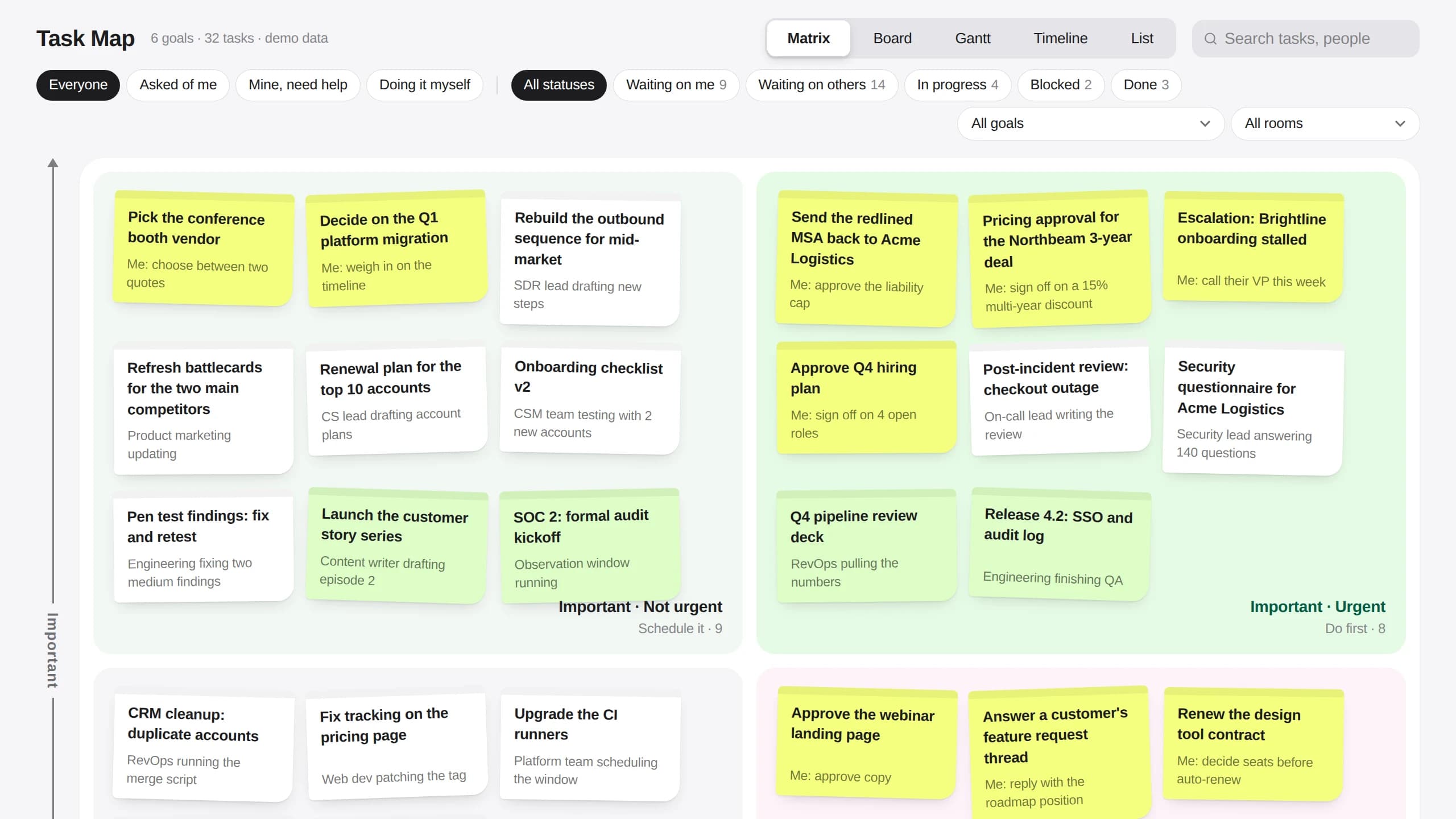
Task Map matrix view with sticky notes sorted into important and urgent quadrants

The matrix. Every open task as a note, sorted by important and urgent, with what is pending written under the title.
What it puts on screen

  • Goals and tasks, kept apart. A goal is an ongoing direction with no todo of its own. The one-off tasks under it are what move it forward, and every view can be narrowed to one goal.
  • A matrix you can argue with. An agent makes the first call on importance and urgency. Drag a note to Do first, Schedule it, Handle fast or hand off, or Park it, and the board cards move the same way.
  • Whose court the ball is in. Each task says what is pending and from whom: waiting on me, waiting on others, in progress, blocked or done. Filter to what was asked of you, what you need help with, or what you are doing yourself.
  • Five views of the same work. Matrix, Board, Gantt, Timeline and List read from one set of tasks, and each view has its own address, so a link opens the same view again.

What comes with it

You connect

Nothing to start. It opens with sample data.

The screens

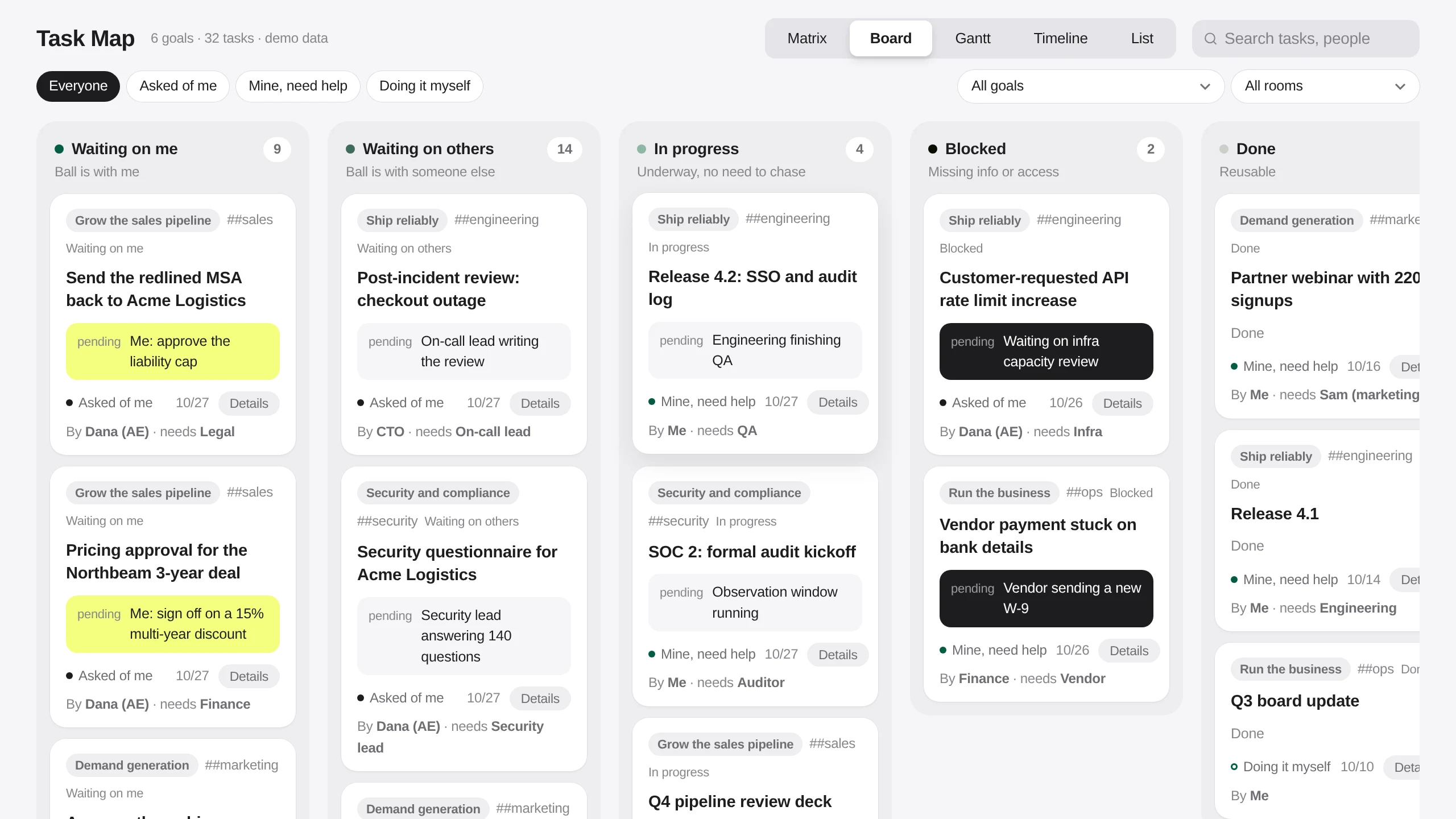
Board view with columns for waiting on me, waiting on others, in progress, blocked and done
Board. One column per status, starting with what is waiting on you, and each card names who raised it and who it needs.
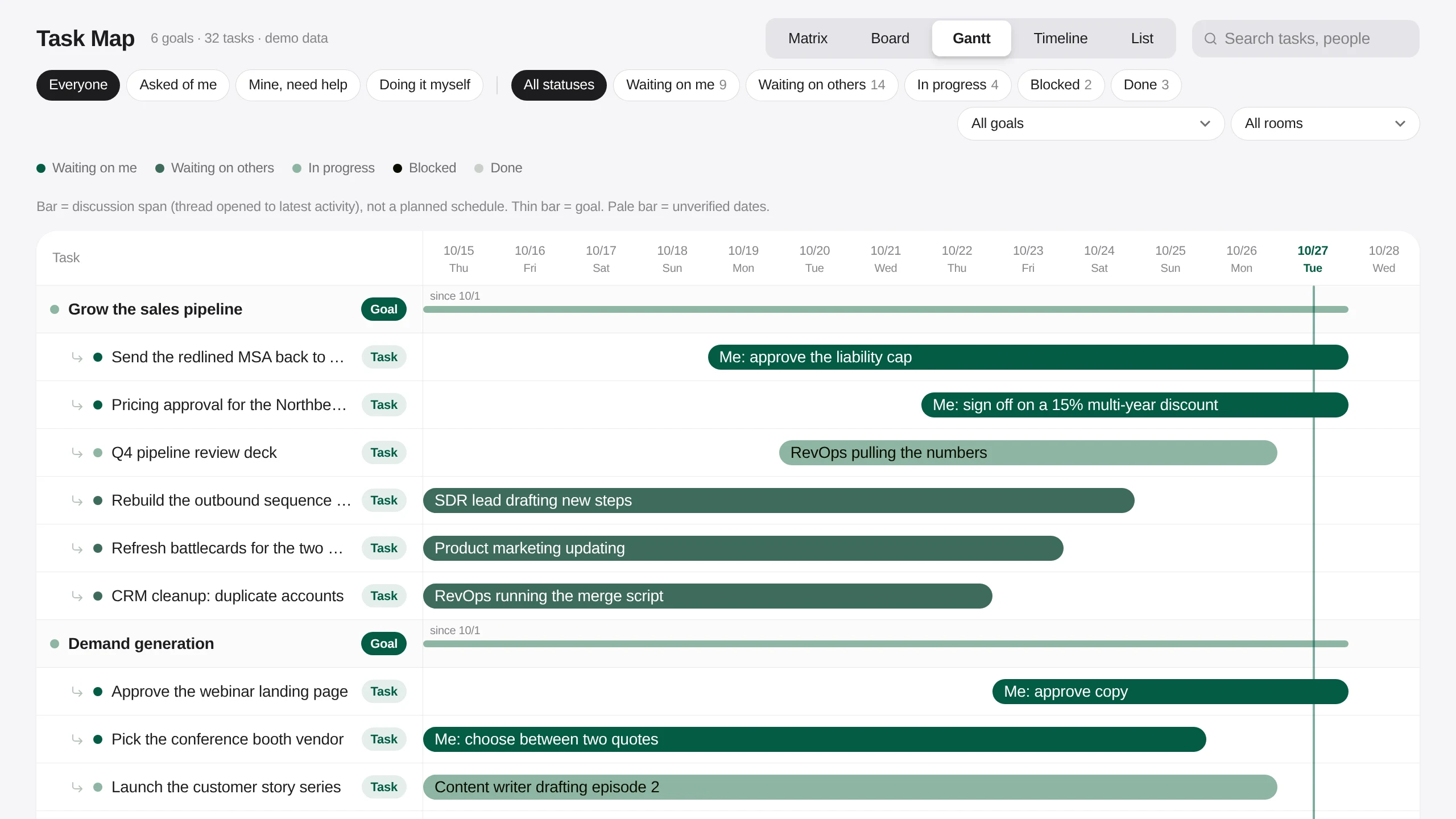
Gantt view grouping tasks under their goals with a bar per discussion span
Gantt. Tasks grouped under their goals, each bar running from when the thread opened to its latest activity.
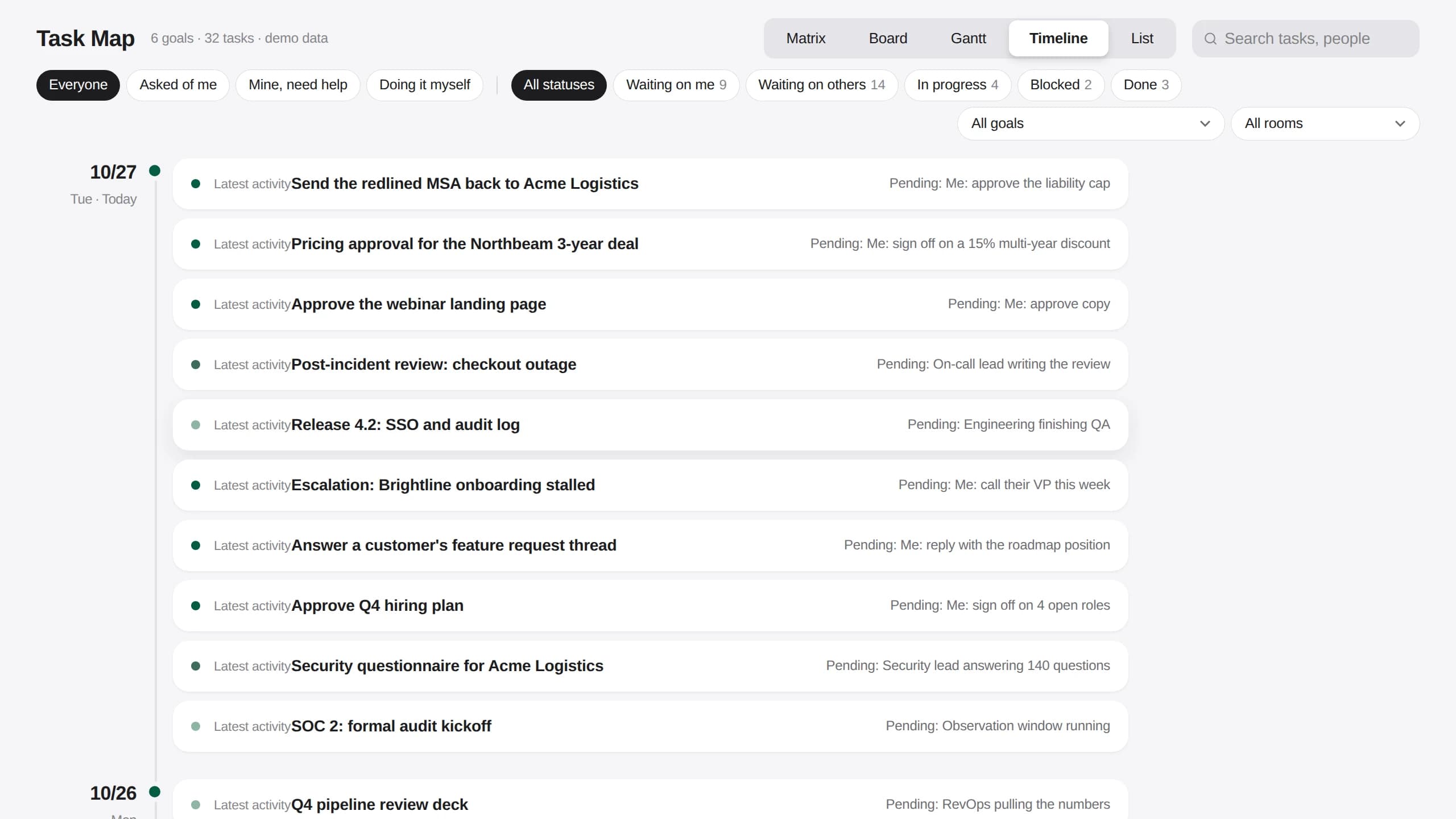
Timeline view listing tasks by day of latest activity with what is pending
Timeline. What moved today and the days before, with what is still pending on each.
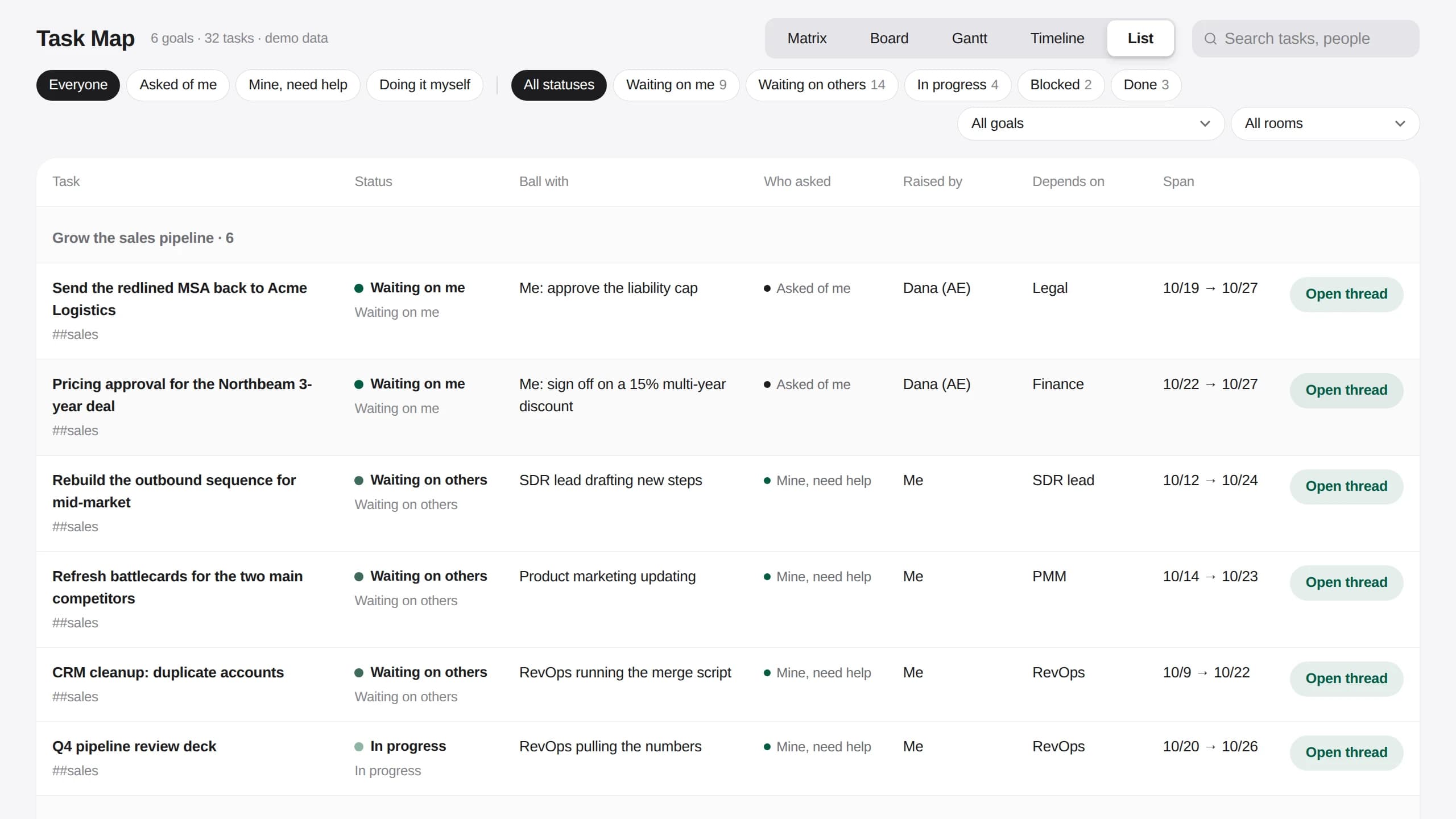
List view with status, ball with, who asked, raised by, depends on and span columns
List. Status, who has the ball, who asked, who raised it, what it depends on and how long it has been open.

Three things the template leaves to you

  • Which Rooms feed the map, and which threads count as a task.
  • What makes a task urgent for your team, so the agent's first call matches yours.
  • Your goals, and which tasks roll up under each one.

The setup guides inside the archive walk your agent through each one.

Questions

Where do the tasks come from?

In a real workspace each task links to the thread it came from, and agents keep the map up to date as those threads move. The template ships with invented demo tasks so the map is full on the first open.

Does dragging a note change anything?

In the demo, only in your browser. Nothing is written back, so anyone can try reclassifying tasks without affecting what someone else sees.

What does the Gantt bar mean?

How long the discussion has run, from when its thread opened to its latest activity. It is not a planned schedule, and a thin bar is a goal.

The instruction behind it

Every goal, task, company and person in the demo is invented. Dragging a note or a card saves the change in your own browser only, so the live demo writes nothing back.

Build me a Task Map App like https://task-map-template.kylon.app. Goals are ongoing directions with no todo of their own; one-off tasks sit under a goal. Put every open task on an Eisenhower matrix (Do first, Schedule it, Handle fast or hand off, Park it) as a note showing the title and what is pending from whom, and let me drag a note to another quadrant to reclassify it. Give each task a status (waiting on me, waiting on others, in progress, blocked, done), who raised it, who it depends on and the thread it came from. Add Board, Gantt, Timeline and List views of the same tasks, each at its own URL, with filters for Everyone, Asked of me, Mine, need help and Doing it myself, plus goal and Room pickers and search. Start with invented demo goals and tasks, keep drag changes in the browser, push a draft and send me the link. Then stop. Do not read our real Rooms or threads until I say so.

Discover more

General CRMApp · sample data

Take an enquiry from first contact to closed, without losing where it came from

Nothing to connect to start

Pipeline list in the Sales CRM template

Creator ManagementApp · sample data

Source creators, track every post, and see what each one returned

7 Skills · 3 data sources included · nothing to connect to start

Creator roster with agency pitched and self sourced creators in one table

Sampling DeskApp · sample data

Track every sample from shipped to posted, and the sales it brought

3 Skills · 2 data sources included · nothing to connect to start

Work queue listing overdue samples ranked by creator GMV

Remodeling CRMApp · sample data

Carry a renovation lead from the first call to the paid design fee

Nothing to connect to start

Pipeline list of renovation projects with stage, next action, owner and due date

Recruiting WorkspaceApp · sample data

Take a role from approved to first day without a spreadsheet in the middle

Nothing to connect to start

Recruiting overview with the hiring pipeline by stage

Travel DeskApp · sample data

Take a custom trip from the first enquiry to a priced, approved proposal

Nothing to connect to start

Travel Desk overview with the trip pipeline by stage