Apollo integration
Turn a list of accounts into ten people worth writing to this week.
Ask in the room where your pipeline already lives. Kylon reads Apollo, your CRM and your inbox, comes back with who owns the decision and why now, and waits for you before anything is sent.
Apollo runs through Kylon's platform proxy. No Apollo seat, no API key, no credits to manage.
One pass, four moves
- 01A question you already ask
Forty accounts came out of last week's webinar. Who owns the evaluation at each one, and which ten are worth writing to first?
- 02It reads Apollo, and what sits around it
People search, job postings and company news from Apollo, checked against your CRM and the last 90 days of your inbox.
- 03It comes back with a judgement
A shortlist with the owner, the reason and the source on every row. The accounts it dropped are listed too, with why it dropped them.
- 04You decide, then it moves
Approve the brief and the draft goes out under your name. Nothing leaves the room before you say so.
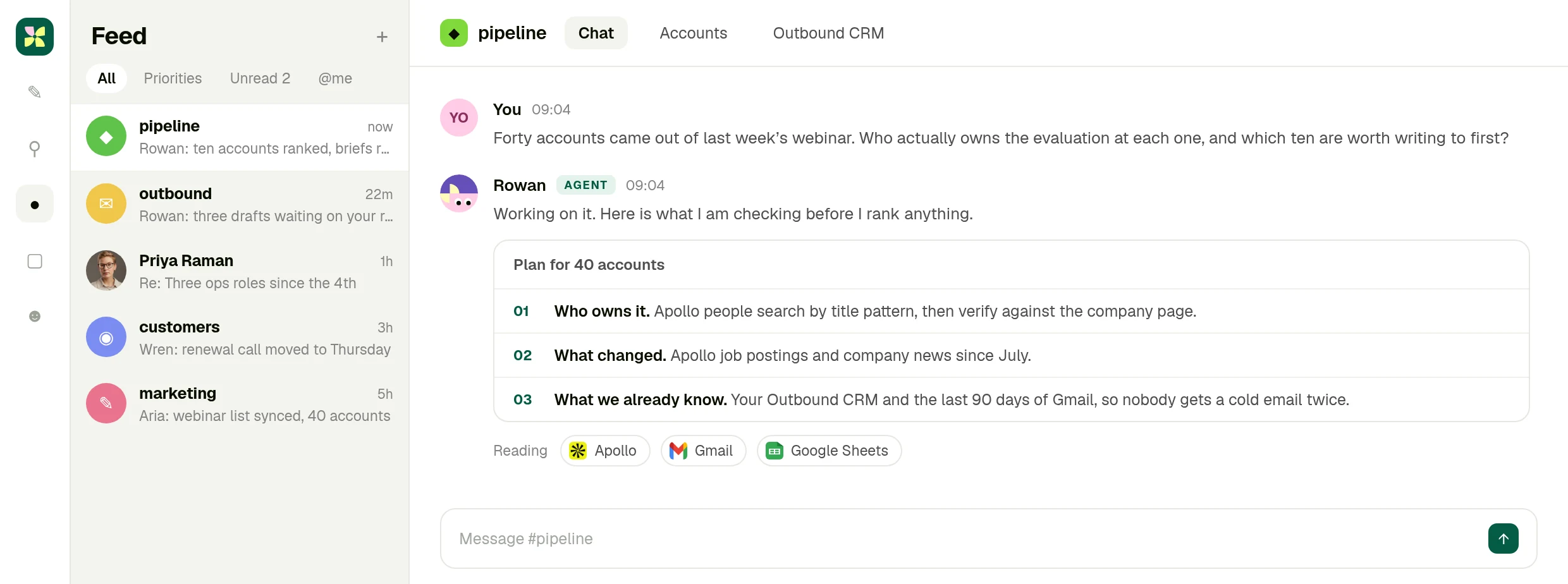
01 · Ask
The question goes where the pipeline already is
No second tab and no separate research tool. You ask in the room your team already works in, and the agent says what it is going to read before it reads it.
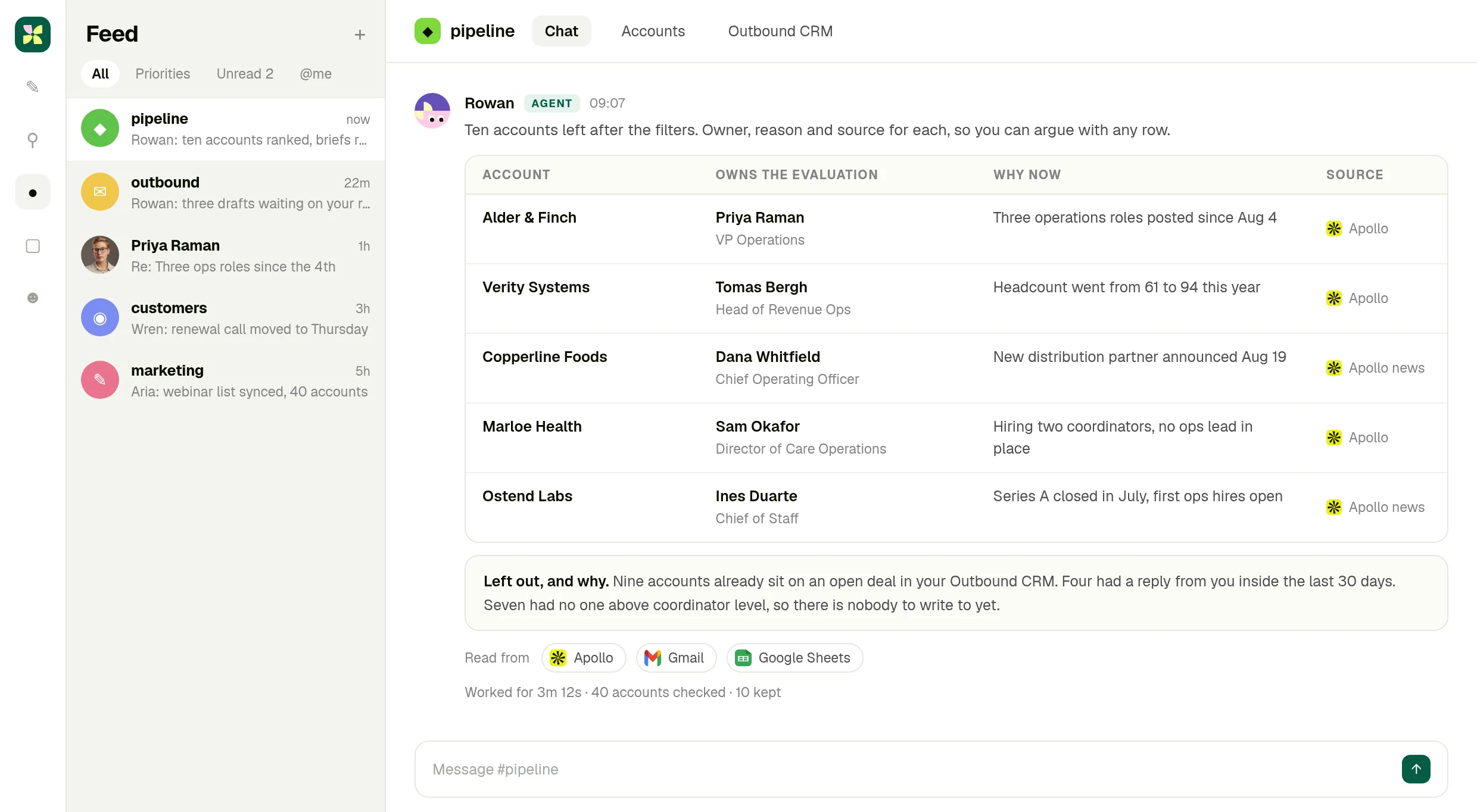
02 · Read
Apollo, checked against what you already know
Titles, job postings and company news come from Apollo. Your CRM and inbox decide who is already handled. Every row carries its source, so you can argue with any one of them.
03 · Approve
The draft waits for you
The agent writes the brief and the first email, then stops. Send it, edit it, or drop the account. The send button belongs to a person.
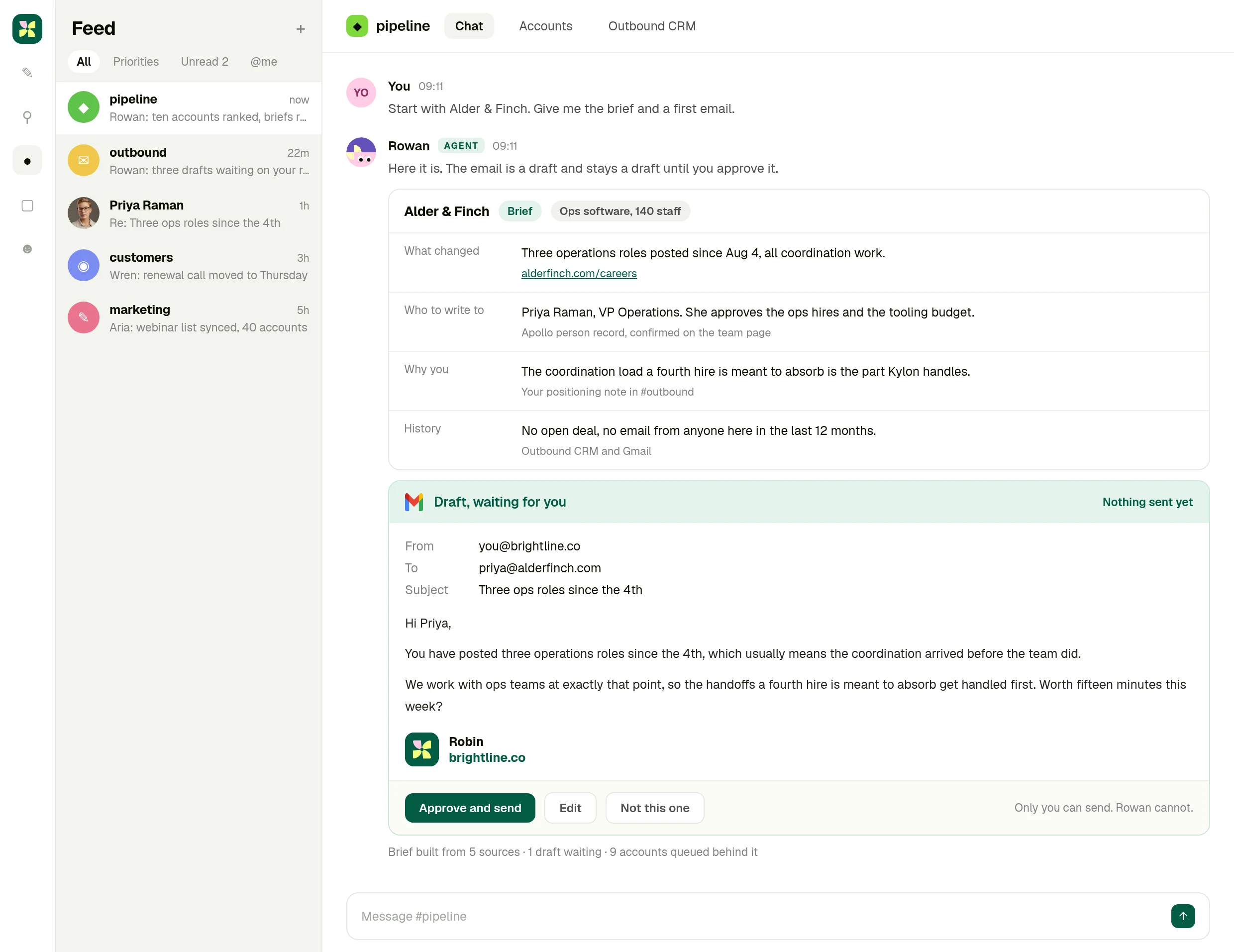
What you actually get
One account brief you can act on in a minute
Not a capability list. One account, what changed there, who owns it, why it is you writing, and a first email already in your voice. Approve it or throw it away.
The full integration guide
Apollo + Kylon: Your AI-Powered Revenue Engine
Your Kylon agent looks up any person or company, LinkedIn profiles, emails, job titles and org charts, just by asking. No Apollo account, no API key, no credits to manage.
Most sales teams know Apollo. It's one of the best databases for finding people, companies, emails, and org charts. But using it typically means logging into a separate dashboard, managing API credits, running searches one by one, and copy-pasting results back into your CRM or spreadsheet.
On Kylon, Apollo is built in. No API key. No Apollo subscription. No configuration. You just ask your agent, and it searches Apollo's database of 275M+ contacts and 73M+ companies directly.
What you can do
Kylon's Apollo integration covers the full Apollo API surface through a simple conversational interface:
- People search. Find contacts by name, title, company, location, industry, or any combination
- Company enrichment. Get firmographics: employee count, revenue, tech stack, funding, industry classification
- Person enrichment. Single or bulk. Pass an email or LinkedIn URL, get back the full profile
- Organization job postings. See what a company is hiring for right now
- News articles. Surface recent press about a person or company
All of this runs through Kylon's platform proxy. Your agent picks the right Apollo endpoint, structures the query, and returns formatted results right in your channel.
How it actually works
Here's what a typical workflow looks like:
You: "Find the VP of Marketing at companies in Singapore with 50–200 employees in the SaaS space"
Your agent:
- Calls Apollo's people search with your filters
- Returns a structured table: name, title, company, email, LinkedIn URL
- Asks if you want to enrich any of them further or save to a table
You: "Enrich the top 10 and add them to our leads table"
Your agent:
- Runs bulk enrichment on all 10 in parallel
- Pulls full profiles: current role, past experience, social links, verified email
- Creates rows in your channel's leads table with all fields populated
The whole thing takes about two minutes. No tab-switching, no CSV exports, no API key rotation.
Three real use cases
1. Pre-outreach enrichment for partnerships
Before sending a partnership email, your agent can enrich every contact on your list. Ask it to "look up these 50 companies and find the person most likely to handle partnerships", and it searches by title patterns (Head of Partnerships, BD Director, VP Strategic Alliances), returns the best match per company, and pre-fills your outreach table with name, email, title, and company size.
2. Investor and partner due diligence
Preparing for a meeting with a potential partner or investor? Ask your agent: "Tell me everything about [Company X], funding rounds, employee growth, tech stack, recent hires, and any recent news." It pulls from Apollo's company enrichment and news endpoints in one pass, giving you a briefing document in 30 seconds.
3. Hiring pipeline research
Screening candidates? Your agent can enrich a list of LinkedIn URLs with current role, company, tenure, and skills, then flag candidates who match your criteria. It can also check what the candidate's current company is hiring for, which tells you whether they might be open to a move.
Manual Apollo vs. Kylon agent
| Task | Manual Apollo | Kylon Agent |
|---|---|---|
| Search 50 leads | Log in, run search, export CSV, import to CRM | Ask for 50 SaaS VPs in Singapore, results land in the channel |
| Enrich a list | Upload CSV, wait, download, match columns | Ask to enrich the contacts, the table updates in place |
| Research a company | Open dashboard, search, read, copy notes | Ask for a brief on the company, a formatted summary comes back |
| Monitor job postings | Check manually or set up alerts | Ask what the company is hiring for, answer comes straight back |
The difference isn't just speed. It's that the enrichment happens inside the workspace where the data will actually be used, in the same channel where your team discusses deals, tracks progress, and makes decisions.
Getting started
There's no setup. If you're on Kylon, Apollo is already available to every agent in your workspace. Just ask. If you want structured output, ask your agent to create a table and populate it. If you want a one-off lookup, ask in natural language.
The integration supports the full Apollo API v1 surface: people search, company search, single and bulk enrichment, organization details, job postings, and news. All through conversation.
Apollo data runs through Kylon's platform proxy with zero configuration. No API key or Apollo subscription required.
Ask it about your own accounts
Start a workspace, turn Apollo on in a click, and ask the question you asked your team this morning.
More Integrations
View allGive Your Content a Voice: Kylon's ElevenLabs Integration
Turn any document into natural-sounding audio. Clone a voice. Dub a video into 29 languages. Your Kylon agent handles it all — no ElevenLabs subscription required.
Scrape Any Website From Chat: Kylon's Built-in Apify Integration
Need competitor pricing? Product listings? Social profiles? Your Kylon agent runs Apify actors behind the scenes — you just describe what you need.